
In this article 8 sections
With skills you no longer have to tell Claude what you like and what you don’t at the start of every session. You write the instructions once and call them up with a slash command, and Claude sticks to them for the rest of the chat. That goes for how it talks to you as much as for how it writes your gold layer notebooks.
I use three skills a lot: Caveman, I Have ADHD and KDF Gold Modeling, which I built myself. Below I install one from GitHub, show what each does to Claude’s answers, and get Anthropic’s Skill Creator to build a new skill without writing it myself.
What a skill is
You might remember the early days of ChatGPT, when every conversation started with “You are an experienced data engineer. You write SQL really well, always in this dialect, with these preferences…” That’s prompt engineering. Typing it over and over is cumbersome and slow, and we have better ways to do it these days. For a start, the models are a lot smarter than they used to be, so there’s no need to tell Claude it’s a Power BI consultant with ten years of experience.
I don’t do the role-playing anymore, and the quality of the output has never been better.
What you should be using is skills. A skill is a set of instructions you invoke while chatting with Claude, or while writing code with Claude Code or OpenAI Codex, for example. Usually it’s just a Markdown file full of instructions: how to behave, how to write code, how to answer questions.
It becomes a skill once you upload it into Claude as one, so you can invoke it with a slash command. From that moment, everything in the chat follows it. You can use no skills, one, or several at the same time; it really doesn’t matter.
Where skills live in Claude
In the Claude desktop app, open Settings and go to Skills under Customize.
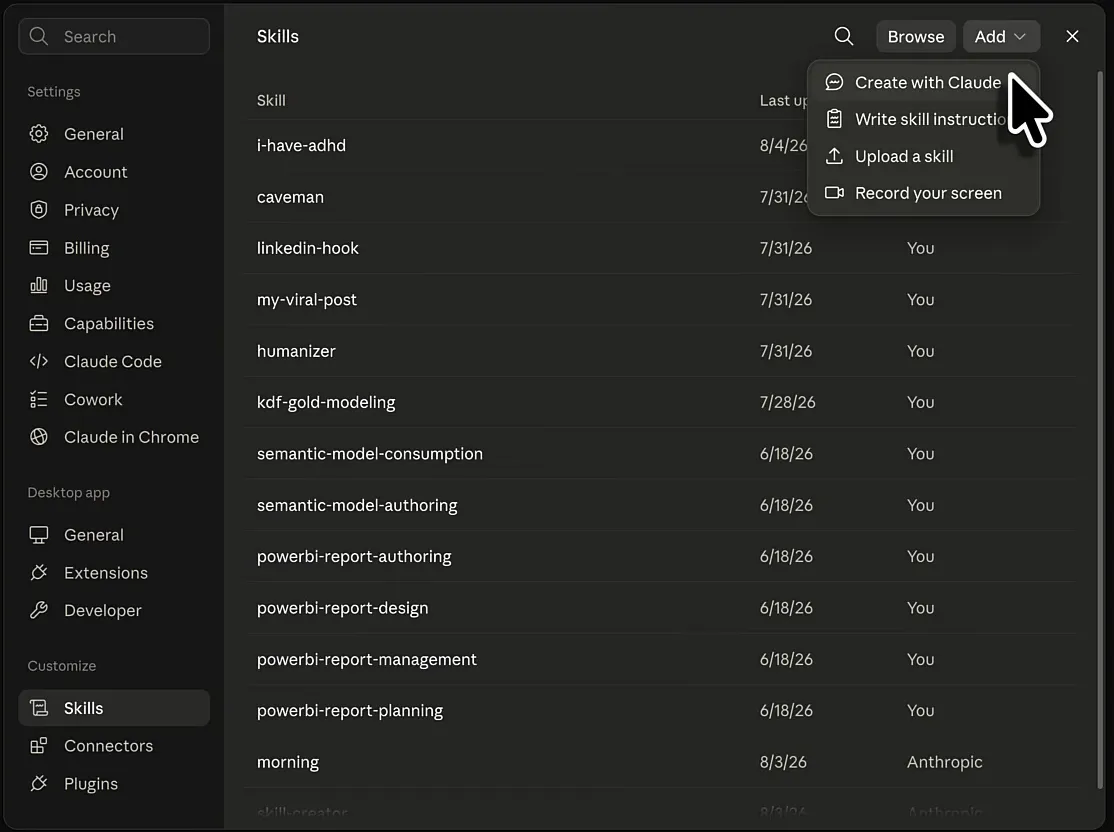
skill-creator and morning ship with Claude from Anthropic. I’ve never used morning, but Skill Creator comes back later in this post.
The Power BI and semantic model skills are made by Microsoft. I downloaded them from a Microsoft repository on GitHub, and they help with Power BI report authoring, design, management and planning, and with semantic model authoring and consumption. You get better output, and your Claude sessions become a lot more in tune with Power BI and semantic modelling. That’s amazing.
kdf-gold-modeling is my own, and caveman and i-have-adhd are open-source skills from GitHub. To add one, click Add: you can create a skill with Claude, write the instructions yourself, upload a skill or record your screen. I’ll start with uploading.
Caveman: blunt answers, fewer tokens
Installing Caveman
Search for “Claude caveman” and you’ll find the JuliusBrussee/caveman repository on GitHub. When I recorded this it had 5,500 forks and almost 96,000 stars, so the community clearly likes it. Its description puts it very cleverly: “why use many token when few token do trick”, a Claude Code skill that cuts 65% of tokens by talking like a caveman.
Fewer tokens should mean it takes longer before you run out of your allowance, and on the API your conversations and code generation get cheaper.
The README has install commands for every coding agent on your machine, but for Claude you can also just download the skill file: open skills/caveman/SKILL.md and download the raw file. Mine came down as SKILL (1).md because I’d downloaded plenty of SKILL.md files before. The file name doesn’t matter.
In Claude, go to Settings, Skills, Add, Upload a skill and pick the file. Claude works out that this is the caveman skill because the name is in the file. Open it in the list to read the instructions, which start with “Respond terse like smart caveman. All technical substance stay. Only fluff die.”
Caveman in action
Without a skill, “Hi Claude, how are you today?” got me a polite, rather fluffy answer: it’s doing well, thank you for asking, and so on. With /caveman and the same question, even the grammar went: “Good. Ready for work. What we build today?”
Then I asked “Let’s build an app with Fabric Rayfin. What do you need?” (Rayfin is what I used to build a Fabric app with Claude Code.) I was still on Opus 5 High, an expensive model, and probably should have switched to Sonnet. It does show that the model keeps doing everything a smart model does: it thought it through and searched the web for Rayfin. Only the output goes caveman.
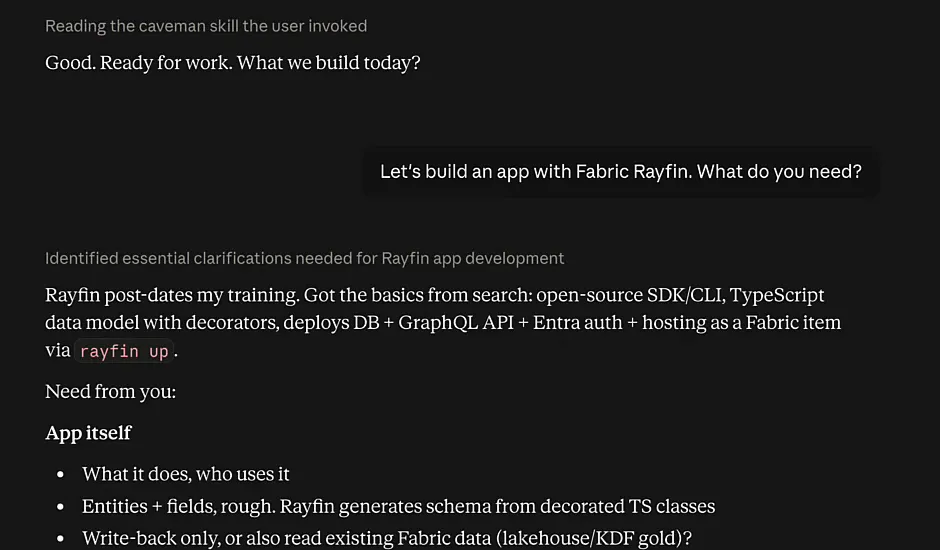
It opened with “Rayfin post-dates my training. Got the basics from search”, followed by short bullet lists of what it needed for the app, the environment and the frontend. Then its plan: I answer, it fetches the Fabric apps docs on Microsoft Learn and the GitHub repo, then it scaffolds.
When I typed “stop caveman”, it said “Back to normal.” and repeated the same answer in full paragraphs. So Caveman makes answers a lot less enjoyable to read, but at least they’re cheaper to run.
I Have ADHD: the next action first
What it changes
The second skill is ayghri/i-have-adhd on GitHub: “a skill for your coding assistant that stops it from burying the answer. Action first. Steps numbered. No ‘Hope this helps!’”
I’m not sure what makes it ADHD-friendly as such. I don’t have ADHD, or at least I’m not diagnosed with it, so let’s leave it at that. I do find the skill very helpful, because it makes Claude very to the point. You don’t get the “Great question!” and the politeness, with the gist buried somewhere in a long sentence. You get a task, numbered steps and the next thing to tackle. The README lists its 10 rules (the full text, with examples, is in SKILL.md):
- Lead with the next action.
- Number multi-step tasks.
- End with one concrete next step.
- Suppress tangents.
- Restate state every turn.
- Specific time estimates (minutes, not “a bit”).
- Make wins visible.
- Matter-of-fact errors.
- Cap lists at 5 items.
- No preamble. No recap. No closers.
Installing works the same as Caveman: download SKILL.md and upload it under Settings, Skills, Add, Upload a skill.
I Have ADHD in action
In the same chat I typed /i-have-adhd tell me what you need in order to build the Rayfin app.
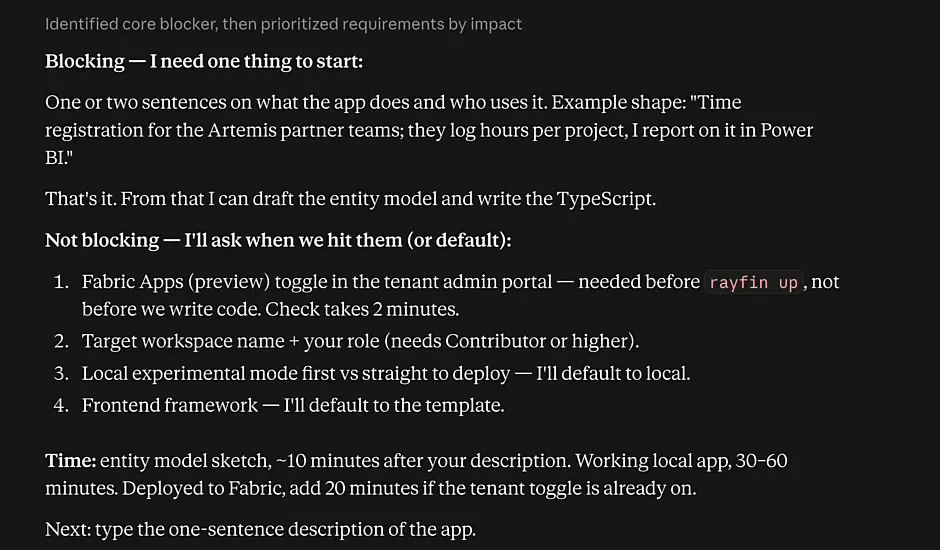
It went straight to the one blocker: one or two sentences on what the app does and who uses it. The other items weren’t blocking. Each had a default, and it would ask about them when we got there, so it never asked me to do ten things at once. It gave time estimates and stopped at a single next step: type a one-sentence description of the app. If you have ADHD, or you’re otherwise quick to lose your train of thought (I was losing mine while explaining this on camera), that really helps you home in on the one thing to do.
So I typed: “pokemon style report application where we walk through a 2D world and talk to NPCs that give us answers on our business performance.”
The answer opened with “Run this now”: a scaffold command that takes two minutes and works regardless of the open question. Then came a sketch of the model with four entities, and the one decision blocking the data side. Rayfin gives you its own SQL database in Fabric, populated from your TypeScript schema, and doesn’t read your gold layer directly. So how should the metrics get there? The options came as a list to click or answer by number: a nightly KDF notebook that writes to the Rayfin SQL database, the frontend querying the semantic model over REST, or hardcoded fake metrics for now.
I use this skill a lot, in Claude chat, in Claude Code and in the Claude extension for Visual Studio Code. I like being direct, and I like my AI to talk back to me the same way. It helps me stay on track and work out what to do next. Even if you don’t have ADHD, or you think you do but aren’t officially diagnosed, this skill might help you a lot.
My own skill: KDF Gold Modeling
KDF is the Kimura Data Framework, a product my company is building, and gold is the gold layer of the medallion architecture. This skill helps me create dimensional models following the Kimball methodology.
You might think that’s the skill of a good data engineer, and it is. It’s also the skill of a good AI assistant: when we write the notebooks that transform data from silver to gold, we usually create dimensions and facts following Kimball’s theory.
I’ve read Kimball’s book a couple of times and have been using its lessons for a decade and a half. For this skill I wrote a summary of every chapter, with examples of the different dimension and fact tables. That’s how I teach Claude what my dimensional models should look like.
I’ve also taught it to write notebooks the way I write them: they conform to the KDF logic, use Spark SQL and keep SQL keywords in lower case, because I don’t really like upper-case SQL. It gives Claude a massive skill increase, quite literally, and helps me write better code.
Building a new skill with Skill Creator
The easiest way to create a skill is to let a skill do it. Type /skill-creator and Anthropic’s Skill Creator asks four things: is this a new skill or an improvement to an existing one, what should it do, when should it fire, and what comes out the other end?
It also explained that in the chat app it writes the skill, runs test prompts and shows you the outputs, while the subagent-based benchmarking and description optimisation loops need Claude Code. At the end it packages the result as a .skill file you can save straight into your profile.
I wanted a YouTube ideation skill for this channel:
New skill - YouTube video ideation for technical explainer videos on data engineering Its goal is to help me quickly ideate videos that will do well on YouTube It should fire if the user is asking about new video ideas for YouTube What comes out the other end is a list of outputs: overall concept, the framework of the video, a script (only if asked for explicitly), a title and description.
The script only comes on request, because I don’t want a massive script every time this skill fires.
Claude followed up with three multiple-choice questions. I like this ask-user-questions feature a lot: you can write your own answer, but nine out of ten times one from the list will do.
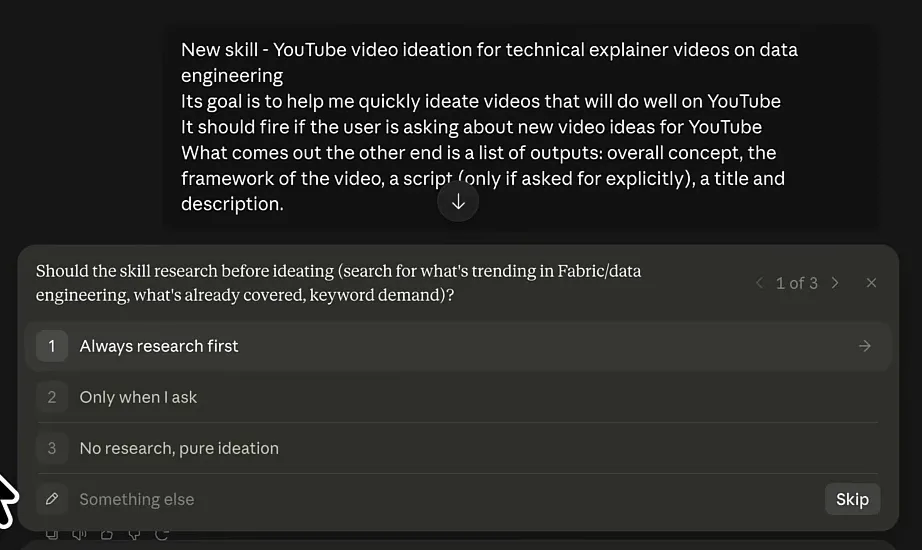
I picked: always research first, five to seven rapid-fire concepts and then drill in, and optimise for browse and suggested traffic (hook-driven). Claude pointed out that the last one shapes the whole skill: browse traffic means the viewer wasn’t looking for the topic, so the concept has to carry its own tension.
Then it drafted the skill. It looked like it was typing live, but it was only pretending, because it had already written everything. The draft is three files:
| File | What it holds |
|---|---|
SKILL.md | The core: packaging before content, a four-part gate every concept has to pass, a dead-on-arrival list of formats like “X Explained” and “Top 10 tips”, and eleven angle patterns |
references/script-writing.md | Only loaded when you ask for a script, so it doesn’t eat context on every ideation run |
references/channel-context.md | A template for your top performers, flops and format constraints, empty for now |
For a real skill I’d usually spend a couple of hours refining this. For the example I accepted everything without reading it all and clicked Save skill, and youtube-video-ideation appeared in my list of skills.
Testing the YouTube ideation skill
In a new chat I switched to Sonnet 5 Medium to make it a bit faster and more efficient. I wanted to compare with and without the skill, so I didn’t invoke it and asked: “Give me a couple of video ideas for my YouTube Channel ThatFabricGuy about Microsoft Fabric”.
It invoked the skill anyway. Fair enough: I was asking for video ideas, so it should fire. I dropped the comparison, since the answer should be way better with the skill anyway. It started researching what’s new in Fabric in August 2026, including the complaints about capacity cost on r/MicrosoftFabric.
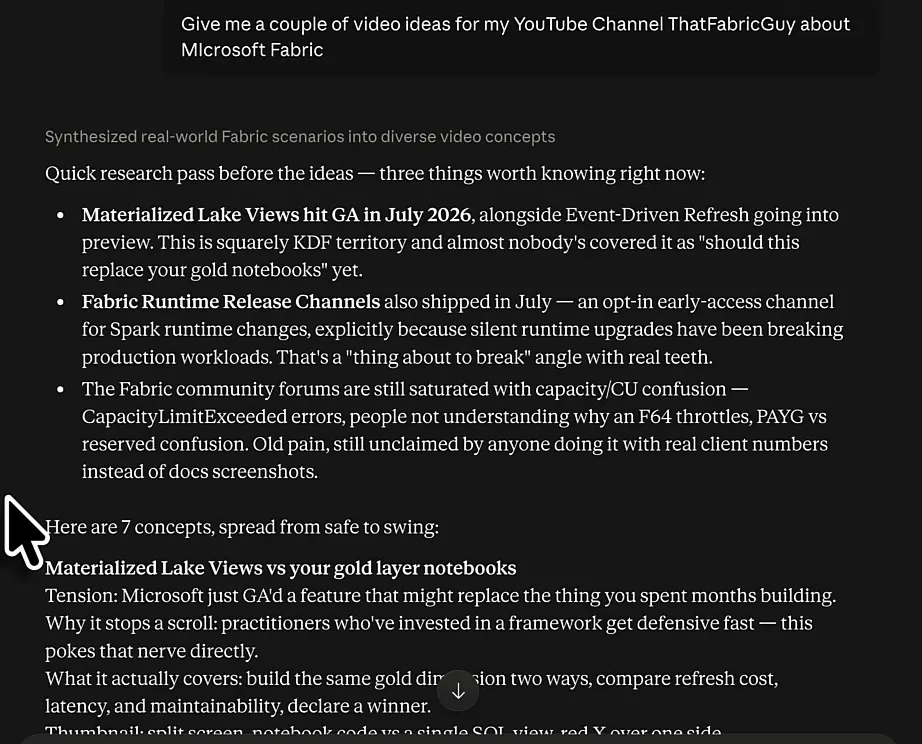
The research pass flagged Materialized Lake Views going GA, the new Runtime Release Channels for opting into Spark runtime changes early, and the ongoing confusion about capacity. Then came seven concepts “spread from safe to swing”, each with the tension, why it stops the scroll, what it covers and a thumbnail. A few of them:
- Materialized Lake Views vs your gold layer notebooks
- The SCD2 bug that duplicated every row in silver
- Why your F64 throttles at half the load you expected
- Stop building a framework. You have three pipelines.
I asked it to go deeper into the three pipelines idea and got the concept, a framework in timed beats starting with a 15-second hook, what to capture while filming (a plain notebook next to the KDF version of the same dimension), four titles with its own pick, two thumbnail options and a description with chapters.
This is good already, and I spent literally zero minutes writing the skill.
Why skills are worth the effort
There are probably YouTube skills out there already, but that doesn’t matter. I made this one the same way I made my gold layer modelling skill. That one took me a couple of hours, on top of the hours I spent reading Kimball and writing the summary, but the end result is the same: a document that tells Claude how to behave, what to do and how to write.
| Skill | Where it comes from | What it does for me |
|---|---|---|
| Caveman | Open source on GitHub | Blunt, minimal answers that use fewer tokens |
| I Have ADHD | Open source on GitHub | The next action first, one blocker at a time |
| KDF Gold Modeling | Built by me | Kimball dimensional models and gold layer notebooks in my style |
Skills work in the Claude desktop app, on mobile and in Claude Code. Claude Code benefits the most: I Have ADHD keeps the next steps short, and a skill like KDF Gold Modeling tells it how you want your Fabric notebooks written. If you haven’t set that up yet, start with how to use Claude Code for Microsoft Fabric development.
Every time you invoke a skill, all of that context goes straight into your conversation, so you don’t have to explain again what you like and what you don’t.
