
In this article 8 sections
Power BI is the quickest way to put a bar chart on a semantic model, but there are visuals it cannot make. Fabric apps, built with Rayfin, let you build your own web app on top of your Fabric data and run it inside Fabric. I built my first one on the New York City taxi data without writing a single line of code myself. Claude Code wrote all of it.
I started with a plain chart of trips per borough. Then I pushed it to something Power BI can’t do: a slow drone flight over a 3D New York, with 14 years of taxi pickups lighting up month by month beneath the camera. I was winging it and had never built a React app before. There’s a lot of room for improvement, but it works.
Create the app in Fabric
I’m a bit late to the game with apps, so the Fabric Apps folder in my ThatFabricGuy workspace was still empty. Click New item, go to All items and search for “app” to find App (preview). I named mine NYC Taxi Analysis.
Fabric then asks what type of app you want to build. There are three templates:
- Blank App: a basic, secure app that you can turn into anything.
- To-Do App: a prefilled app with a to-do list whose items are stored in a Fabric SQL database, handy to kickstart a project.
- Data App: connects to your Fabric data so you can build visualisations on it.
I picked the data app, because I wanted to connect to a semantic model I already have and build visuals on top of it with Rayfin instead of Power BI.
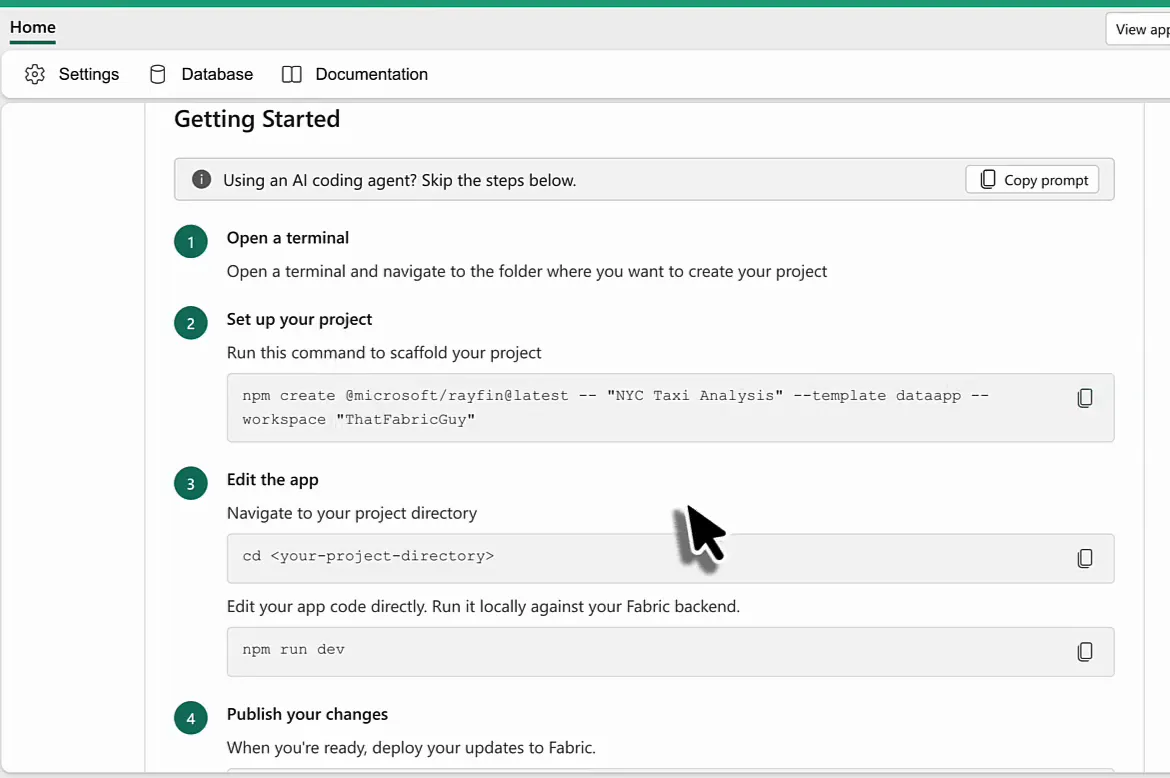
Once the item is deployed, Fabric lists the steps to get started: open a terminal, scaffold the project, edit the app and publish your changes. Look at the banner at the top, though: “Using an AI coding agent? Skip the steps below.” with a button that copies a prompt. That tells you a lot about who Rayfin is built for, and I’ll come back to it.
Scaffold the project in VS Code
Visual Studio Code is my editor of choice. I edit files on my Mac there, run Claude Code, and work with Git, Azure DevOps and Fabric, which is pretty much everything I use day to day. So that’s where I want to build this app. (If you haven’t used Claude Code with Fabric yet, start with how to use Claude Code for Microsoft Fabric development.)
Open a terminal in VS Code and paste the command from the Getting Started page:
npm create @microsoft/rayfin@latest -- "NYC Taxi Analysis" --template dataapp --workspace "ThatFabricGuy"This scaffolds the project, installs the dependencies and links it to the app item in the workspace. You get a React project with Vite and TypeScript, plus an AGENTS.md file and an .agents folder. Remember those two, because they matter later.
The next step on the Getting Started page is to run the app locally:
cd nyc-taxi-analysis
npm run dev
Vite starts and gives you a localhost address, but the app won’t open there: apps connected to semantic models can’t be opened outside the Fabric portal at the moment. Fine, then we publish to Fabric:
npx rayfin upMy first attempt failed because I ran it from the parent folder. From inside the project folder, it builds the app, deploys it to the workspace and prints the portal link. I don’t spend much time in a terminal, so this was all quite new to me, but it worked: an app scaffolded locally and published back into Fabric.
Hand it over to Claude Code
From here on, Claude Code did the work. I started on Sonnet, then switched to Opus with the effort set to high, and asked: “In this Rayfin app, how can I connect to an existing semantic model?”
Claude first read the documentation and the skills that come with Rayfin, and that turned out to be important. Nothing was connected yet, so I had to log in to Azure and pick the tenant that holds my workspace. Then it looked up the semantic models in the workspace through the Fabric API and found nine, several of them about taxis. It refused to pick one for me: “I won’t guess which is authoritative, and the DAX depends entirely on its schema.” I chose the aggregated taxi model that I also use in my data agent posts, and Claude added a connection to it called goldTaxiData.
At this point I switched Claude Code to bypass permissions. I would only have been clicking allow, allow, allow anyway.
Why Rayfin suits a coding agent
This goes so smoothly because Rayfin has been built with agents in mind. Its SDK is written for coding agents like GitHub Copilot, Claude Code or OpenAI Codex more than for human developers. The Purpose section of the AGENTS.md file in the project tells the agent what it is working on:
You will help the user build out this React-based web app that visualizes data from Power BI semantic models. The app fetches live data via DAX queries, renders charts and grids using Vega-Lite and a built-in DataGrid component, and supports light/dark theming. Your job is to discover the user's data, write correct DAX queries, build React components that fetch and display that data, and validate the result in the browser.Between that file, the skills and the documentation, Claude knows a lot about Rayfin, about Fabric apps and about what to do. I don’t know much about React web applications; I had never built one. What I do understand is how Fabric behaves, how semantic models work and how to steer Claude Code, and that turns out to be enough to force my way through to a working app.
First chart: trips per borough
I asked: “Now can you add a query that fetches the number of trips per borough please?”
Claude explored the semantic model first: the columns and other metadata, the format strings of the measures, the boroughs. Then it read the visual reference for Vega-Lite and checked the typings before writing anything, which is front-end work and very new to me. It also verified the query against the live model.
It told me something about my data that I hadn’t asked for, too. 531 million trips have a PickupLocationId with no matching row in the pickup locations table, so they end up under a blank borough. That’s 13.7% of all trips, and 16.9% on the drop-off side. Claude left those rows in, because silently hiding 14% of the trips would understate every borough total, and suggested I chase the problem upstream in the gold layer.
Then I published, refreshed the app and saw nothing. Claude had done exactly what I asked and written a query, but nothing in the app used it yet, so the page was still the empty template. When I asked how to push this to Fabric, it pointed that out and offered to build the chart first. So:
Yes, show the chart and make it simple, nothing too fancy. I just want to see the data there.Claude can’t check the result in a browser here: Playwright isn’t installed and the embedded app needs an interactive Fabric sign-in. The code compiled and the query worked against the model, but I would be the first to actually see the bars. I could have published from the terminal myself, but asking the agent was easier: “Yes, publish please.” It ran a dry run first, reused the existing app item, and deployed four files (1.4 MB) in about five seconds.
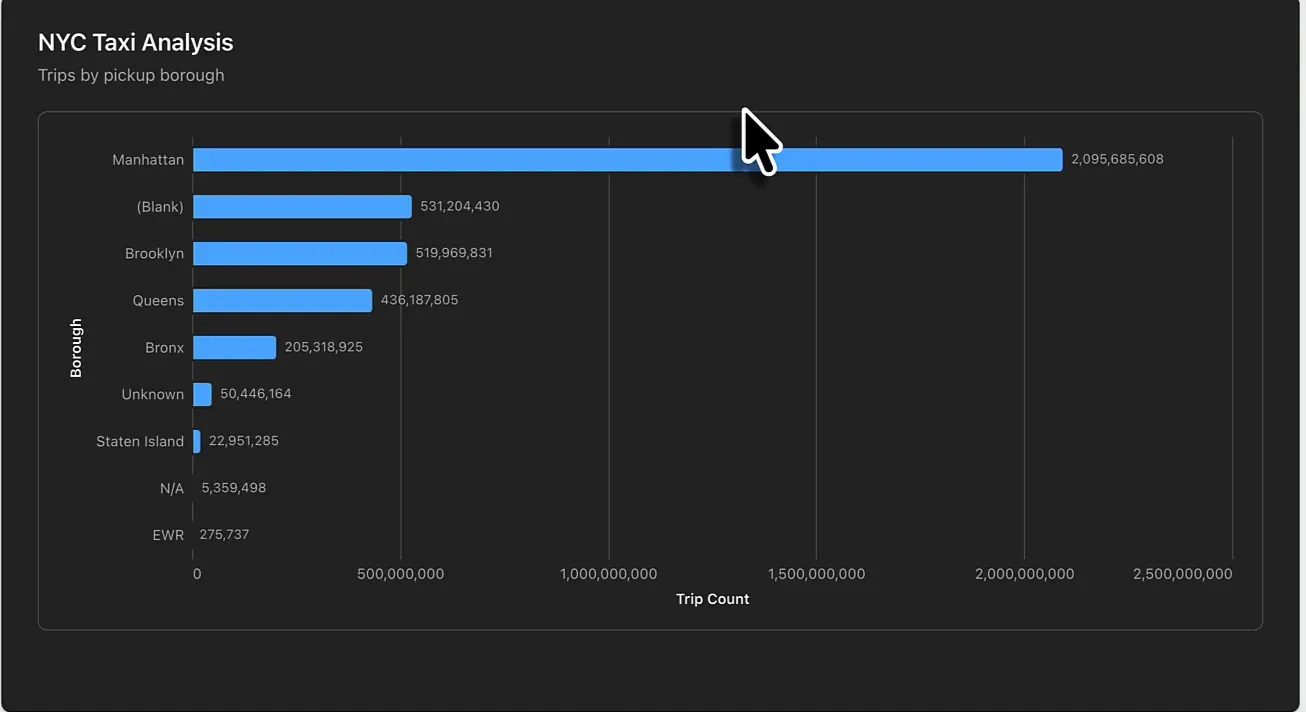
It’s a bit slow, which is fine for now. And there it is: my first visual in a Fabric app, running inside Fabric.
I did not program a sentence, not a word, not a letter. Nothing.
Would I have been faster building this chart in Power BI? The semantic model already exists, so yes, of course. Power BI would have been a gazillion times faster. So the app has to do something Power BI can’t, and I had no idea whether that would work.
Ask for something Power BI can’t do
What I had in mind was a very slow flight over New York City, almost like a drone flight, where you see the taxi pickups happen month by month across all the years in the data set.
To give Claude a visual direction, I searched for top-down images of New York. The style I liked turned out to be called a shaded relief map, so I found two of those (one of lower Manhattan, and one with a bit of Queens and Brooklyn) and attached them to the prompt:
Now, change the visualisation. I want to build something awesome. The thing is, I can create visuals in Power BI really easily. So, for this app we should make something that has a Wow-factor. Something Power BI cannot do.

I'm thinking of a slow drone flight over NYC, where we see taxi trips originating in down below, on the streets. They should be based on the pickup locations. Do not just take boroughs but go a level deeper, more granular.

Visualisation-wise, consider the images attached. I want to see a shaded relief map of the entirety of NYC (all boroughs). The visual should pan over it slowly, as if it's a drone flight.

Then, a timeline should play all pickup taxi trip counts by year and month, and while panning over the city, we see the locations light up as a heatmap under us.
Claude called it a very ambitious task with hard dependencies that aren’t in the semantic model. It confirmed there are no coordinates anywhere in the model: the location dimension only has the location ID, borough, zone and service zone, all as text. The data spans January 2009 to December 2024, which is 192 months across 265 location IDs.
It checked how many pickups actually have a usable location per year. In 2009 that’s 1,296 trips out of almost 171 million, so the first two years would be a blank map and the timeline would start in 2011. It also said it would not reuse my second reference image, because it’s watermarked by Visual Geomatics and is someone’s copyrighted render.
While Claude was validating its queries, I checked my Claude usage, because I wanted to know whether we could actually finish this. We were way within the limits, so I got myself a coffee.
Three questions before it builds
When I came back, Claude had three questions for me, each with a recommended option:
| Question | Options | My pick |
|---|---|---|
| Where should the taxi zone geometry come from? | NYC Open Data GeoJSON, a file I provide, or no real geography | NYC Open Data |
| The relief look in the references is an offline specialist render. What’s the closest achievable basemap? | Extruded buildings, relief tiles fetched at runtime, or one pre-rendered relief image | Extruded buildings |
| Vega can’t do a camera flight over a basemap. Which rendering library is OK to add? | deck.gl with MapLibre, deck.gl only, or no new dependencies | deck.gl with MapLibre |
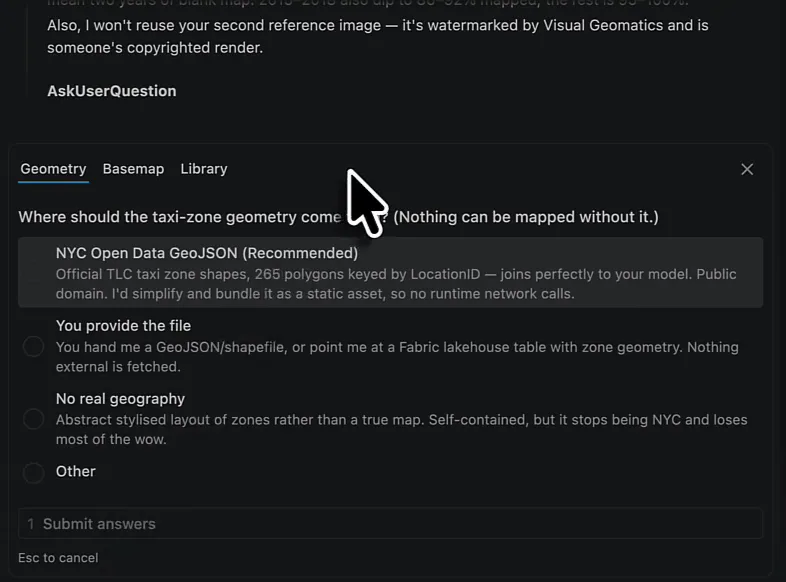
The open data option is the official TLC taxi zone shapes: 265 polygons keyed by location ID, so they join straight onto the model. Claude would simplify them and bundle them as a static asset, so the app makes no network calls at runtime. The runtime relief tiles came with a warning: live external calls from inside the Fabric iframe might be blocked.
Sourcing open data
Then Claude went shopping. It found building footprints for 1,083,004 buildings with roof heights, searched the NYC Open Data catalogue for the taxi zones, and installed deck.gl and MapLibre: everything it needed to build a 3D New York to fly the camera over. For a while I had no idea what was happening. This might not be the best way to do things in production, but as an experiment it’s awesome.
What Claude built
After quite some time, Claude came back with a summary. The flight map is three stacked layers in deck.gl: water as the background, the zones as plates of land, and 966,135 extruded buildings on top. The buildings are lit from the south-west so the street grid carves itself out, which gives the relief feel of my reference images.
The zone plates are the heat map. Each zone’s colour moves from the land colour through dark and amber to hot as its pickup density goes up, so the busy zones glow between the buildings. Density is log-scaled against the 99th percentile instead of the maximum: Manhattan zones out-volume the outer boroughs by orders of magnitude, so on a linear scale everything outside Midtown would stay black for the whole animation.
The camera and the timeline share one clock. One pass from 2011 to 2024 is exactly one loop of the city, along a path through all five boroughs, and takes about two and a half minutes. There’s a play/pause button and a scrubber.
The buildings were the hard part: 449 MB of GeoJSON, simplified and packed into 288 binary tiles totalling 28 MB. The app streams the tiles nearest to the drone first and keeps no more than 40 loaded, so only one or two megabytes are live at any time.
Claude also listed the judgement calls I should know about:
- It dropped MapLibre after all. deck.gl renders the buildings, water and zones itself, so MapLibre would only have fetched external basemap tiles, which is exactly the risk inside the Fabric iframe. The bundle ended up smaller than the Vega version it replaced.
- New Jersey and Westchester render as water, because there’s only zone geometry for New York City.
- Five zones in the model have no shape: Corona, the two Governors Island zones, “N/A” and “Outside NYC”. They account for 56.2 million trips, but 50 million of those are the N/A placeholder. Only about 401,000 are trips from real places, 0.01% of the 3.53 billion trips that can be mapped.
Claude still hadn’t seen any of it render. The deploy would also be a big step up from the first chart: 292 files and 34 MB instead of four files and 1.4 MB. Claude didn’t know the file count or size limits of Fabric’s static hosting and suggested I take a look first. That isn’t massive, so I told it to publish directly: 294 files, 28.3 MB, uploaded in 45 seconds. Fabric took the whole tile set without complaint.
Flying over Manhattan
Refresh the app and it says “Loading 14 years of pickups over New York…”. Behind that message are 3.5 billion rows of trip data, so it takes a while (I sat there thinking: please be cool, please be awesome). Then Manhattan appears in the distance and the camera starts to pan.
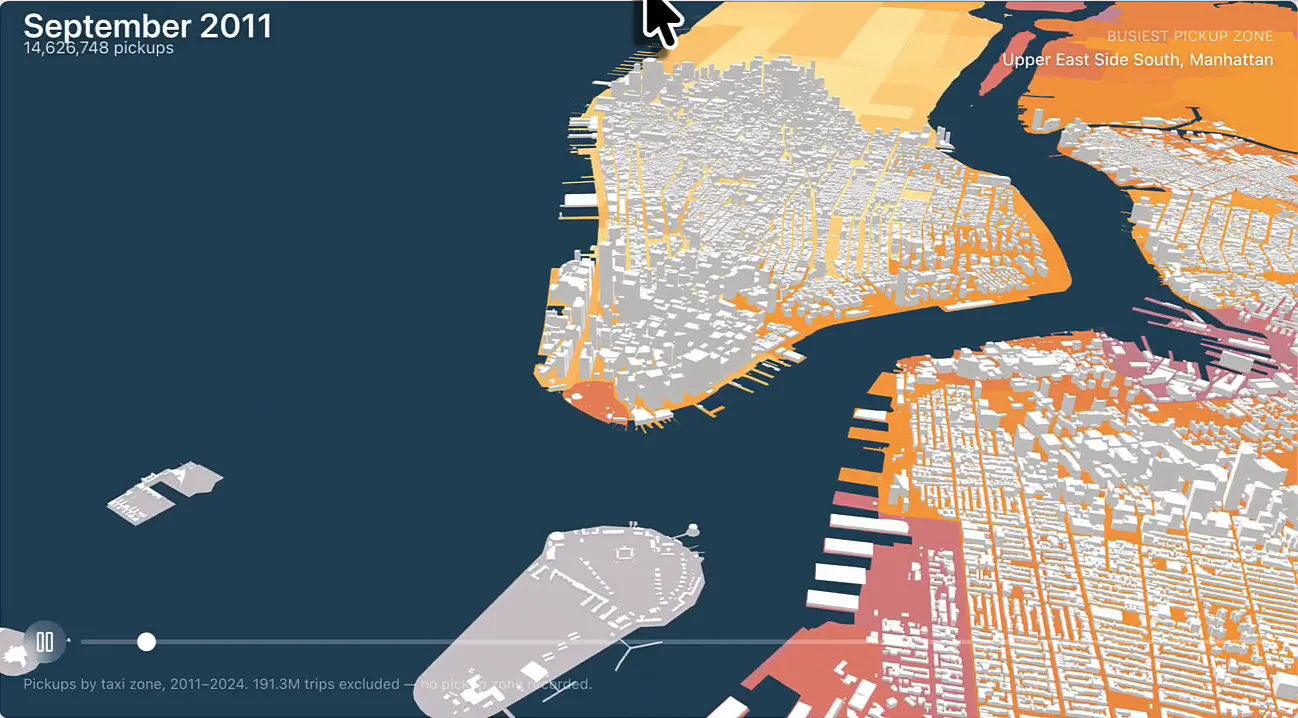
The top left shows the month and its number of pickups, the top right the busiest pickup zone, such as Upper East Side South. I tried hovering over the map for details, but you can’t. The camera flies over Manhattan, then out over Brooklyn and Queens, while the timeline runs through the months at around 13 to 14 million pickups each. Into 2020 you see the number drop: during COVID there were way fewer taxi trips.
It’s a bit slow, and with more prompting and refinement it can get a lot better. But it’s quite cool.
What I’d change next
I’d change two things. The first is how the trips are shown. Right now the zones are coloured like a heat map, which tells you where most trips start, but I’d rather show a star or a bubble per pickup location. The second is the camera: the flight bounces around the city, and a straight pan up and down would be easier to follow.
That’s for part two, where I’ll refine the app.
For the borough bar chart, Power BI wins easily. For this one, there is absolutely no way you would get a visualisation like it out of Power BI. Without any programming skills, I built the app in just under an hour, using a semantic model I already had and an agent that read Rayfin’s documentation for me.
