
In this article 10 sections
I’ve talked a lot about using AI to develop on Microsoft Fabric. Before an agent can build anything there, though, it needs a machine with the right tools, logins that don’t involve handing over your password, and a way into your tenant. I set all of that up from scratch on an empty macOS virtual machine, without touching a single Fabric item, and finished by asking Claude to check its own setup.
This is the prep work for a series where Claude Code goes from raw data to an actual dashboard without me touching code by hand. The final check also turned up a problem: my account has access to two tenants, and Claude was looking at the wrong one.
What goes on the machine
I work on a MacBook, so creating a clean macOS virtual machine is easy. Everything below is macOS with Homebrew, but most of it applies to Windows as well. If you use Parallels like I do, install Parallels Tools first: until I did, I couldn’t copy and paste between my laptop and the VM, which gets annoying fast.
| Tool | What it’s for |
|---|---|
| Homebrew | Installs almost everything else |
| Git and GitHub CLI | Version control, and a GitHub login on the machine |
| Python 3.13 and pipx | Running the Fabric CLI |
| Azure CLI | az login to your tenant, so tools can get a Fabric token |
| Fabric CLI | Managing Fabric from the command line |
| Claude Code | The agent itself |
| Microsoft’s skills | Knowledge of how Fabric and Power BI work and how to write code for them |
| Fabric Core MCP server | Access to your workspaces, capacities and items |
Homebrew, Git, GitHub CLI and a pinned Python
Install Homebrew
Open Terminal (Cmd+Space, type Terminal) and check whether Homebrew is there with brew --version. On a clean machine it isn’t, so install it:
/bin/bash -c "$(curl -fsSL https://raw.githubusercontent.com/Homebrew/install/HEAD/install.sh)"It asks for your password (the terminal doesn’t show it, by design) and lists everything it’s going to install. Press Return to continue.
When it finished, brew --version still said command not found. Homebrew isn’t on your PATH yet. The installer prints the commands to fix that under Next steps, with your own user name in them. On my VM they were:
echo >> /Users/thatfabricguy/.zprofile
echo 'eval "$(/opt/homebrew/bin/brew shellenv zsh)"' >> /Users/thatfabricguy/.zprofile
eval "$(/opt/homebrew/bin/brew shellenv zsh)"
After that, brew --version worked.
Install the basics
brew install takes a list, so Git, the GitHub CLI, Python and pipx go in one command. The @3.13 pins Python to version 3.13:
brew install git gh python@3.13 pipxThen verify. You should always verify your work. I don’t particularly care about the version numbers, but calling --version tells you straight away whether something is installed:
git --version
gh --version
python3.13 --version
pipx --version
Why Python 3.13
The Fabric CLI currently supports Python 3.10 up to 3.13. If you install whatever the newest Python is, the Fabric CLI might not support it, so I fix my installation on 3.13.
You don’t end up with only 3.13, by the way. The install output shows Homebrew pulling in Python 3.15 as a dependency of pipx, and the Azure CLI later brought Python 3.14 along. The Fabric CLI install below tells pipx exactly which Python to use.
Signing in to GitHub
I created the repository for this project on github.com first: tfg-demo, private, with a README and the Python .gitignore template, and no licence for now.
Back in the terminal, log the GitHub CLI in:
gh auth loginI picked GitHub.com, HTTPS, yes to authenticating Git with my GitHub credentials, and login with a web browser. The CLI copies a one-time code to your clipboard and opens the device login page, where you paste it. Check the result with:
gh auth statusIt shows the account, the Git protocol and a token (masked). Then set your Git identity:
git config --global user.name "Bas Land"
git config --global user.email "you@example.com"
The Azure CLI
The Azure CLI is how you az login into your Azure tenant, so tools on this machine can get a Fabric token and so on. Running brew update first isn’t necessary on a fresh install, but it’s good practice to do once in a while:
brew update
brew install azure-cli
az --version
az login
az login opens the browser and signs you in with the account you pick. It then lists the tenants and subscriptions it found and asks you to select one. My account can see more than one tenant, which comes back to bite later. For now, check which tenant you’re on:
az account show --query tenantId --output tsvCompare the ID with the tenant Fabric shows under your profile in the portal. Mine matched.
Claude gets access to Fabric, GitHub and the Azure portal without ever needing my personal password.
That’s the important part of all these logins. GitHub, Azure and Fabric each get a token through a browser sign-in on this machine, and the tools Claude uses later pick those tokens up.
The Fabric CLI
You can work with Fabric through a command line interface, which makes it a lot easier if you know what you’re doing and can do it in code. Claude Code can do that quite easily, so it gets the Fabric CLI too. Install it with pipx, on the Python we pinned:
pipx install ms-fabric-cli --python python3.13
pipx ensurepath
pipx ensurepath adds ~/.local/bin to your PATH, and the change only takes effect in a new terminal. I quit Terminal with Cmd+Q and opened a fresh window. Then:
fab --version
fab auth login
fab auth status
fab ls
I was on Fabric CLI 1.7.0. For fab auth login I chose interactive with a web browser. fab auth status shows that you’re logged in to app.fabric.microsoft.com, with your account and the tokens hidden. fab ls listed three workspaces: My workspace, GPU Test (SEA) and ThatFabricGuy, the same three I see in the Fabric portal. Remember that number.
At this point I can manage Fabric through the CLI myself, and I still haven’t touched a single bit of AI. The interesting part is letting Claude handle this.
Claude Code
Install and sign in
I used Anthropic’s native installer:
curl -fsSL https://claude.ai/install.sh | bash
claude --version
Start Claude Code by typing claude in the terminal. The first time on a machine it asks for a theme, then a login. I chose a Claude account with a subscription (I have Claude Max on that email address), followed the link in the email and authorised Claude Code. After the security notes, the recommended settings and trusting the folder, macOS asked whether Terminal could access my Documents and Downloads folders. I allowed both.
Skills from Microsoft
Now you have Claude Code running, but it’s still a regular, boring coding agent. Time to make it work with Fabric really well.
When you can do something, you have a skill, and when an AI agent learns to do something really well from a set of instructions, we call that a skill as well. (I wrote about skills for Fabric work before.) Luckily, Microsoft has written a lot of them. Inside Claude Code, add Microsoft’s marketplace and install from it:
/plugin marketplace add microsoft/skills-for-fabric
/reload-plugins
/plugin install fabric-skills@fabric-collection
/plugin install powerbi-authoring@fabric-collection
The marketplace shows up as fabric-collection. Power BI is packaged separately from Fabric, which is why there are two bundles. The main Fabric bundle contains the Fabric engineering skills. The Power BI bundle adds the semantic model and report authoring workflows, and we’ll need those later in the series.
Exit Claude Code (/exit), start it again and type /skills to see what’s loaded. My list includes the skills synced from my Claude account, such as humanizer, i-have-adhd and kdf-gold-modeling (which I built in an earlier video), next to the Power BI ones from the plugin.
The Fabric Core MCP server
The skills give Claude knowledge: how Fabric and Power BI work and how to write code for Fabric. The MCP server gives it access to Fabric itself. So now we have the CLI and the MCP.
Exit Claude Code and run claude mcp list in the terminal. Among the servers is claude.ai Microsoft Fabric Core MCP at https://api.fabric.microsoft.com/v1/mcp/core, connected. I didn’t add it on this machine: these MCP servers are tied to my Claude account, so it came along when I logged in. I set it up in my post on connecting Claude Desktop to the Fabric Core MCP server.
The same list showed one failure. The powerbi-modeling-mcp server that comes with the Power BI plugin is started with npx, and the error said Executable not found in $PATH: "npx". I come back to that below.
Back in Claude Code, /mcp opens the server and View tools lists everything Claude can do in Fabric through it.
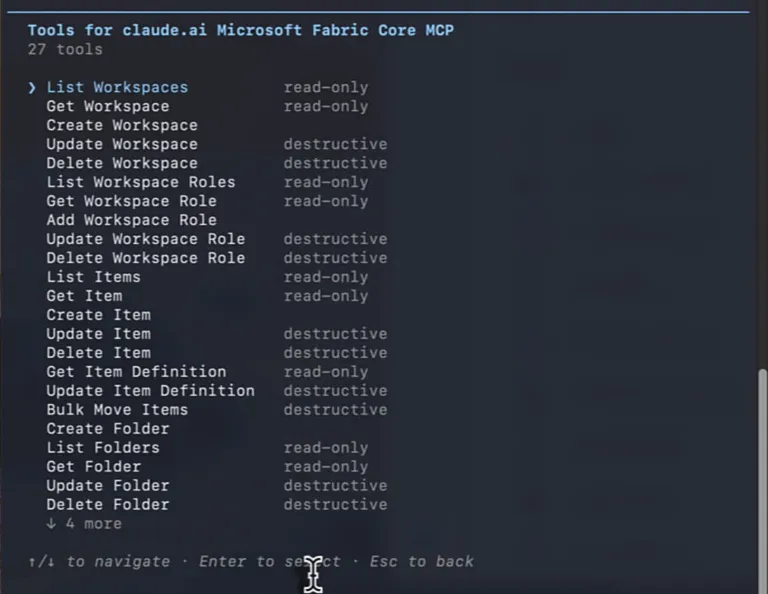
There are tools for creating and working with workspaces, workspace roles, items, item definitions and folders, and further down a Get Knowledge tool. Getting knowledge is really interesting, because it means Claude can pull in information from the internet and understands where to find it.
A repository for the project
The project needs a folder that is also a Git repository. I typed mkdir fabric-ai-platform into Claude by mistake, so Claude created it for me. That should have been a terminal command, but fine. Then, in the terminal:
cd fabric-ai-platform
git init
claude
From here I stopped doing things in the terminal myself and started asking Claude:
Please connect this local repo to github basland/tfg-demo
I don’t have to think about what the GitHub CLI wants from me any more, because Claude figures that out. It checked the remote repository and the local one, saw that the local repo was empty, added the remote and checked out main tracking origin/main. Nothing was overwritten or merged, and from there git push and git pull work without extra arguments.
Then I asked for a better README:
Write a nice README that tells the story of this repo - we are building an autonomous AI agent for Microsoft Fabric and this repo is the result of everything we are about to do
The file went from a one-liner to about 5 KB. Claude wrote it as the start of a journey, since the repo is still empty: the story, what we’re building, principles, a five-chapter roadmap with checkboxes, a planned folder layout and a placeholder for getting started. It also listed its assumptions, such as Python as the language because the .gitignore is the Python template, and the agent talking to Fabric through its REST APIs.
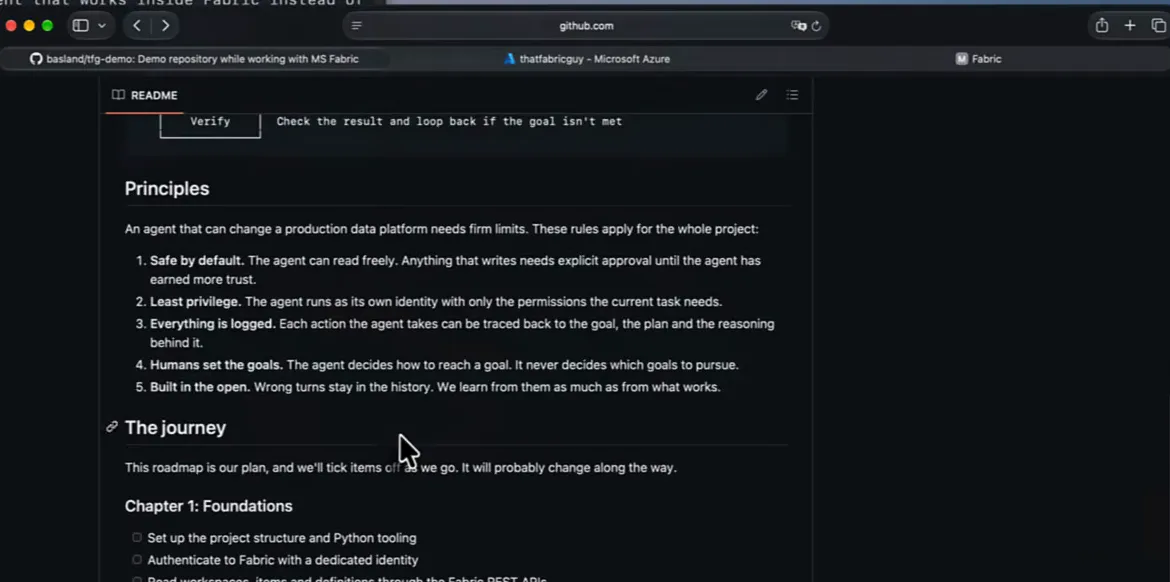
It asked whether to commit and push. I said no, opened the file first, then typed yes - coimmit and push. I make typos and it doesn’t really matter, because Claude understands me. Writing for humans is much more difficult than writing for AI agents. After a refresh on GitHub the repo had two commits, and the second one was by Bas and Claude: me and my nice little helper.
Checking the setup without touching anything
For the last part, Claude has to actually work with Fabric. I wrote this prompt:
Before we build anything, verify that this development environment is ready for Microsoft Fabric work.
Do not create, modify or delete anything.
Check the Fabric-related skills and tools you have available, then list the Microsoft Fabric workspaces that I can access.
Tell me which tool or interface you used for each check.
I wanted to see whether Claude can work with everything it has: the Azure CLI for logging in, the Fabric CLI for my actual Fabric environment, and the Fabric MCP server if it wants to use it. I didn’t steer it towards the CLI or the MCP; I let it cook and figure things out by itself. It ran a loop of --version checks over the CLIs, called the Fabric Core MCP twice and ran fab auth status.
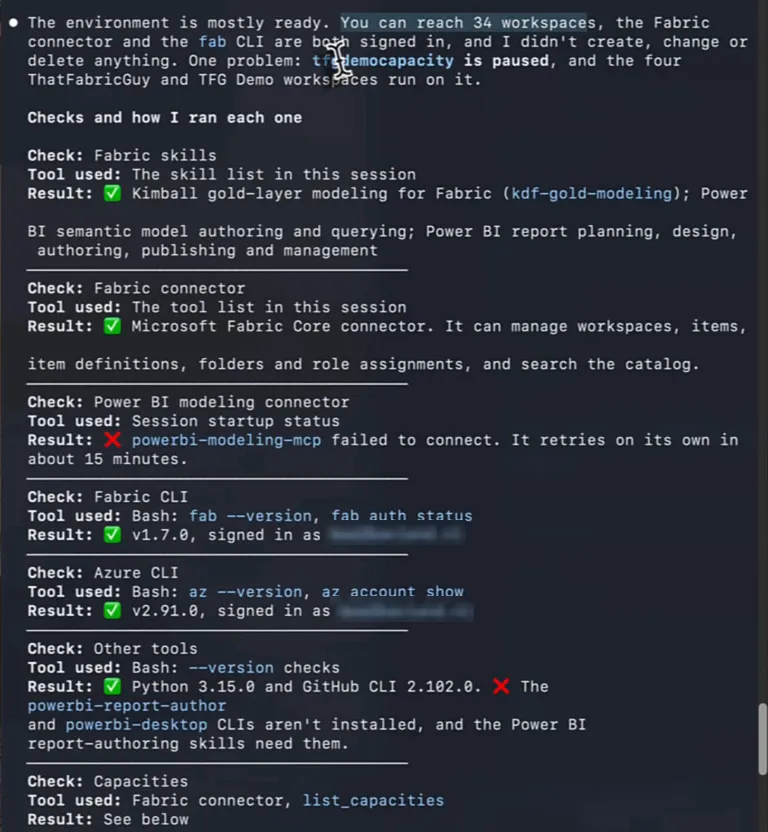
Its verdict was that the environment is mostly ready, with 34 workspaces in reach and nothing created, changed or deleted. These were the checks:
| Check | Tool used | Result |
|---|---|---|
| Fabric skills | The skill list in the session | kdf-gold-modeling, plus the Power BI semantic model and report skills |
| Fabric connector | The tool list in the session | Fabric Core connector available |
| Power BI modeling connector | Session startup status | powerbi-modeling-mcp failed to connect |
| Fabric CLI | fab --version, fab auth status | 1.7.0, signed in |
| Azure CLI | az --version, az account show | 2.91.0, signed in |
| Other tools | --version checks | Python 3.15.0 (as python3) and GitHub CLI 2.102.0; powerbi-report-author and powerbi-desktop CLIs not installed, and the Power BI report-authoring skills need them |
| Capacities | Fabric connector, list_capacities | Listed |
| Workspaces | Fabric connector, list_workspaces | 34 workspaces |
So the Power BI side isn’t complete yet: the modelling MCP server needs npx, and the report authoring skills need two CLIs that aren’t on the machine.
I’ll install those later in the series, when they’re needed.
Claude catches a tenant mismatch
Claude saw 34 workspaces, and fab ls had shown three. It had even noted that the Fabric CLI and the Azure CLI were signed in to the same tenant, but that the Fabric connector doesn’t report which account it uses, so it couldn’t confirm the connector was looking at the same thing. It wasn’t. The same account has access to two tenants, and the connector was looking at the wrong one.
In that first answer, Claude also suggested two things before building: resume the paused capacity, and give the agent its own identity. My account can reach production and client workspaces, and the least-privilege rule it had just written into the README means the agent shouldn’t run as me. A service principal with access to the demo workspace only would fit that rule. The README roadmap already has “Authenticate to Fabric with a dedicated identity” in chapter one.
I copied the tenant ID from the Entra ID overview in the Azure portal and told Claude:
Remember, we need to use the tenant
<tenant id>for this project. Try again to list workspaces and capacities. Store in your project memory file this rule.
This time it skipped the connector. It requested a token for that tenant with the Azure CLI, checked the token was issued for the right tenant, and made read-only calls to the Fabric REST API through az rest.
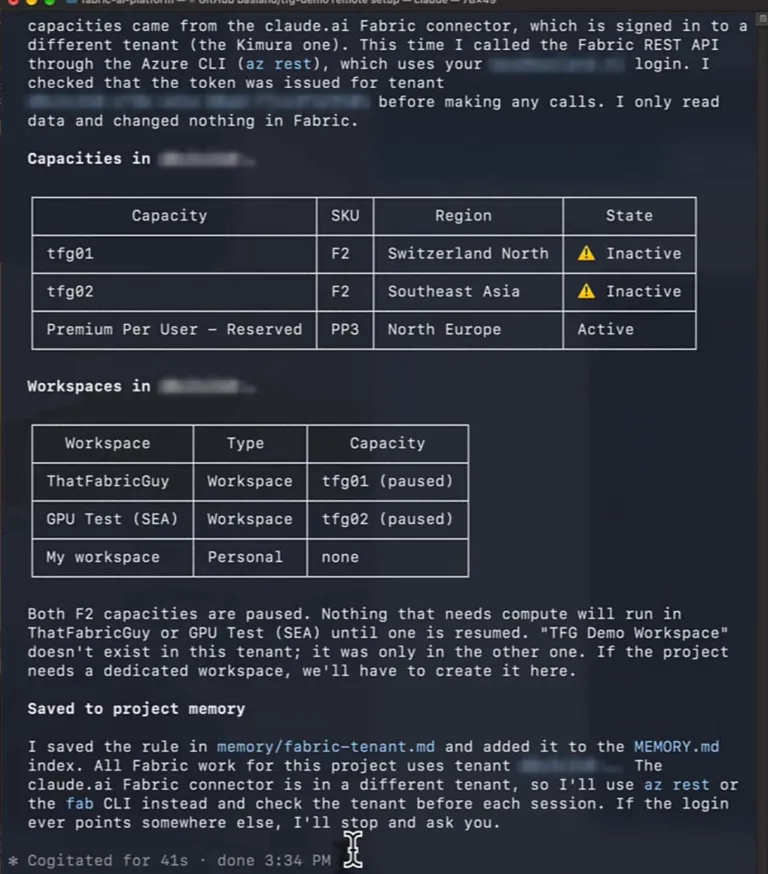
Now the picture matched what I see in Fabric: two F2 capacities, tfg01 in Switzerland North and tfg02 in Southeast Asia, both paused, plus a reserved Premium Per User capacity in North Europe. The three workspaces were ThatFabricGuy on tfg01, GPU Test (SEA) on tfg02 and My workspace. Claude also pointed out that the TFG Demo Workspace it had found earlier only exists in the other tenant, so if the project needs a dedicated workspace we’ll have to create it here.
Then it saved the rule in memory/fabric-tenant.md and added it to the MEMORY.md index. The rule says that all Fabric work for this project uses the demo tenant. The claude.ai Fabric connector is in a different tenant, so Claude uses az rest or the fab CLI instead and checks the tenant before each session. If the login ever points somewhere else, it stops and asks me.
Ready for the series
With one prompt that wasn’t allowed to change anything, Claude showed that it has the Fabric-specific skills, can see the project repository and has access to the Fabric tooling. It can authenticate into a Fabric tenant and inspect it down to the workspaces and capacities. When it couldn’t tell which account the connector used, it said so, and as soon as I gave it the right tenant it fixed the mismatch and saved the rule for every session after this one.
That’s the machine ready. In the rest of the series, Claude Code goes from raw data to an actual dashboard in this tenant, and I don’t touch the code by hand.
