
In this article 9 sections
I use lakehouses for my gold layer, but I still write my data transformations and mappings in SQL. If you come from the SQL world, a Fabric Warehouse with T-SQL stored procedures looks like the obvious place for that work. In a lakehouse you write notebooks, and in a notebook you can write Spark SQL as well as PySpark.
This post walks through the pattern I use: a Spark SQL query for the transformation and a Python merge to upsert the result into a Delta table. I also put the same query next to its PySpark version, so you can see why most of my notebooks are written in SQL.
The notebook setup
The notebook maps data into a Delta table, and it starts with two variables:
# Variables
key_columns = ["PK"] # this could be a list of multiple columns
table_name = "factTaxi2024"
key_columns is the list of key columns of the target table. Here it holds one column name, but it can hold several. table_name is the target table that the output of the transformation gets merged into. Usually that is a table in the gold layer, which you might call the data warehouse or the dimensions and facts layer. For this demo it is factTaxi2024.
Why SQL for transformations
I know SQL. I grew up with it: since 2013 I have written almost nothing but SQL queries to transform data, and I can write it with my eyes closed.
I also find it more readable and easier to digest. And SQL is the main language for set-based operations over data sets, which is what you are doing when you transform data or write mappings for a data warehouse layer.
Writing Spark SQL in a PySpark notebook
The goal of the query is to get a result set into a dataframe. A dataframe is a variable that holds a temporary table, much like the temp tables you would use in SQL Server. There you write insert into #table_name; here you create a Spark dataframe to hold the intermediate data. (For how a dataframe differs from a temp table, see Spark dataframes are views, not tables.)
You create one with a variable name, an equals sign and spark.sql(). Inside goes a string that Spark runs as a Spark SQL query:
df_with_sql = spark.sql(f"""
    select
        t.PK
        ,t.PickupDate
        ,t.DropoffDate
        ,t.PassengerCount
        ,t.TripDistance as TripDistanceMiles
        ,t.FareAmount
        ,t.PassengerCount * t.TripDistance as PassengerMiles
        ,t.FareAmount / t.PassengerCount as FareAmountPerPassenger
    from 0_demo_taxi2024_10mln t
    --join to pickup location
    left join gold_dimlocations_pu pu
        on t.PickupLocationId = pu.LocationID
    --join to dropoff location
    left join gold_dimlocations_do do
        on t.DropoffLocationId = do.LocationID
    where 1=1
        and pu.Borough <> do.Borough -- only show rides to other boroughs
        and t.PassengerCount > 0 -- assume for now we only want passenger rides
""")
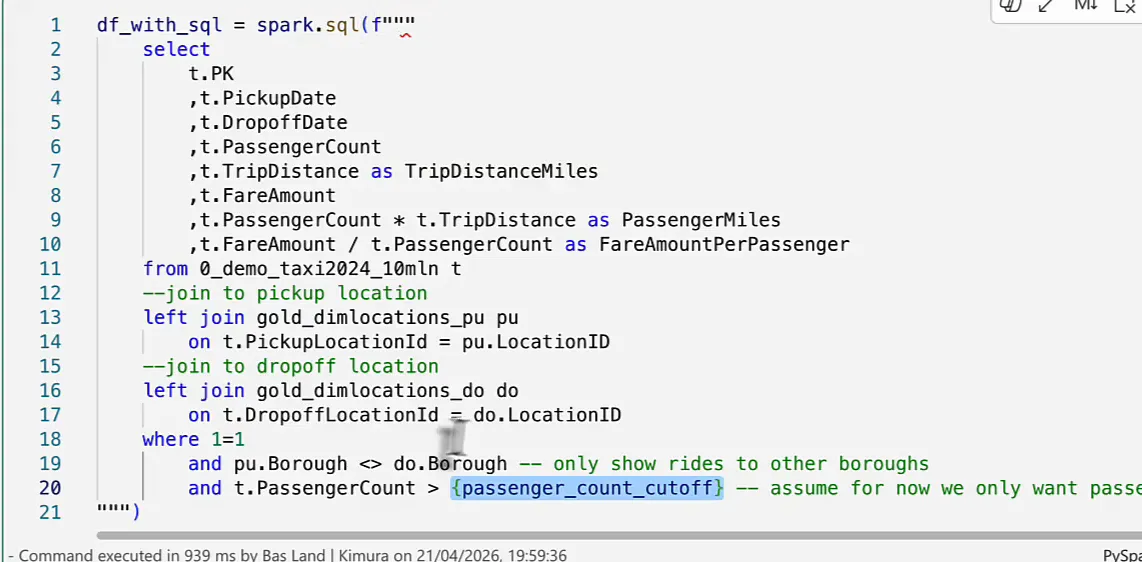
The three double quotes delimit a multi-line string, so the query can span as many lines as it needs. The f in front makes it an f-string, which lets you put Python variables into the query. Say I want the passenger count cut-off in a variable. I add passenger_count_cutoff = 5 to the variables cell and change the last filter to:
and t.PassengerCount > {passenger_count_cutoff} -- assume for now we only want passenger ridesWhen the cell runs, {passenger_count_cutoff} is replaced by the value of the variable. I think that’s quite cool.
How I format SQL
From there it is a regular SQL query, and I am very nitpicky about how it looks.
I write it in lower case. A lot of people write SQL in upper case: the documentation, everybody and their AIs. I find that very shouty. Lower case feels a little more mellow.
I always call the base table t. I learnt this in my first job (shout out to René). It stands for transaction if you are mapping a fact table, or for table. I don’t care, really; it could just as well have been x, y, a or b. As long as every mapping calls its base table t, I can copy a join from one mapping into another, even one that reads from a different transactional table, and paste it without touching the alias. Every other table gets an alias that tells me which table it is: pu for the pickup locations, do for the drop-off locations.
I indent the select list, the joins and the where clause. And in the where clause I use a little trick, where 1=1, so every real filter starts with and at the same level of indentation. That way I can comment out the first or the last filter without breaking the syntax.
You end up with a query you can follow at a glance. You see what it reads from, what the joins are, what the filters are and how every column is mapped. Each as tells me a column is renamed, I can see the multiplication and the division, and the borough filter tells me I only keep rides that go to another borough.
Why the lakehouse: the Python merge
So why don’t I put this SQL in Fabric Warehouse stored procedures? Because in a PySpark notebook the result lands in a Spark dataframe, and I can hand that dataframe to a Python merge.
I have written about merging dataframes in PySpark before, with the full setup. Here is the short version:
# Merge into target table
delta_table = DeltaTable.forName(spark, table_name)
merge_condition = ' and '.join([f"target.{key} = source.{key}" for key in key_columns])

delta_table.alias('target').merge(
    source=df_with_sql.alias('source'),
    condition=merge_condition
).whenMatchedUpdateAll() \
    .whenNotMatchedInsertAll() \
    .execute()
What happens here:
delta_tableholds the target table as a Delta table object, and it gets the aliastarget.- The source is the dataframe with the result of the SQL query,
df_with_sql, with the aliassource. merge_conditionbuildstarget.key = source.keyfor every key inkey_columnsand joins them with' and '. With several keys in the list you get one comparison per key column, all chained together.- When a row matches, update it. When it doesn’t, insert it. Then execute.
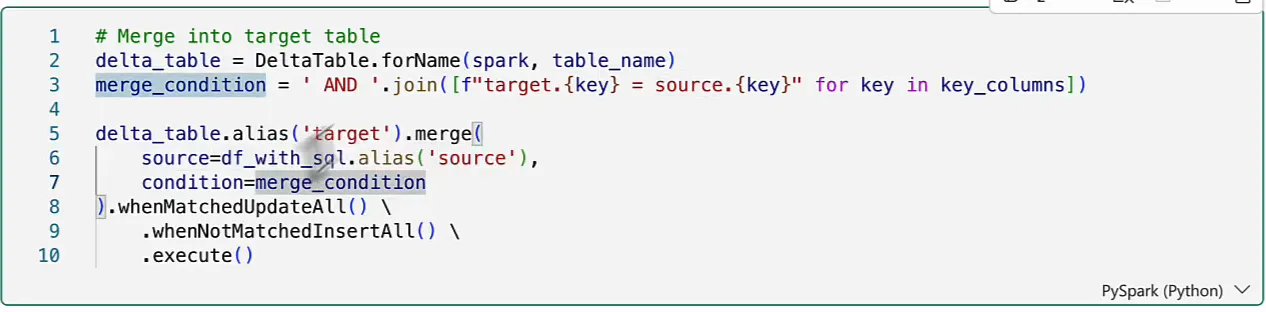
The whole merge is five or six lines. In SQL a merge can take many, many lines, depending on whether you insert, update or delete, how many columns there are, what the business key is and so on.
Python merge is the bomb. You should use it.
You can’t use it in Fabric Warehouse, because there you write T-SQL. Lately you can do a T-SQL merge there too, which is perfect, but I really like how this one is set up.
So I prefer SQL for data transformations and Python for things like merge operations, because Python makes my life super easy there. The pattern is a SQL query that writes into a Spark dataframe, which is a Python object, and that dataframe goes straight into a Python merge.
The same query in PySpark
You can write the exact same query in PySpark. It looks like this:
from pyspark.sql import functions as F

pu = spark.table("gold_dimlocations_pu")
do = spark.table("gold_dimlocations_do")

df_with_pyspark = (
    spark.table("0_demo_taxi2024_10mln")
    .join(pu, F.col("PickupLocationId") == pu["LocationID"], "left")
    .join(do, F.col("DropoffLocationId") == do["LocationID"], "left")
    .filter(
        (F.col("PassengerCount") > 0) &
        (pu["Borough"] != do["Borough"])
    )
    .select(
        F.col("PK"),
        F.col("PickupDate"),
        F.col("DropoffDate"),
        F.col("PassengerCount"),
        F.col("TripDistance").alias("TripDistanceMiles"),
        F.col("FareAmount"),
        (F.col("PassengerCount") * F.col("TripDistance")).alias("PassengerMiles"),
        (F.col("FareAmount") / F.col("PassengerCount")).alias("FareAmountPerPassenger"),
    )
)
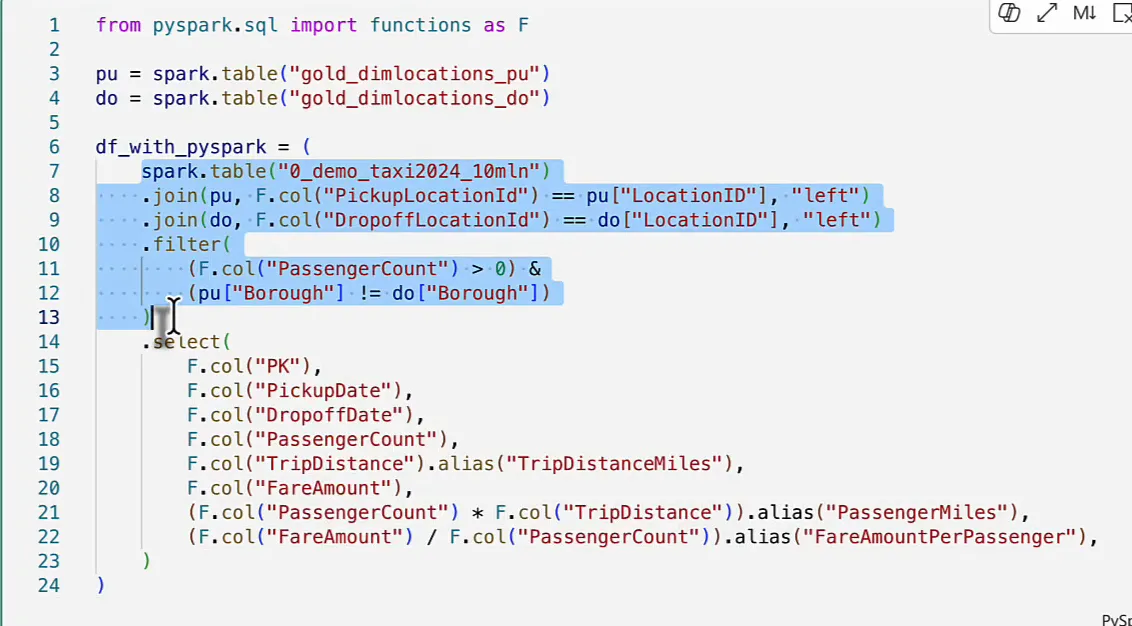
It reads the base table with spark.table() and left joins the pickup and drop-off locations. Then it applies the two filters, combined with &: the boroughs must not match and the passenger count must be larger than zero. At that point the base data set is put together, and only then does it select the columns. Where a column gets a new name you add .alias(); without it, the column keeps its original name. The multiplication and the division are easy enough.
Why I don’t like the PySpark syntax
Maybe it’s just a preference, maybe SQL is simply more readable, but I don’t really like this syntax. There is a lot of F.col(), because I import the PySpark SQL functions as F and have to tell the engine that everything I reference is a column. In SQL that is implied, and both the engine and other developers understand it.
PySpark is the more verbose way of writing queries. That might be good, it might be bad. It isn’t my preference.
What PySpark gets right: the order of operations
There is one thing I really, really like about PySpark, and that is the order of operations. The order of operations in a SQL query comes up on LinkedIn and Stack Overflow every once in a while, and in SQL it is all wrong. You start by selecting columns before you know which table you are reading from, and only after the column list do you get to the table. That makes it a bit awkward to write.
PySpark starts with the base table, then does the joins, then the filtering. If you want to filter the base table, you can move the filter up so it hits the table first, and from there you only work with the filtered data. That’s really cool. Only when the base data set is prepared do you start selecting columns.
SQL for transformations, Python for the merge
That is how I build my gold layer in a Fabric lakehouse: a Spark SQL query for the transformation, the result in a dataframe, and a Python merge to upsert it into the Delta table. PySpark gets the order of operations right, and I’ll give it that. For everything else, please, please, please just write a SQL query. You will make me happy, and hopefully a lot of other people too.
