
In this article 10 sections
By now you know AI can help you code your data platform pretty well. One piece of the puzzle I only discovered recently is letting Claude decide for itself whether its work was good enough, by running queries against your lakehouses, warehouses and semantic models to check the data and the code it wrote. It works, and I’ll show you how. But every row that comes back goes to Anthropic, so please don’t try this at home.
I’m showing this for educational purposes only. Let a professional do it. (That’s me.)
Writing the code is half the job
I’ve covered a few ways to bring Claude into Fabric development. With Claude Code in Visual Studio Code and Git, it edits your notebooks and semantic models as files and you push the code. With the Fabric Core MCP server, it finds out which objects you have, or creates a lakehouse for you. Both of those deal with code and objects.
This time Claude logs into the Fabric environment itself and runs queries directly against the lakehouse, to validate the data and the queries it generates for you. It can do the same across lakehouses, warehouses and semantic models (with DAX queries). It can do a lot of things if you ask it nicely.
Why I say don’t try this at home
When you ask Claude to run a query, the result set is sent to Anthropic’s servers, where the model runs. That’s all the data the query returns from your own platform: proprietary data, personal information that might fall under GDPR, trade secrets, product configurations, pricing, margins and whatnot.
Try it with demo data, or understand that it’s at your own risk and you are sharing data with Claude.
The demo table
My demo data lives in a lakehouse in the InternalDWH workspace, in a table called azure_cost_mgmt in the bronze schema. There’s nothing special about it. I’ve been extracting data over the REST APIs from Microsoft Azure cost analysis (I think that’s what it’s called, I don’t even know for sure) into Fabric, to have a nice little demo data set.
It has products, consumed services, meter IDs and names, categories, subcategories, regions and things like that, and at the end the cost in the billing currency and the cost in US dollars.
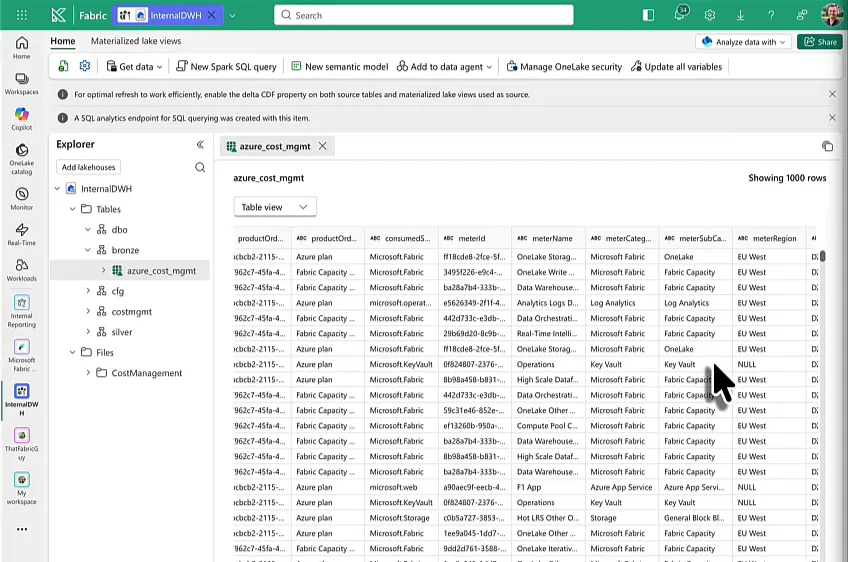
Asking Claude Code for the numbers
I had Visual Studio Code on the right of my screen with Claude Code in the side panel, running Sonnet 5 on high effort. I could have done the same from the terminal or from Claude Code in the Claude desktop app; it doesn’t really matter. This was my prompt:
Hey Claude, please check in my Fabric workspace "InternalDWH" on the Kimura tenant the table bronze.azure_cost_management, tell me the latest ETL run id (given by Sys_Timestamp), and the total USD spent by MeterCategory, Subcat, and ProductName. Omit all other fields.
If you need me to login, tell me what to do.
Claude first looked at the Fabric MCP tools it had. Those only cover item and workspace management, with no SQL or query tool for lakehouse tables, so they were no help here. It did spot that the table in my CLAUDE.md is called bronze.azure_cost_mgmt while I’d typed bronze.azure_cost_management, and figured it was probably the same table. Then it gave me two options: run the query myself in the SQL analytics endpoint and paste the result back, or give it a tool that can execute SQL. I told it I wanted it to run the query and tell me the numbers.
Logging in, and skipping the ODBC driver
Claude checked what was on my laptop. The Azure CLI was there, the SQL Server ODBC driver wasn’t. So it came back with a plan: install the Microsoft ODBC driver (msodbcsql18) through Homebrew, log in with az login using a device code, get an access token for https://database.windows.net/, fetch the lakehouse’s SQL endpoint connection string through the Fabric REST API, and run the query with pyodbc. Installing the driver changes the system, so it asked me to confirm first.
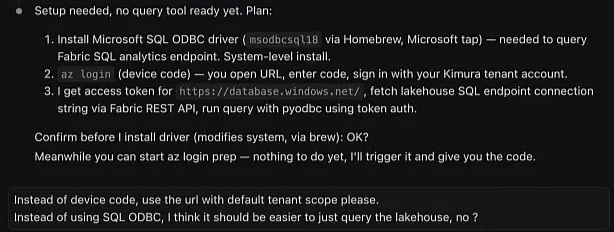
I changed two things. There’s an easy az login command that opens a browser login where you pick your account and you’re done, so I asked for that with the default tenant scope instead of a device code. And I thought there should be an easier way to query the lakehouse than ODBC, though I wasn’t quite sure.
I’d worked this out once before, in a very different environment: a customer’s Claude Code. The customer wanted to do this, and I figured it out with them. I warned them about the risks of sending data over to Claude, but they said that was fine, because it wasn’t really a secret data set. So they started doing it. I thought it was really cool, which is why I’m showing it to you now.
Claude queries OneLake on its own
Claude ran az login, my browser opened, I picked my account and I was logged into Microsoft Azure through the Azure CLI. From there Claude worked on its own:
- It got a OneLake storage access token from the Azure CLI (
az account get-access-tokenforhttps://storage.azure.com). - It installed the DuckDB Python package and browsed OneLake, ending up on the ADLS REST APIs, until it had confirmed the table folder
bronze/azure_cost_mgmt. - To read the table properly, it installed the
deltalakepackage (delta-rs), because that respects the Delta log and avoids stale files. It opened the table with the OneLake bearer token and found version 169. - Its first query failed, so it installed pyarrow and pandas and ran it again.
- It deleted the scratch file holding the access token.
I didn’t run a single query myself.
The result
Claude’s summary: the login worked, and it queried the lakehouse straight from OneLake with delta-rs and DuckDB, without needing an ODBC driver. bronze.azure_cost_mgmt was at version 169 with 118,332 rows. The latest ETL run ID was about a week old when I recorded this, which doesn’t really matter here.
For the totals, Claude made a decision on its own. The bronze table keeps the full I/U/X changelog, so summing the raw rows would double count. It deduplicated to the latest row per natural key and left out the deleted (X) rows. Okay, sure. The total came to $56,575.82, with almost $26,000 of that on the Fabric capacity reservation.
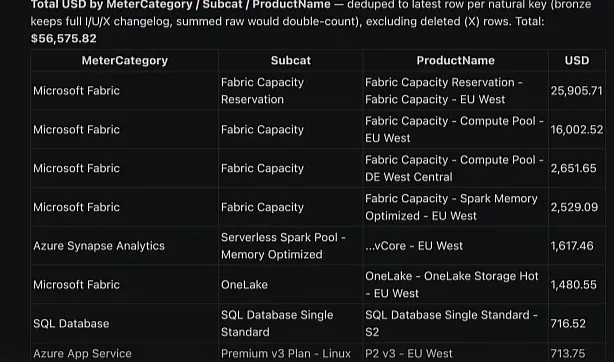
Below the top rows it said there were 64 more, mostly under $500, and it saved the full 75-row breakdown to a CSV file. It also added a note that the data looked like our own Fabric and Azure consumption rather than a managed client’s cloud spend, and that I should check the subscription or the table if I’d expected client data.
Let Claude check its own transformations
In practice, this means that when you ask Claude Code to write queries, notebooks or stored procedures for you, you don’t have to stop at writing the code and publishing it into your Fabric environment. You can ask it to validate the code as well. Tell it which data or which results you expect, or have it run a query against the source data set itself to work out whether its transformations were correct.
Where your data goes
I cannot stress this enough: if you don’t know what you’re doing, don’t try this at home.
The inference on your prompt happens somewhere on Anthropic’s machines. So when Claude Code queries your data, the result goes through Anthropic’s servers before you’ve even seen it yourself. It also leaves Microsoft Fabric. You might say Fabric is secure enough and you trust Microsoft, and that’s fine, but the data still leaves the Microsoft sphere. Claude Code runs the query instead of you, and the inference machines that answer your prompts read the result.
Keeping the data in your own sphere
If you want AI to validate your work without the data leaving, you have options. You can self-host open-weight or open source models. They’re not really that good, though, and not the same as the OpenAI and Anthropic frontier models. If you want the OpenAI or Anthropic models hosted closer to home, start looking at the options Microsoft Azure, Amazon Bedrock and others give you.
I hope this inspires you to do cool things with AI and data engineering. And I hope I’ve warned you plenty of times not to just send your data to a service you don’t know.
