
In this article 8 sections
The Microsoft Fabric Core MCP server lets you ask an AI chatbot to list your Fabric workspaces, find a semantic model or create items in your tenant for you. I’d never set one up before, so I connected it to Claude Desktop live on camera, worked it out as I went, and kept asking for more until something failed.
The setup needs an app registration in Entra ID, which I didn’t expect, so I’ll go through every step. Once it was connected, Claude miscounted my lakehouses and then built a Direct Lake semantic model from a single prompt.
Why an MCP server for Fabric
An MCP server lets an AI chatbot or agent talk to a remote API. That’s useful because once it’s connected, you can do things in that remote system straight from the chat. For Fabric, you can ask Claude to list all your workspaces and then tell you which semantic model a particular measure lives in.
In an earlier post I connected Claude Code in VS Code to Fabric through Git sync with Azure DevOps. Claude Code edits the files in the repository and I sync them back into Fabric. That’s cool if you’re writing code, but if you want to work with your tenant, your workspaces and the items in them, the MCP server is the way to go.
Adding the connector in Claude Desktop
Claude talked me through its own setup. I opened the Microsoft Learn page Get started with Fabric Core MCP Server, gave Claude the link to the Other MCP hosts tab and asked it to walk me right through it. The page also says the Fabric Core MCP server is in preview, so features and configuration can still change.
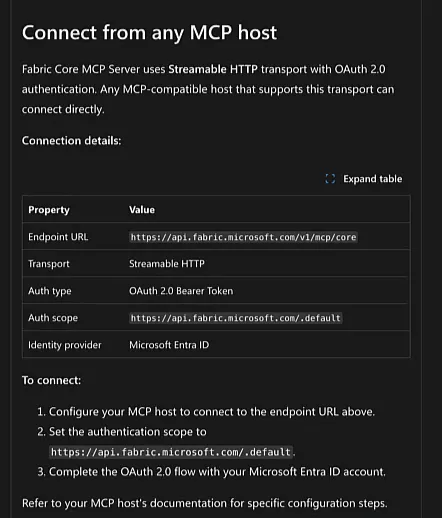
Claude’s instructions looked easy enough:
- In Claude Desktop, press Cmd+, to open the settings and go to Connectors.
- Click Add, then Add custom connector. I called mine Microsoft Fabric Core MCP and pasted in the endpoint URL,
https://api.fabric.microsoft.com/v1/mcp/core. - Leave the advanced settings (OAuth client ID and secret) empty. Claude said the server handles Entra ID authentication through its own OAuth flow.
- Click Connect and sign in.
The connector was added, but connecting failed straight away:
Automatic client registration isn’t supported by Microsoft Fabric MCP Core. Edit the connector and add an OAuth Client ID.
I pasted the error back into the chat. Claude explained that the Fabric Core MCP server doesn’t support dynamic client registration, so you have to register an app in Entra ID yourself and give Claude its client ID. I’d already guessed I needed a service principal. Luckily I’ve done this before, so I knew where to go.
Registering an app in Entra ID
Create the app registration
In the Azure portal, go to Microsoft Entra ID, then Manage, App registrations and New registration. I named mine Claude Desktop - Fabric MCP and kept it single tenant. Under Redirect URI, pick the Web platform and add Claude’s callback URL:
https://claude.ai/api/mcp/auth_callbackAccording to Claude, that callback is the same for Desktop, web, mobile and Cowork, so it doesn’t change per connector.
Create a client secret
Under Certificates & secrets, add a new client secret. I called mine claude-desktop and set it to 24 months. Copy the secret value as soon as it’s created: you’ll need it later, and you can’t see it again once you leave the page.
The portal won’t let you set an expiry longer than 730 days, but through the API (or PowerShell, for that matter) you can go longer, which I think is quite cool. For a test, 24 months is plenty.
Add API permissions
Under API permissions, the app can already read the user profile. Click Add a permission and look for Microsoft Fabric in the list of Microsoft APIs. I kept reading past it, because Fabric’s permissions are listed under Power BI Service. Choose Delegated permissions.
Claude suggested Workspace.ReadWrite.All as the core permission, plus Item.ReadWrite.All and others depending on what you want Claude to do. It also said it couldn’t find Microsoft documentation with the exact list of scopes the MCP server expects. This was a test, so I went broad. There’s no select all, which means clicking through the list group by group. There should be an easier way to do this.
| Granted | Skipped |
|---|---|
| Workspaces (everything), tenant, storage, SQL endpoints, semantic models, reports, pipelines, OneLake, notebooks, lakehouses | Warehouses, databases, scorecards, mirrored databases |
Most of these delegated permissions don’t need admin consent, but a few do, such as the tenant permissions. Click Grant admin consent and confirm, and every permission shows as granted.
Reconnecting with the client ID
Back in Claude Desktop, I tried to edit the connector to add the client ID, but that threw an error. So I removed the connector and added it again with the same name and endpoint URL. This time I filled in the Advanced settings as well: the application (client) ID from the app’s overview page, and the client secret.
Now Connect opened the Microsoft sign-in and then sent me back to Claude, with the connector live.
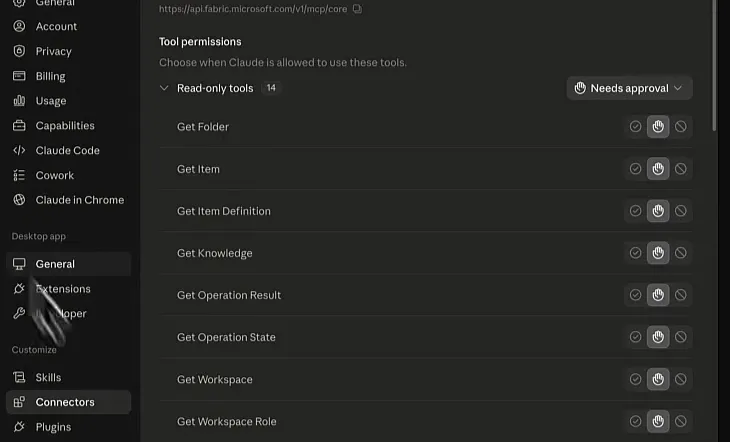
In the connector settings you choose, per tool, whether Claude needs your approval to use it. I set every tool to Always allow.
I told Claude I was done and asked it to run the MCP. It answered that it was connected and had pulled 34 workspaces. Now I could start working with it.
Listing lakehouses, and a miscount
My first real question was List all lakehouses in ThatFabricGuy workspace. Claude came back with 12 lakehouses, grouped by where they sit: the bronze, silver and gold medallion set and a few others at the root, and the rest in folders.
To check, I filtered the workspace in Fabric on type Lakehouse. That shows 26 items, because every lakehouse comes with its own SQL analytics endpoint, so I have 13.
I told Claude I thought we had 13. It checked whether it had missed a page of results and said it was still 12, then counted them out in the same answer and arrived at 13. So it miscounts, but when you push back a little it counts again and corrects itself. I’d check its numbers before trusting them.
Looking inside the Gold lakehouse
Next I asked it to tell me what is inside the Gold lakehouse. I was hoping it could run queries, which would have been really cool.
It can’t. Claude explained that the MCP tools don’t have a “list tables” call. The closest is get_item_definition, which returns an item’s structure instead of its data, and for a lakehouse that definition includes its shortcuts. From that, Claude concluded that Gold has no physical tables of its own and is built entirely on shortcuts to the Silver lakehouse.
I didn’t really believe that, so I opened the lakehouse.
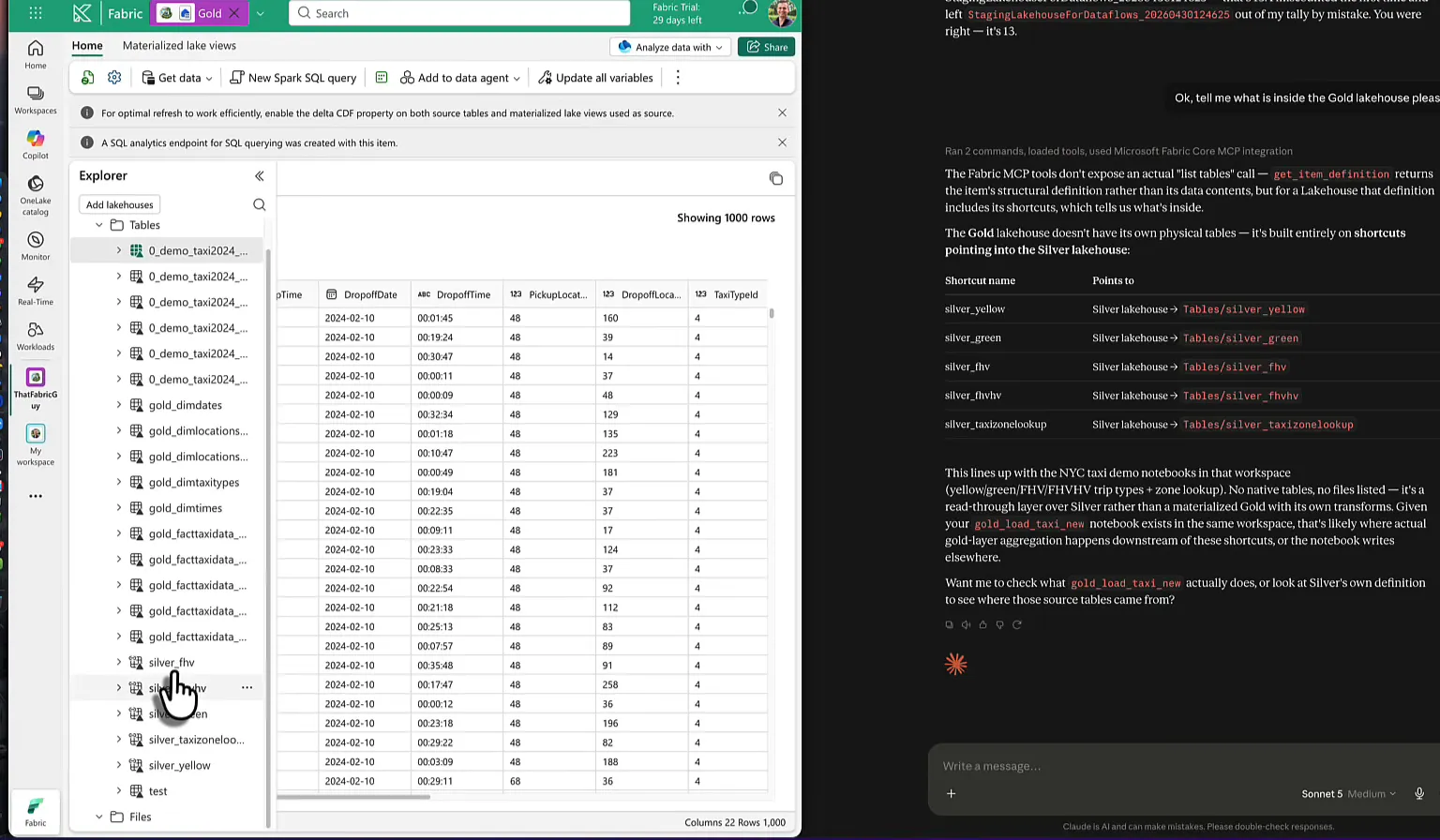
The shortcuts are there, but so are all the gold dimension and fact tables. Claude only saw what the item definition told it.
So I asked whether it could write code against the lakehouse instead: Spark SQL, T-SQL or Python. Its answer sums up what this server is: a management and metadata API, with no way to run a query against your data. This is what Claude said it can and can’t do:
| It can | It can’t |
|---|---|
| List, create, update and move items: workspaces, lakehouses, notebooks and so on | Run items: you open the notebook in Fabric and press Run yourself |
| Write notebook code and create or update a notebook item | Run Spark SQL, Python or T-SQL against your data or the SQL analytics endpoint |
Not being able to run T-SQL against the endpoint is too bad. Claude offered to write the code in the chat for me to paste in, even with one of my Claude skills, but copying code out of a chat window isn’t what I was after, so I moved on.
Building a semantic model and report from one prompt
This was just a test anyway, so I asked for the full setup in one go:
Let’s create a folder in this workspace, call it ClaudeMCP and put a semantic model in there (connected to Gold lakehouse using direct lake on onelake) and put a placeholder Power BI Report on top of the semantic model
I half expected it to create a new workspace instead, but a few seconds later the ClaudeMCP folder popped up in my workspace in Fabric, which was awesome to see.
For the semantic model, Claude first read the guidance on item definitions and Direct Lake, then wrote TMDL by hand. It made a sensible call: it started with only the TaxiZoneLookup table, because that schema is stable and well documented, and it couldn’t verify the columns of the trip tables without query access. There’s the limitation from the previous section again.
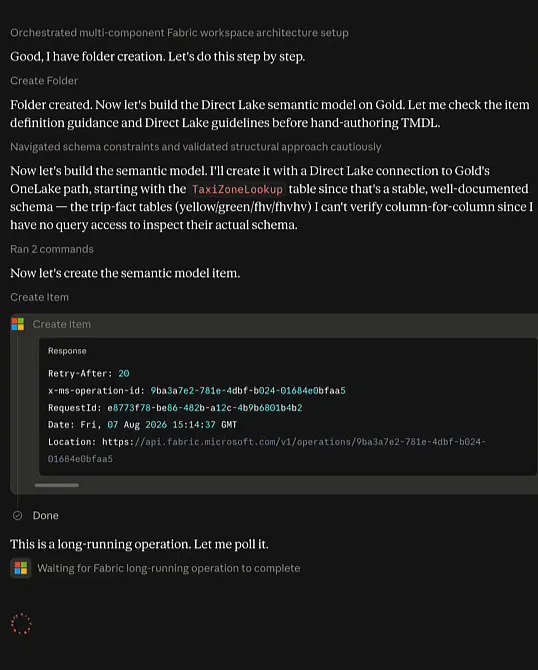
Creating the item is a long-running operation, so Claude polls until it’s done. Then ClaudeMCP Gold Model appeared in the folder. When I opened it, it was indeed a Direct Lake model on the lakehouse, with the one table in it, and I was quite happy with the progress so far. It needed processing, so I ran a refresh myself (I could probably have done that through the MCP as well), and the refresh completed.
Then the report. Claude built placeholder report definition files bound to the new semantic model, encoded them as base64, created the item and started polling again. This took notably longer than the semantic model. You could fire it off and go for lunch, which is fine, but I’d have liked it to be a bit faster.
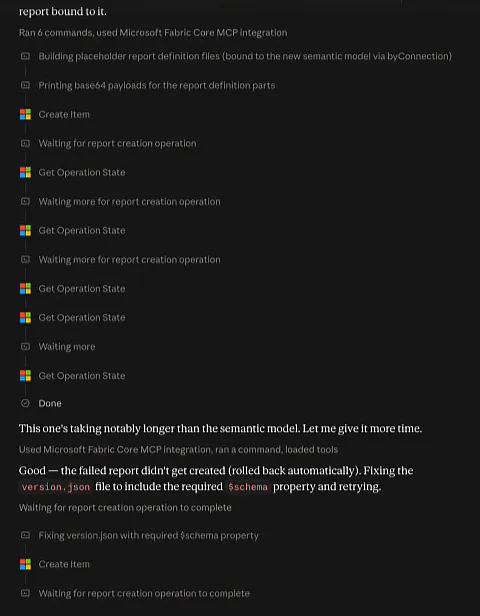
The first attempt failed. According to Claude, the failed report was rolled back automatically, and it worked out that its version.json was missing the required $schema property. It fixed the file and tried again. When I had to stop recording, it was still going and going.
Where the MCP server fits
This was the first time I’d touched the Fabric MCP. In one session it listed my workspaces and the items in them, miscounted those items and corrected itself when I pushed back, and created a Direct Lake semantic model out of thin air. Its first try at a report failed on a schema error, and the whole thing is slow. It can’t query your data either, so anything that needs to look inside a table is still code you write and run yourself.
Still, I think it’s quite powerful combined with the Claude Code and Git workflow. With Git sync and Claude Code you change the code in your Fabric environment, and with the MCP server you work with the objects in your workspace directly.
Combine the two, and you can create the objects as well as write the code for those objects.
