
In this article 6 sections
If your notebooks and pipelines in Microsoft Fabric run under your own user account, they break the day that account does. Lose access to your account and the pipeline fails. Leave the company and the pipeline fails. So you need something else, and that something is a workspace identity: it gives the workspace its own service principal, which you can authorise on other services such as Azure Key Vault.
Until lately, connections to Key Vault could only go through your user account, which is not really convenient. In this post I create a workspace identity, give it access to Key Vault and then run the notebook from my Key Vault post from a pipeline, as that identity instead of as me.
Create a workspace identity
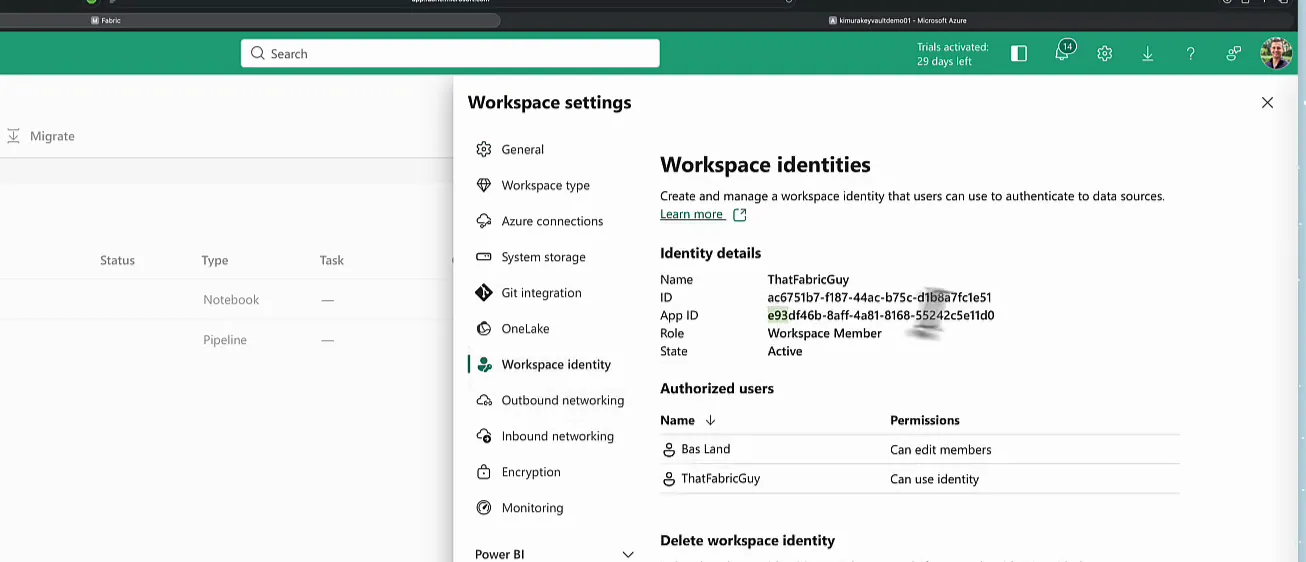
This part is very simple. In my ThatFabricGuy workspace, open Workspace settings, go to Workspace identity and click Create workspace identity.
The identity is created straight away, but it has no name and no role, which is a bit strange (especially the missing name). Refresh the page and the name shows up: ThatFabricGuy. A workspace identity gets the same name as the workspace itself.
Add it to the workspace as a member
Next, add the new identity to the workspace. Click Manage access, then Add people or groups. You are not adding a person or a group this time. Type the name of the workspace identity, ThatFabricGuy, and it comes up as an app with an App ID. Pick it and make it a Member.
Back in Workspace settings > Workspace identity, the role now reads Workspace Member, so that is looking good. Keep this page in mind, because you need the IDs on it in a moment.
The notebook we want to run
For the demo I reuse the KeyVault Demo notebook from the post on Key Vault secrets in Fabric notebooks. It gets contacts from the Moneybird API twice: once with a token hard-coded in the notebook, and once with the same token fetched from Key Vault:
keyvault_url = 'https://kimurakeyvaultdemo01.vault.azure.net/'
secret_name = 'mbsecret'

token = notebookutils.credentials.getSecret(keyvault_url, secret_name)
The token that comes out of getSecret then goes into the Authorization header of the API call. For this demo I added one cell near the top that shows who is running the notebook:
print(mssparkutils.env.getUserName())Run the notebook by hand and that cell prints my own email address. Both API calls work, including the Key Vault one, but it is my user account that authenticates against Key Vault and gets the token. I want ThatFabricGuy, the workspace identity, to run the notebook and authenticate against Key Vault instead.
Give the workspace identity access to Key Vault
My Key Vault is a demo vault, so there is not much in it: under Secrets there is a single secret, mbsecret, the Moneybird token the notebook fetches.
To find the identity, go back to Workspace settings > Workspace identity in Fabric. Mine has an App ID that starts with e93 and ends with 11d0.
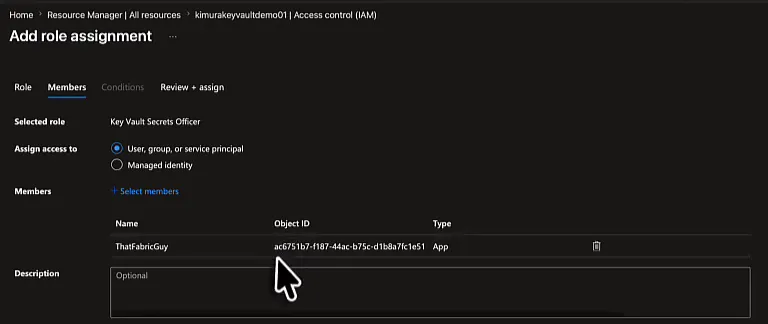
In the Key Vault in the Azure portal, open Access control (IAM) and click Add role assignment. Search for the role Key Vault Secrets Officer and select it: the Secrets Officer can work with all the secrets in the vault.
Click Next. On the Members tab, keep User, group, or service principal: a workspace identity is really a service principal. Click Select members, search for ThatFabricGuy, pick it and click Select.
The members list now shows ThatFabricGuy as an App, with an Object ID next to it. That Object ID is a different one from the App ID you just looked up. It matches the ID field on the workspace identity page in Fabric, ac6751b7-... in my case, so that is how you check you picked the right identity. Click Next, then Review + assign.
Run the notebook as the workspace identity
Back in Fabric I have an empty pipeline called WorkspaceIdentity. Choose Pipeline activity and add a Notebook activity. On its Settings tab, select the workspace (ThatFabricGuy) and the notebook.
In Safari the notebook dropdown has a bug: the list stays empty. Typing in the filter still works, so I searched for key vault and the first hit was KeyVault Demo. For screens like this one you are better off in Chrome or Edge.
If you save the pipeline like this and do nothing else, it runs with my user credentials and passes them on to the notebook it starts. So it is very important to set a Connection on the notebook activity that runs as the workspace identity.
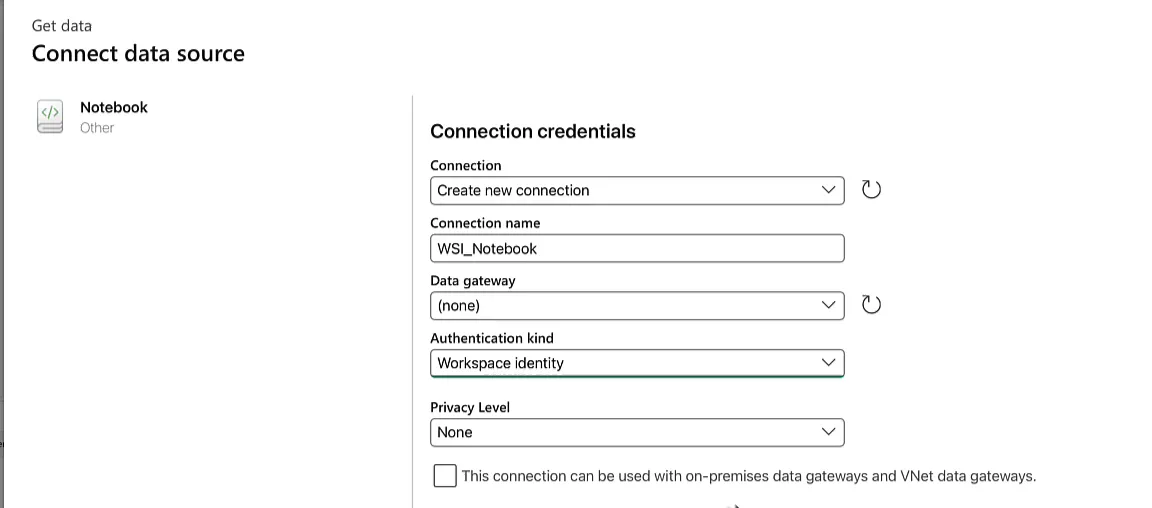
There were no notebook connections yet, so open the connection dropdown, click Browse all and choose Notebook. That opens Connect data source with the connection credentials:
- Connection: Create new connection
- Connection name: I called mine
WSI_Notebook - Authentication kind: Workspace identity
The authentication kind starts out as Service principal, which asks for a tenant ID, a client ID and a key. With Workspace identity you need none of those. That’s it: this connection now runs as the workspace identity.
Check who ran the notebook
Save the pipeline and run it. Once the notebook activity is in progress, click the activity name and open the snapshot. It opens in a new tab and shows the notebook as it runs.
The first thing I saw was that the test username cell had failed.
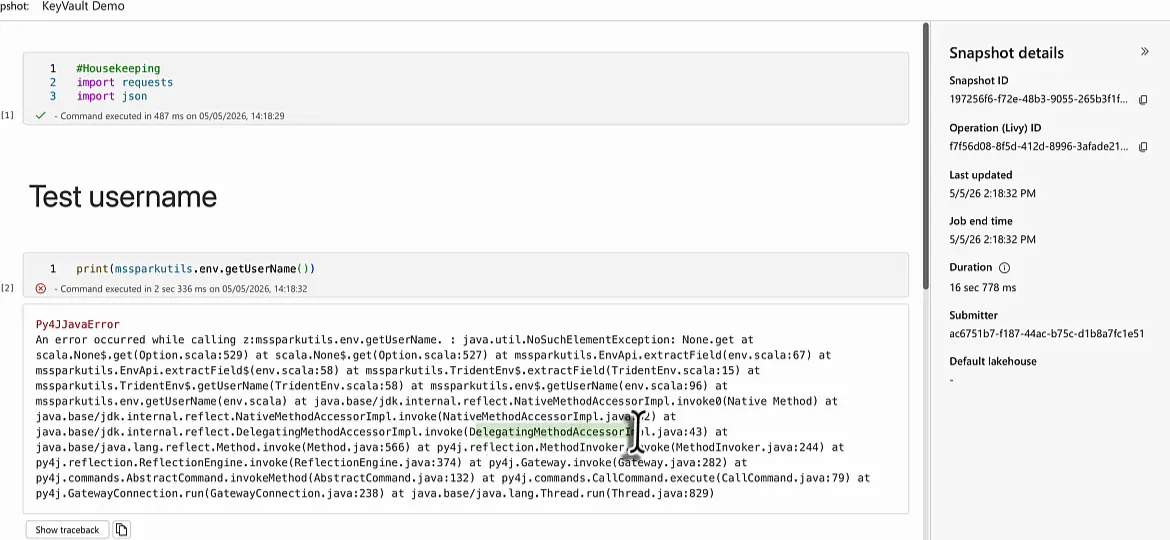
You do not need that cell to prove it anyway. The snapshot details show the Submitter of the notebook run, and that is ac6751b7-..., the ID of the workspace identity.
With the cell removed and the notebook saved, I ran the pipeline again. The submitter is still the workspace identity, and this time the run succeeds. The version with the hard-coded token works, which is no surprise, and the version through Key Vault works too.
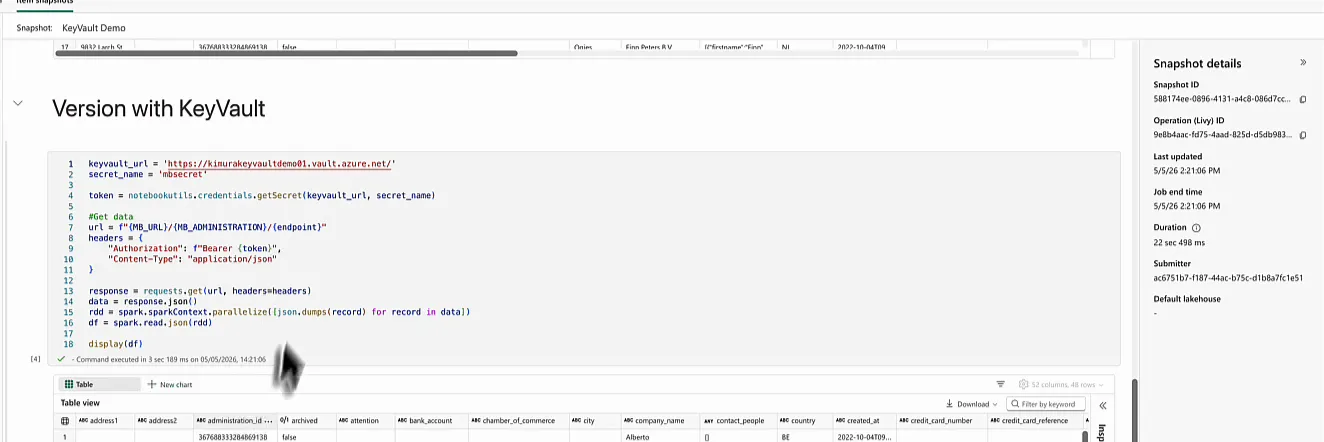
So the pipeline submits the notebook as the workspace identity, and the workspace identity logs in to Key Vault to fetch the secret.
No more connections tied to your account
To sum up the setup: create the workspace identity and make it a member of the workspace, give it a role on the Key Vault, and run the notebook through a connection with Workspace identity as its authentication kind.
The pipeline no longer depends on my user account, and that is the problem this solves: if I leave the company, or log out of all my active sessions, every connection that runs as me breaks.
What happens if you leave the company? The pipeline fails.
With a workspace identity connection in Microsoft Fabric, a service account runs all of your connections instead of you.
