
In this article 7 sections
Fabric data agents are brilliant for data discovery: you talk to your data without knowing upfront which questions you are going to ask. Out of the box, though, they don’t always behave. The agent runs on a GPT-5 model, and that model can misread your question or simply make things up, which is the last thing you want when you base decisions on the answers.
I introduced data agents in an earlier post. This time I build one with two data sources, a fast aggregated semantic model and a big detailed lakehouse, and tune it with four settings: agent instructions, data source descriptions, data source instructions and example queries. What I want at the end is an agent that picks the right source and understands the data model well enough to answer complex questions.
Two sources: aggregates first, detail when needed
As usual I’m using the New York City TLC taxi data set: every taxi trip in New York from 2009 up until now, over 4 billion rows.
My data agent, TaxiAnalysis, has two data sources:
- Gold, the gold lakehouse with all the taxi data. I’ve selected the date, pickup location, drop-off location, taxi type and time dimensions for the agent, plus the fact table with the trip records, partitioned by year, month and taxi type. That is 4 billion rows with a lot of columns, down to how much toll was paid and the MTA tax amount.
- Taxi_Data_Agent, a semantic model on an aggregated version of that fact table. It has just a few measures (number of passengers, number of trips, trip distance in miles, average passengers per trip and average trip distance in miles) across three dimensions: taxi type (yellow, green, and the for-hire vehicles like Uber and Lyft), pickup location and pickup date.
Aggregated by day, location and taxi type, the semantic model holds only a couple of million rows. That is about a thousand times smaller than the lakehouse, and therefore way faster. Most questions I can think of can be answered from the semantic model, but sometimes you need to dive into the lakehouse. Maybe not for taxis, but for plenty of companies this is a very real scenario.
You can add both sources and start asking questions, and you might get good results. But as of 2026 we all know AI likes to hallucinate, and when you use it to analyse your data and make decisions for your company, you want to prevent that. So you need to set the agent up properly.
Agent instructions: the system prompt
Go to the Setup tab and open Agent instructions. It is a Markdown box, and what you write there becomes detailed instructions for the agent. Microsoft has an example template with sections for the objective, data sources, key terminology, response guidelines and handling common topics, and I kept that structure.
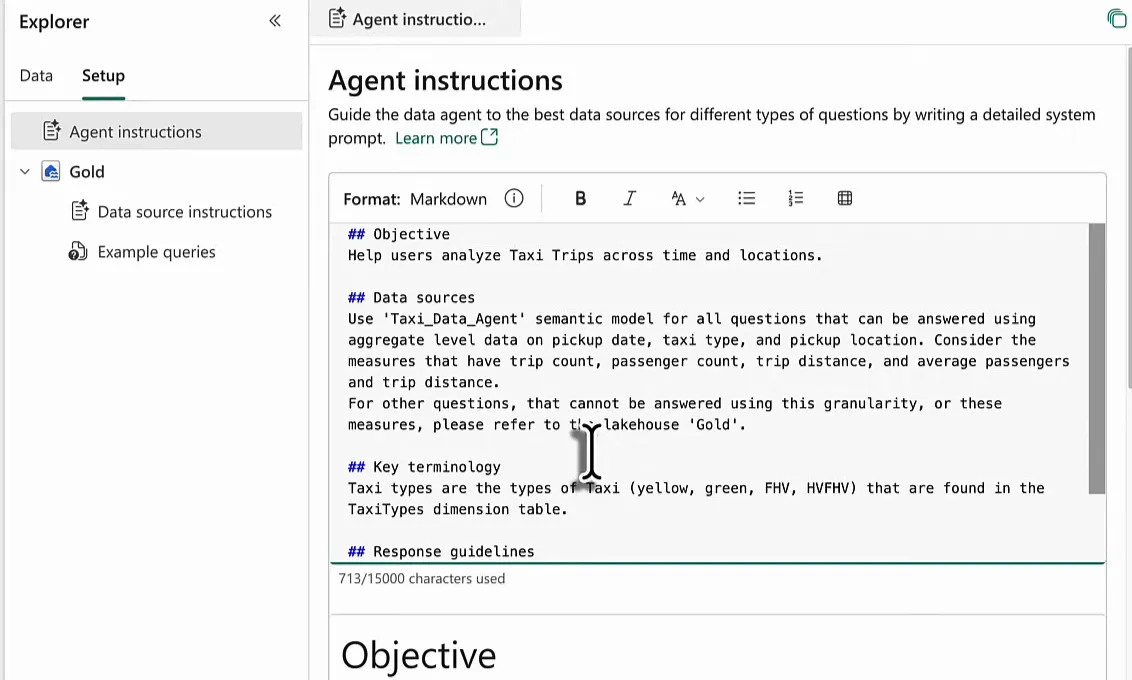
This is what I put in:
## Objective
Help users analyze Taxi Trips across time and locations.

## Data sources
Use 'Taxi_Data_Agent' semantic model for all questions that can be answered using aggregate level data on pickup date, taxi type, and pickup location. Consider the measures that have trip count, passenger count, trip distance, and average passengers and trip distance.
For other questions, that cannot be answered using this granularity, or these measures, please refer to the lakehouse 'Gold'.

## Key terminology
Taxi types are the types of Taxi (yellow, green, FHV, HVFHV) that are found in the TaxiTypes dimension table.

## Response guidelines
Model should give context with the numbers. For example, don't give just a list of taxi trip volumes per month, but describe briefly the trend you're seeing, the comparison to last year, and such. Keep it brief, but interesting.

## Handling common topics
N/A
The data sources section is the routing rule: the semantic model for every question it can answer at its aggregation level with its measures, the lakehouse for anything else, say a question about the MTA tax amount. I added the key terminology because during testing the agent did not understand my questions about taxi types, and for whatever reason it didn’t look in the taxi types dimension. And in the response guidelines I ask for context around the numbers instead of a bare list. A list of numbers I can get from a Power BI report; a data agent can do so much more than that.
Describe and instruct the lakehouse
Next to the agent-wide instructions, a data source can get its own settings. For the semantic model you cannot add any. A semantic model is just a set of tables with relationships and DAX measures, so that is pretty easy for the agent to understand, I’d say. For a lakehouse you can add a description, instructions and example queries.
Data source description
The description is a few sentences on what can be found in the data source. That helps a lot: when you ask a question in plain English, the agent first has to work out which lakehouse, database or semantic model to look in, and the description tells it quickly what kind of data to expect.
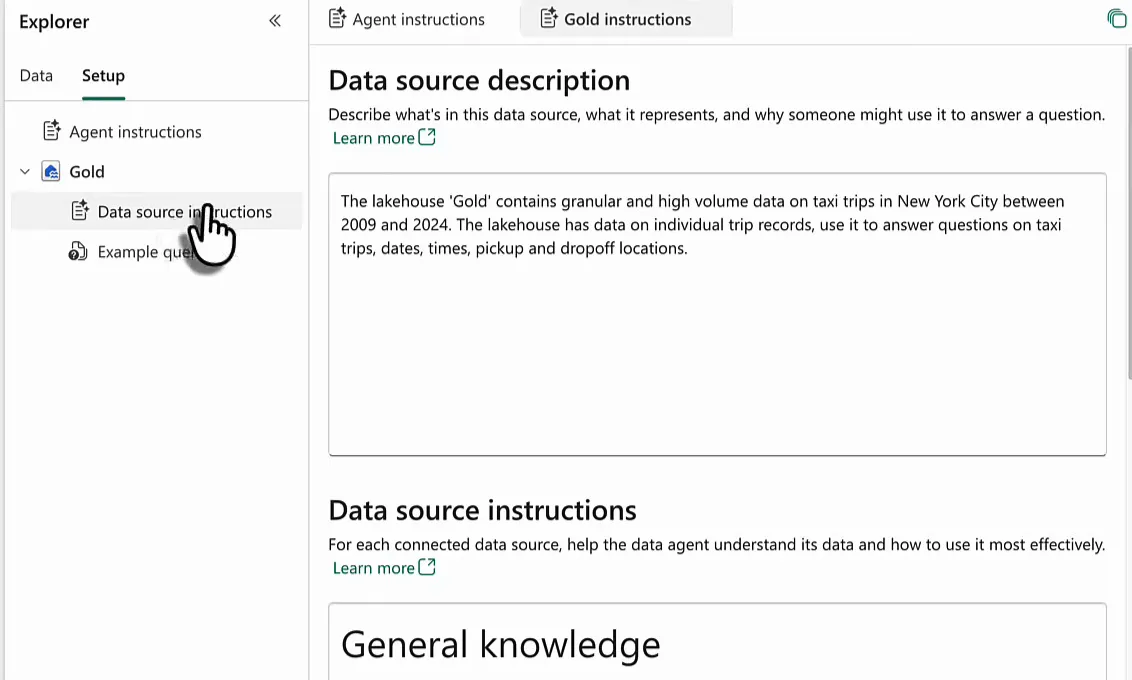
Data source instructions
The instructions are Markdown again. Mine have four parts:
## General knowledge
The dataset contains information on taxi trips in New York City for the years 2009-2024. During those years, a lot has happened (covid). Consider your general knowledge to be part of the knowledge required to answer questions about this data.

## Table descriptions
gold_dimdates: calendar table with date, month, years
gold_dimlocations_do: dimension with dropoff (do) locations, aggregate to zone and borough
gold_dimlocations_pu: dimension with pickup (pu) locations, aggregate to zone and borough
gold_dimtaxitypes: dimension with taxi types (i.e. yellow, green, hvfhv, fhv).
gold_dimtimes: time table dimension containing times, in order to show pickup and dropoff times. Can be used to find busy times during the day.
gold_facttaxidata_partitionyearmonthtaxitype: fact table containing ± 4 billion taxi trips, connected to the dimensions mentioned above.

## When asked about
When asked about relations data, i.e. busy times for taxi trips in a borough, make sure to follow the relations between tables, i.e. you can join the fact table to gold_dimtimes using the pickuptime field joined to the Time field on the dimTimes.

## Other instructions
Be aware this dataset is large, and slow. Use the Semantic Model 'Taxi_Data_Agent' where possible.
Under general knowledge I tell the agent to use what it already knows. It runs on GPT-5, the model you know from OpenAI and ChatGPT, so it knows a lot about what happened in the world in 2019, 2020 and so on. When I ask why the number of taxi trips dropped in that period, I want it to understand that this was covid, then analyse the data and quickly pinpoint where it happened. My first version also listed the 9/11 attacks, which I only spotted while recording. Those happened years before this data starts in 2009, so out they went.
The table descriptions are there because my table names are quite technical: underscores, “gold” in every name, and abbreviations like do and pu for drop-off and pickup. So I spell out what each table holds, for example that gold_dimlocations_do is a dimension with drop-off locations, aggregated to zone and borough.
Questions like “busy times for taxi trips in a borough” need data from several tables, so the “When asked about” paragraph tells the agent to follow the relations between them. And under other instructions I warn it that the lakehouse is large and slow, so it should use the semantic model as much as possible.
Teach the joins with example queries
The last setting is Example queries: pairs of a natural language question and the SQL query that answers it.
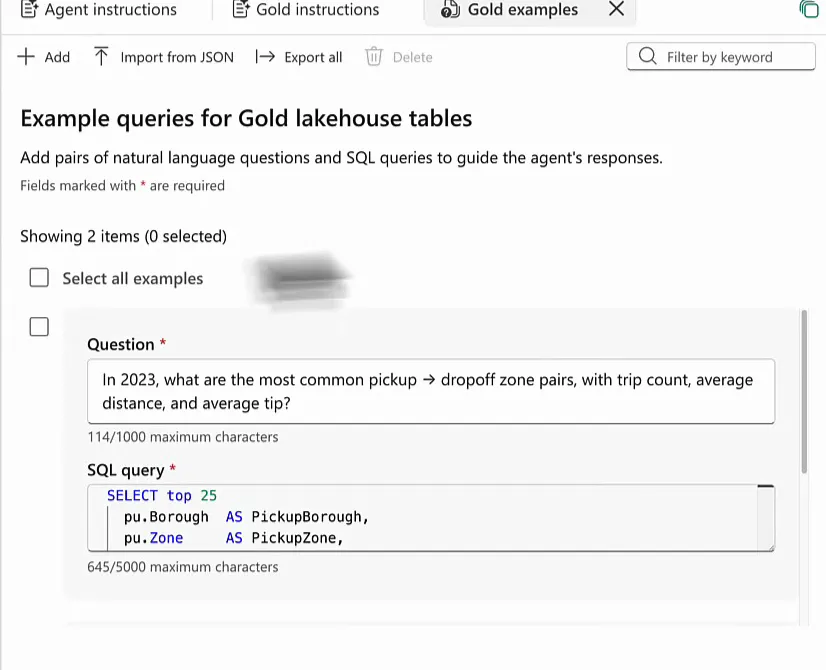
My first example asks: “In 2023, what are the most common pickup → dropoff zone pairs, with trip count, average distance, and average tip?” The tip amount is not in the semantic model, so only the gold lakehouse can answer it. I wrote the SQL by hand, taking the top 25 for “most common” and ordering so the most popular pair is on top.
select top 25
  pu.Borough             as PickupBorough,
  pu.Zone                as PickupZone,
  do.Borough             as DropoffBorough,
  do.Zone                as DropoffZone,
  count(*)               as TripCount,
  avg(f.TripDistance)    as AvgTripDistance,
  avg(f.TipAmount)       as AvgTipAmount
from Gold.dbo.gold_facttaxidata_partitionyearmonthtaxitype f
join Gold.dbo.gold_dimdates d
  on f.PickupDate = d.Date
join Gold.dbo.gold_dimlocations_pu pu
  on f.PickupLocationId = pu.LocationID
join Gold.dbo.gold_dimlocations_do do
  on f.DropoffLocationId = do.LocationID
where d.CalendarYear = 2023
group by pu.Borough, pu.Zone, do.Borough, do.Zone
order by TripCount desc
This does a few things. It helps the agent with the more complicated questions that go across many tables. It also shows how I set up my analysis. Without this example the agent might not understand that PickupLocationId in the fact table is the same as LocationID in the pickup locations table. With it, the agent knows these fields can be joined, and it can analyse my queries to create valid queries of its own.
The second example goes further: “For 2024, find the pickup→dropoff zone pairs where riders tip unusually high compared to what you’d expect for that trip distance. Show the top 10 biggest positive ‘tip surprise’ pairs, with the pair’s avg tip, expected tip, and trip count.”
That takes a more complicated query. A common table expression, pair_stats, calculates the averages per zone pair. A second one, overall_model, works out the tip per mile across all of 2024. The final select then looks for the pairs where the average tip is unusually large compared to the tip you’d expect for that distance.
with pair_stats as (
  select
    pu.Borough as PickupBorough,
    pu.Zone    as PickupZone,
    do.Borough as DropoffBorough,
    do.Zone    as DropoffZone,
    count(*)   as TripCount,
    avg(f.TripDistance) as AvgTripDistance,
    avg(f.TipAmount)    as AvgTipAmount
  from Gold.dbo.gold_facttaxidata_partitionyearmonthtaxitype f
  join Gold.dbo.gold_dimdates d
    on f.PickupDate = d.Date
  join Gold.dbo.gold_dimlocations_pu pu
    on f.PickupLocationId = pu.LocationID
  join Gold.dbo.gold_dimlocations_do do
    on f.DropoffLocationId = do.LocationID
  where d.CalendarYear = 2024
    and f.TripDistance is not null
    and f.TripDistance > 0
    and f.TipAmount is not null
  group by pu.Borough, pu.Zone, do.Borough, do.Zone
),
overall_model as (
  select
    sum(f.TipAmount) / nullif(sum(f.TripDistance), 0) as TipPerMile_2024
  from Gold.dbo.gold_facttaxidata_partitionyearmonthtaxitype f
  join Gold.dbo.gold_dimdates d
    on f.PickupDate = d.Date
  where d.CalendarYear = 2024
    and f.TripDistance is not null
    and f.TripDistance > 0
    and f.TipAmount is not null
)
select top 10
  ps.PickupBorough, ps.PickupZone,
  ps.DropoffBorough, ps.DropoffZone,
  ps.TripCount,
  ps.AvgTripDistance,
  ps.AvgTipAmount,
  (om.TipPerMile_2024 * ps.AvgTripDistance) as ExpectedAvgTipAmount,
  (ps.AvgTipAmount - (om.TipPerMile_2024 * ps.AvgTripDistance)) as TipSurprise
from pair_stats ps
cross join overall_model om
where ps.TripCount >= 500  -- avoid tiny-sample weirdness
order by TipSurprise desc;
I know SQL, so writing these by hand is no problem, and it is worth the effort: the examples show the agent how I think and how the data model is built.
Then hit Publish.
Testing: does it pick the right source?
First question: “What was the average trip distance traveled in 2023 for taxi trip originating from Manhattan?” This one should go to the semantic model, and the agent should understand that Manhattan is a borough.
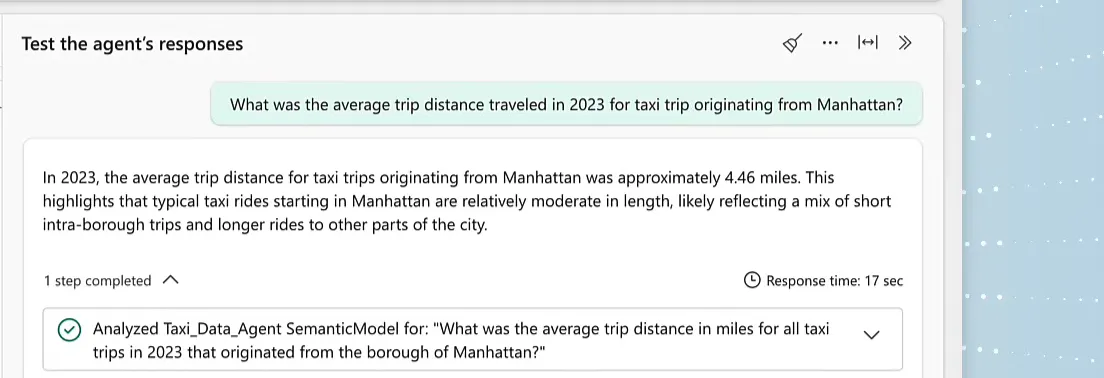
It does, which is really cool. The completed step says it analysed the Taxi_Data_Agent semantic model, and when you open the query code you find a DAX query on the existing AvgTripDistanceMiles measure:
// Average trip distance (miles) for taxi trips in 2023 originating from Manhattan
// Uses the existing [AvgTripDistanceMiles] measure from 'factTaxiTrips_aggregate'
EVALUATE
  CALCULATETABLE(
    ROW(
      "Average Trip Distance (Miles) - 2023 Manhattan",
      [AvgTripDistanceMiles]
    ),
    'dimDates'[CalendarYear] == 2023,          // Filter to year 2023
    'dimLocations'[Borough] == "Manhattan"     // Filter to trips picked up in Manhattan
  )
The answer is 4.46 miles, followed by a line of context about a mix of short trips within the borough and longer rides to other parts of the city. That is what I asked for in the response guidelines.
Then the follow-up: “Now show the average trip distance originating in Manhattan, where the drop off location was outside Manhattan, again for 2023.” The drop-off location is not in the semantic model, so this one should go to the gold lakehouse. And it does: about 10.56 miles, notably longer than the average for all trips from Manhattan, because these trips leave the borough.
This is the SQL it generated:
select
  avg(f.TripDistance) as AvgTripDistance
from Gold.dbo.gold_facttaxidata_partitionyearmonthtaxitype f
join Gold.dbo.gold_dimdates d
  on f.PickupDate = d.Date
join Gold.dbo.gold_dimlocations_pu pu
  on f.PickupLocationId = pu.LocationID
join Gold.dbo.gold_dimlocations_do do
  on f.DropoffLocationId = do.LocationID
where d.CalendarYear = 2023
  and pu.Borough = 'Manhattan'
  and do.Borough <> 'Manhattan'
The query is perfect, so the answer is very reliable. Put it next to my example queries and you’ll recognise the joins, down to the table aliases.
Tell it what not to do
One more test: can it cook? I tried to trick the agent into giving me an apple pie recipe. I had not prepared anything for this, and it happily gave me a classic apple pie recipe: ingredients, instructions, preheat the oven, bake, and let it cool for at least two hours before serving.
That is to be expected; GPT-5 definitely knows how to bake an apple pie. But now I’m spending very expensive Fabric capacity on apple pie recipes, and that is something I might not want. So I went back to the agent instructions and added this to the response guidelines:
Only respond to questions about taxi trips, data analysis, and such. Do not steer of topic. Tell the user it is too expensive to use Fabric Data Agents for other things than data analysis.Then I asked for a blueberry muffin recipe.

This is very important, in the agent instructions and in the data source instructions alike:
Tell the agent what you want it to do, and just as clearly what you don’t want it to do.
GPT-5 already comes with a lot of guidelines: it won’t generate things that are crimes, dangerous or harmful to others. Nothing stops it from going way off topic from your data analysis, though, and every off-topic answer burns through the capacity units of your Fabric capacity. I go into what a data agent actually costs in a separate post.
The setup in short
- Build a semantic model with measures on aggregated data, and add the underlying lakehouse next to it in the same data agent.
- Tell the agent to use the semantic model wherever possible, because it is fast, efficient and cheap. The lakehouse is slower and more expensive, but it answers way more questions.
- Use the agent instructions for the objective, the routing between the sources, your terminology and how you want answers written.
- Give the lakehouse a description, instructions that explain the tables and how they relate, and example queries that show the joins.
- Write down what the agent should not do as well as what it should.
Do that, and the agent picks the right source and writes queries you can check. It also stops baking apple pies on your Fabric capacity.
