
In this article 7 sections
A data agent feels cheap when you try it out on your own. Put it in front of a team that chats with their data all day and your credit card will feel it, because every question burns capacity units twice: once for the AI model and once for the queries it runs.
I’ve written about setting up a data agent and optimising one. For this post I chatted with my taxi data agent for 10 to 15 minutes, just to rack up some spend. I tried to make its life a bit difficult with hard questions (it answered every one of them correctly, I checked), and then went to the Fabric Capacity Metrics app to see how much that hurt my capacity.
Two parts to every data agent bill
The first part is the agent itself: the AI component running in Azure. It is a GPT-5 model on Azure OpenAI, and in Fabric it shows up as the LlmPlugin (large language model plugin). As soon as you start chatting, the agent generates spend on that LlmPlugin item. That spend only covers the model receiving your input and generating output for you.
The second part is the queries the agent runs to answer you: a DAX query against a semantic model, a SQL query against a lakehouse or warehouse, or a KQL query against a real-time analytics database. Those queries are billed against the item they run on, so when the agent sends DAX to a semantic model, the spend shows up on the semantic model. That is why you need to look in more than one place to find out what an agent costs.
Find the agent in the Capacity Metrics app
The Fabric Capacity Metrics app is a semantic model and a report on how much compute your Fabric workloads consume. I refreshed its semantic model right after my chat session so the latest spend would come through. If you haven’t used the app before, I walk through it in this post on the Capacity Metrics app.
On the Compute page, filter the item list on the LlmPlugin item kind. I only have one, TaxiAnalysis.
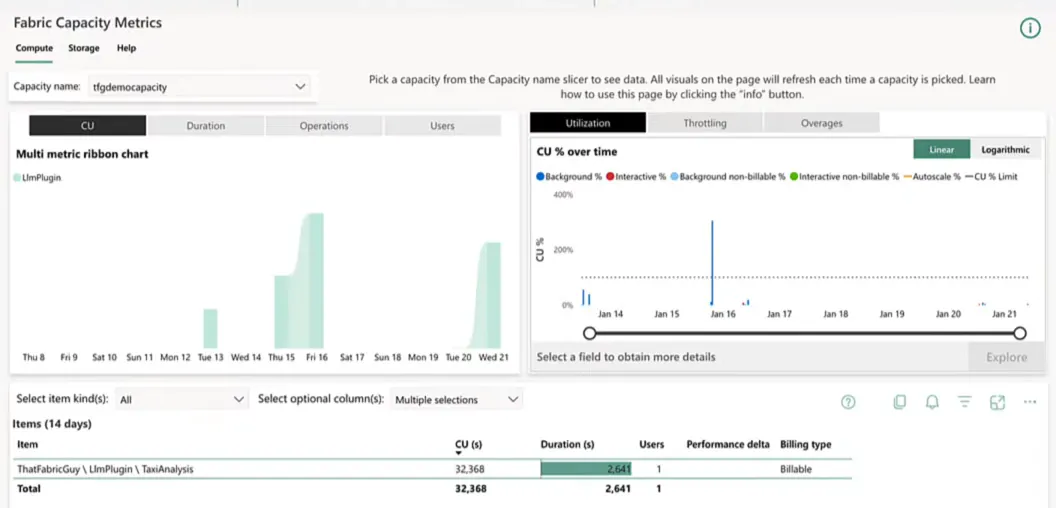
Over the past two weeks, all the data agent work for my recent videos added up to 32,368 CU seconds. One capacity unit gives you 86,400 CU seconds per day, one for every second in the day, so two weeks of building, optimising and testing data agents cost less than half a day’s worth of a single capacity unit. That’s a small amount, but then again, I haven’t been chatting with it all day.
Ten minutes of chatting
Hovering over today in the ribbon chart (Wednesday 21 January, the day I recorded this) shows almost 10,000 CU seconds, 9,702 to be precise. That doesn’t sound like a lot, until you remember it took about 10 minutes.
Round it to 1,000 CU seconds per minute of talking to the model and you can see how quickly you might burn through your compute allocation. Every capacity unit gives you 86,400 CU seconds per day, which works out to roughly an hour to an hour and a half of chatting with your data agent per capacity unit. And that is the LLM alone, before a single query has run against your semantic models or lakehouses.
What the queries add
To see the second part of the bill, remove the LlmPlugin filter and look at the same day for all items. I hadn’t run notebooks or processed anything else that day, so everything in this table is the LLM plus the queries it generated against my lakehouse and semantic models.
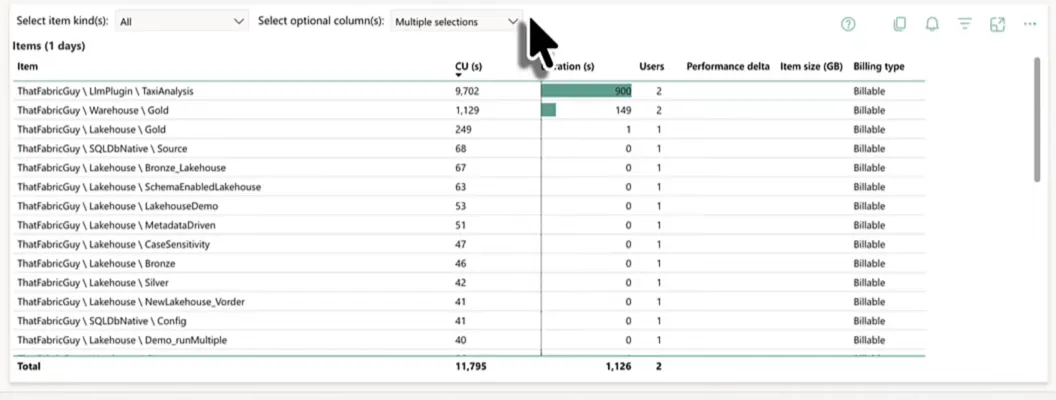
The total is 11,795 CU seconds, of which 9,702 is the LlmPlugin. So around 2,000 CU seconds went into actually answering my questions in those 10 to 15 minutes.
Most of that sits on Warehouse \ Gold. Funny thing is, I don’t have a warehouse called Gold; I have a lakehouse called Gold. Warehouse spend on a lakehouse is usually the SQL analytics endpoint at work, and here it is most definitely the data agent writing SQL queries against my lakehouse. Microsoft’s documentation agrees: if the agent generates a query for a data warehouse, its execution is billed through the SQL Query operation. The small numbers on the other items can just be metadata refreshes on those models.
A couple of thousand CU seconds for a few questions isn’t that much. If multiple people chat with your data all day, though, you can rack up quite some spend.
Semantic models are the cheap source
My agent also has a semantic model as a data source, Taxi_Data_Agent, built on an aggregated version of the taxi data. Scroll down the list and there it is.
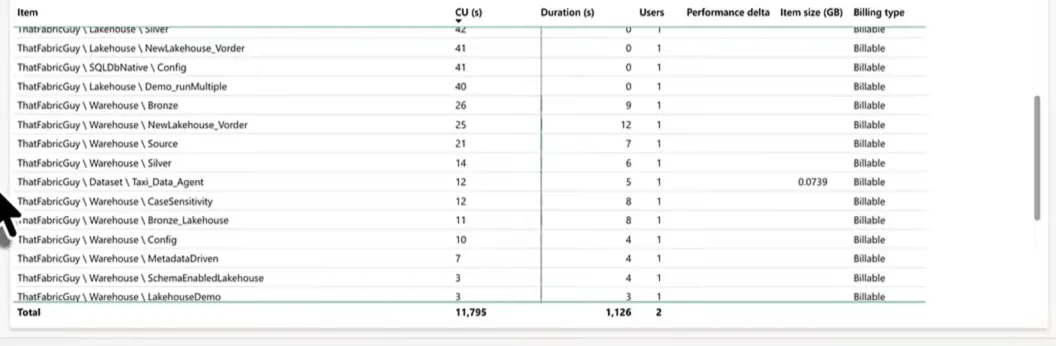
Twelve CU seconds, which is quite cheap. Querying a semantic model is so much more efficient than running SQL against a lakehouse, because you have aggregations, precomputed measures and relationships between tables. That makes the queries the agent generates that much more efficient and cheaper.
Spend-wise, a data agent should question your semantic models first and your lakehouses or warehouses second.
How token pricing works
The last piece is what Microsoft charges for the AI part. The Microsoft Learn page “Data agent in Fabric consumption” lists the consumption rate for the agent itself. That rate covers the AI queries against the Azure OpenAI models and leaves out the queries against your semantic models, warehouses and lakehouses.
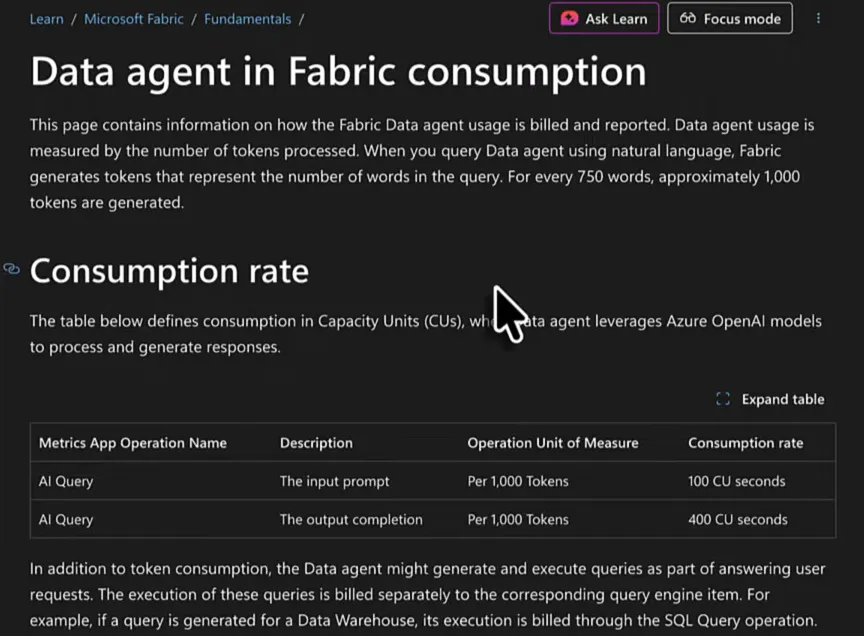
| Operation | What it is | Rate per 1,000 tokens |
|---|---|---|
| AI Query | The input prompt you write | 100 CU seconds |
| AI Query | The output completion you receive | 400 CU seconds |
A token is generally a part of a word. In English I reckon every two words use about three tokens, so 1,000 tokens is in the order of 600 to 700 words. Microsoft’s page puts it at approximately 1,000 tokens for every 750 words. Either way, 100 CU seconds for 600 to 750 words of input, and 400 CU seconds for the same amount of output, might not sound like a lot. Start typing a lot and getting long answers back, though, and it turns into quite an expensive bill.
The same page has a worked example: a request with 2,000 input tokens and 500 output tokens costs (2,000 × 100 + 500 × 400) / 1,000 = 400 CU seconds, or 6.67 CU minutes. The queries the agent generates come on top of that and are billed through their own operations.
In the Capacity Metrics app the token spend shows up under the operation name AI Query on the LlmPlugin item kind, which is what we filtered on earlier.
Keep the bill under control
My advice: be wary, because these are potentially expensive operations. You cannot just assume you’ll pay very little, because users will find ways to either break your best practices or chat a lot with your data agents.
Two things from my post on optimising data agents help here. Give the agent a semantic model on aggregated data and tell it to use that wherever it can, since that is by far the cheapest source. And keep the agent on topic: if your agent analyses taxi trips, you don’t want it handing out apple pie recipes on your capacity.
Then keep an eye on the Capacity Metrics app. Filter on the LlmPlugin for the model spend, and look at the items your agent queries for the rest. In my test the model was by far the biggest part of the bill, with the queries on top.
