
In this article 14 sections
- Why “dashboards are dead”
- What a Fabric data agent is
- Deterministic versus probabilistic answers
- Data sources and the five-source limit
- How a data agent answers a question
- What a data agent costs
- Security: row-level security, responsible AI and read-only access
- Prerequisites
- The demo agent: a semantic model and a lakehouse
- Ask a question and check the reasoning
- Charts in the chat
- Set up the agent properly
- Build an agent from scratch
- Validate before you trust
A dashboard answers the questions you thought of in advance. The moment a user has a new one, they’re back in your backlog. Fabric data agents let people ask whatever comes up next, in plain English, against the semantic models and lakehouses you already built. Whether you end up with a useful analysis tool or a very expensive chatbot depends a lot on how you set it up.
I start with a bit of theory: where dashboards fall short, how an agent turns a question into a query, what it costs, how security works and which prerequisites you need (one of them matters a lot in the EU). Then a demo on the New York City taxi data, because I always think demos are more interesting than slides. First an existing agent, then one I build from scratch.
Why “dashboards are dead”
You’ve all built dashboards. Power BI has been around for 10 or 11 years, and we had other tools before that. Dashboards are really good at answering questions, but they are questions we have to think of in advance: what is my user going to ask next week or next month, and can I answer that with the data on this report?
That limits what users can ask. A new question means “can you build a new dashboard?” or “can you add a page to this report?”. In larger organisations, with a data team that is too small and too many users asking questions, that turns into a multi-month backlog of Power BI to-dos.
Dashboards also take a lot of upfront effort: sitting with users, understanding requirements, finding the data in the warehouse or somewhere else. And they carry very little context. You can drill from a dashboard into report-level detail, but it is really hard to bring context about the business process into Power BI. Users struggle to pull in anything from just outside their own process, and that limits discovery.
For a repeatable process, though, dashboards are really good. If a report is looked at every week or month and answers the same questions every time: perfect. Power BI is the way to go.
What a Fabric data agent is
A data agent is an interface to consume your data, just like Power BI is. Instead of looking at charts and graphs, you talk to the data like you’d chat with a colleague in Teams. With SQL or DAX you need to know the data structure and the syntax, and join, filter and aggregate correctly. With an agent you ask a question in English and get an answer.
There is very little setup: once the data set and the semantic model are in place, you can create an agent in minutes. Getting that setup right still matters a lot, though, and much of this post is about it: security, data sources and instructions.
What I find a very strong argument for agents over dashboards is combining data. The agent can pull highly refined data from a semantic model, drop down to the underlying data lake when it needs more detail, and add general knowledge about things in the world that are not in your data lake at all.
Agents and dashboards are good at different jobs:
| Dashboard | Data agent | |
|---|---|---|
| Questions | Thought of in advance | Ad hoc, with follow-up questions |
| Answers | Deterministic: same input, same output | Probabilistic: can differ every time |
| Setup | Requirements, interviews, report design | Minutes once the data and model exist |
| Context | Hard to add beyond the report | Combines your data with general knowledge |
| Best for | Tracking the same numbers every week or month | Discovery and ad hoc analysis |
You’re all playing with Copilot, Claude and ChatGPT, so you know how to work with chatbots. Now you can do that with your own data, and get answers much faster. Maybe a colleague knows everything about some KPI, but you don’t want to take half an hour of their precious time if you can ask the agent.
Deterministic versus probabilistic answers
The big downside is that there is no deterministic repeatability. A DAX measure on a data set gives the same answer for the same input, every single time, so we can predict and validate it easily. AI is probabilistic: every time you ask, the answer might be slightly different. That’s fine for discovery and ad hoc follow-up questions. For a number you want to track every week, a data agent may not be the solution yet.
Then there are hallucinations. I have the feeling they occur less and less, but we’ve all seen AI confidently present a wrong answer, and only when you push back does it say “oh yes, sorry, my bad”. That happens with data agents as well. Fabric data agents use the OpenAI GPT-5 model family, the same models as ChatGPT, so the prompting tricks and the hallucinations you know from ChatGPT will probably show up here too.
Data sources and the five-source limit
A data agent can use lakehouses, warehouses, Power BI semantic models, KQL databases (for streaming analytics) and ontologies. I think SQL database in Fabric was added very recently as well, so there are probably more than these five types by now.
At any given time an agent can have five data sources active, in any mix: five lakehouses, or two semantic models and three warehouses.
How a data agent answers a question
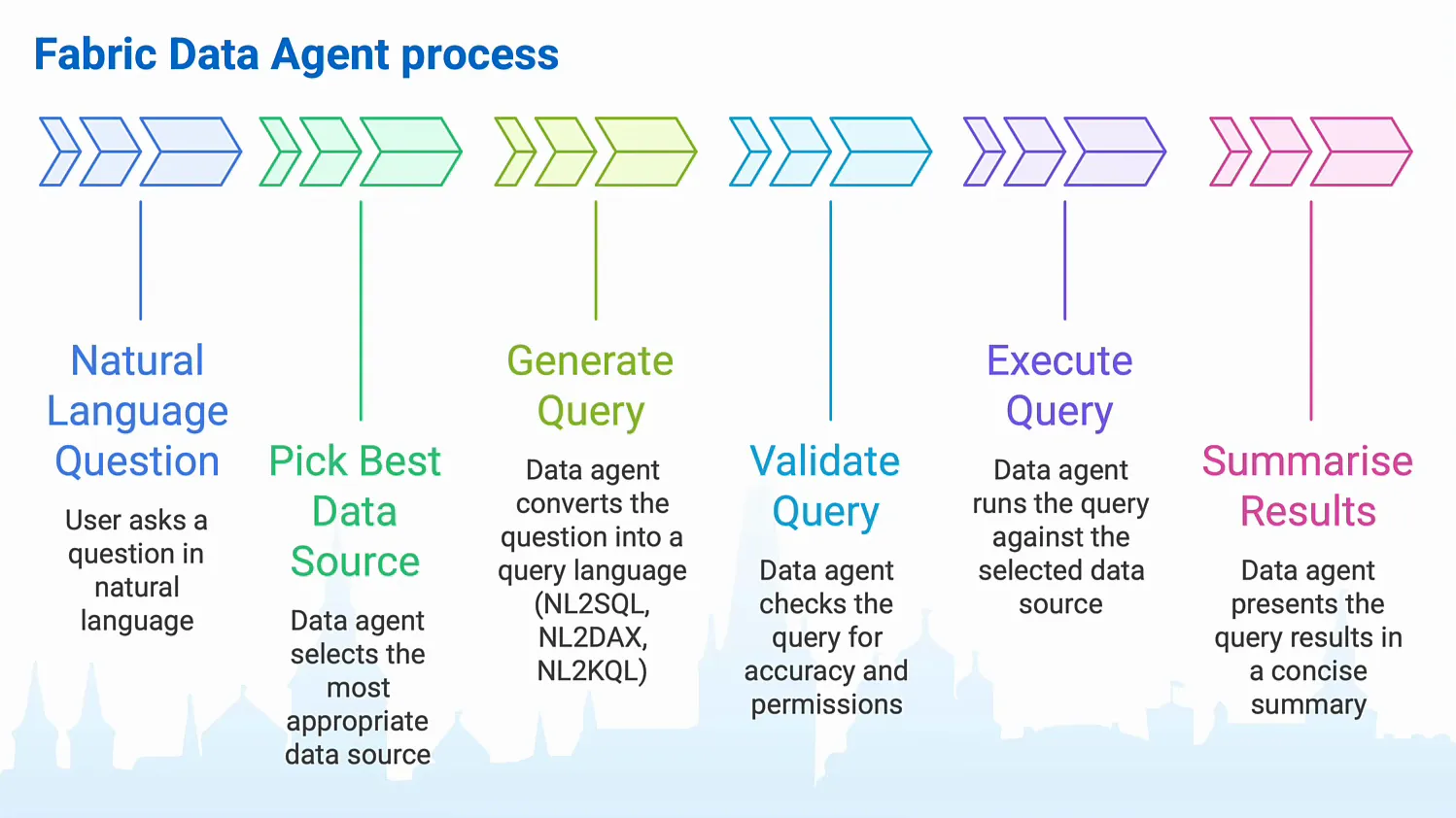
You ask a question in natural language, say “what was my revenue last week?”. Then the agent:
- Picks the best data source, based on the metadata of your sources and on the instructions and sample queries you gave it during setup. Those instructions and queries are the part you control, and the demo below shows how.
- Generates a query against that source: DAX for a semantic model, SQL for a warehouse or lakehouse, KQL for a KQL database.
- Validates the query for accuracy, permissions and validity.
- Executes the query and fetches the result set.
- Summarises the results in plain text or, and this is quite new, as a chart.
What a data agent costs
The round trip from English to a query and from the result set back to English is handled by the data agent, and you pay for it as capacity units on the agent item. Executing the generated query is billed to the underlying data source: when the agent reads from a lakehouse, the lakehouse consumes the CUs for fetching the data.
That means you have to think about the questions people will ask. One optimisation I like: a pre-aggregated, pre-filtered semantic model tailored to the common questions, with a lakehouse or warehouse below it that holds all the data in scope. Then tell the agent to prefer the semantic model as much as possible, because that is way cheaper than querying the very detailed lakehouse. I dig into the numbers in How Much Do Microsoft Fabric Data Agents Cost?.
Security: row-level security, responsible AI and read-only access
With AI you need checks and balances, and the first one is user access. If the agent reads from a Power BI semantic model with row-level security (or object-level security), it respects that, so you and I can chat with the same agent and see different results. I believe this also works for OneLake security row-level security on the Delta tables in your lakehouses, but I haven’t tested that recently.
Then there are the responsible AI checks. These come less from the Fabric team and more from the model makers at OpenAI: automated decision-making, criminal activity and so on are not allowed. Ask it how to build a bomb and, just like Copilot, ChatGPT and Claude, it won’t help you.
The third one usually gets skipped, but it is quite important: the connection from the agent to the data source is read-only. Even if the agent hallucinated an update script in SQL, it could not change any data, and no user can change data through clever prompting. That makes us all sleep better at night.
Prerequisites
A paid Fabric capacity. The smallest one works: you can use data agents on an F2, you don’t need an F64 or anything like that. My demo capacity is an F2, because I don’t like paying a lot of money for demos. A Fabric trial capacity does not work. When we asked Microsoft about this, their answer was that they simply don’t have the GPUs lying around to give away AI for free. With the demand for GPU power in Azure data centres, that makes sense, I guess.
XMLA enabled, if you use semantic models as a source, because the agent talks to semantic models through XMLA.
Cross-geo AI processing, a setting in your Fabric or Power BI tenant settings. Microsoft tries to process your data in the region where it lives, but because of constraints on compute power it can relay your question to an AI component in a different region.
The demo agent: a semantic model and a lakehouse
For the demo I use the New York City Taxi and Limousine Commission (TLC) data set: a large, open data set that grows every month and is somewhere between 4.5 and 5 billion rows these days.
My existing agent, TaxiAnalysis, has three tabs in the explorer: Data, Setup and Tools. Under Data are its two sources.
The semantic model, Taxi_Data_Agent, has four tables, all exposed to the agent. You can untick a table to keep it in the model but hide it from the agent. Its measures (number of trips, number of passengers, average trip distance, average passenger count, total trip distance) can be analysed by taxi type, pickup location and date. It’s an aggregated model, by pickup location, taxi type and day.
The lakehouse, Gold, is my demo lakehouse with a lot of crappy table names. Only the tables I tick are used by the agent. The important one is the fact table with one row per taxi trip from 2009 up until 2024, 4 billion rows, with dimensions for dates, times, pickup locations, drop-off locations and taxi types.
Ask a question and check the reasoning
My question: “What are the top 5 locations in Manhattan that originate taxi trips to Brooklyn in 2022?”
The agent rephrased it as “Find the top 5 pickup locations in Manhattan from which taxi trips went to Brooklyn during 2022. List pickup zone names, with the total number of such trips.” and went to the lakehouse instead of the semantic model. That’s the right call, because the semantic model only knows where a trip started. To filter on the destination it had to fall back to the 4 billion row fact table. 27 seconds later:
| Pickup zone | Trips |
|---|---|
| Lower East Side | 586,400 |
| East Village | 539,070 |
| TriBeCa/Civic Center | 376,371 |
| Little Italy/NoLiTa | 309,558 |
| West Village | 282,296 |
To understand why you got an answer, open the reasoning step under the response.
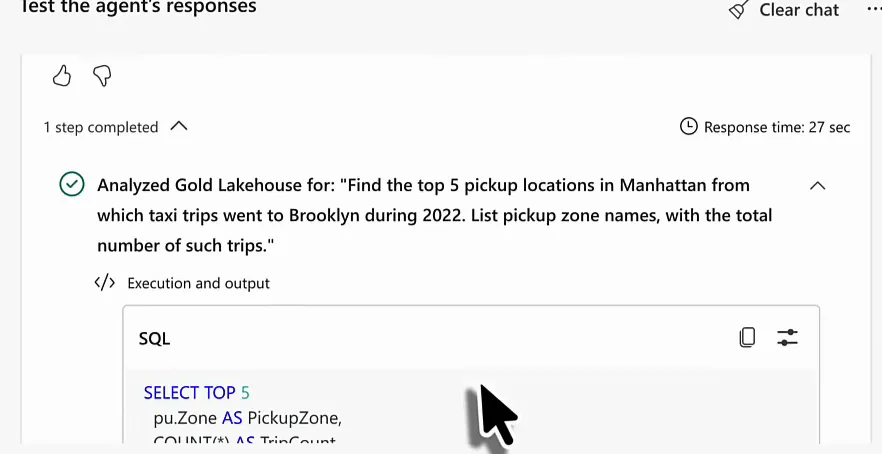
This is the query it ran against the SQL analytics endpoint of the lakehouse:
select top 5
  pu.Zone as PickupZone,
  count(*) as TripCount
from Gold.dbo.gold_facttaxidata_partitionyearmonthtaxitype f
join Gold.dbo.gold_dimdates d
  on f.PickupDate = d.Date
join Gold.dbo.gold_dimlocations_pu pu
  on f.PickupLocationId = pu.LocationID
join Gold.dbo.gold_dimlocations_do do
  on f.DropoffLocationId = do.LocationID
where d.CalendarYear = 2022
  and pu.Borough = 'Manhattan'
  and do.Borough = 'Brooklyn'
group by pu.Zone
order by TripCount desc
It joins to the date dimension to filter on calendar year, and to the pickup and drop-off locations to filter on borough. I never told it to filter on borough. It worked that out because it knows Manhattan and Brooklyn are boroughs of New York, and it saw columns called Borough in these tables. That was all quite good.
Charts in the chat
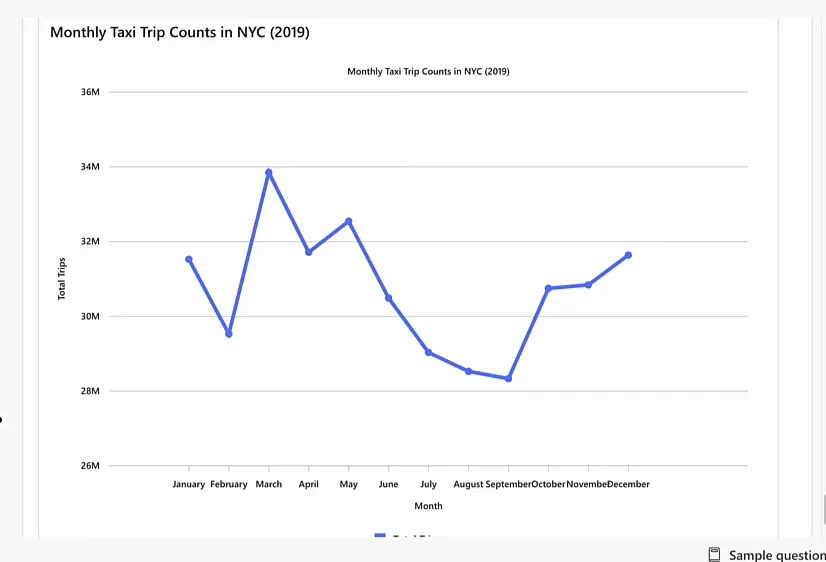
Data agents can now generate visualisations. I asked for a trend line of trip counts in New York in 2019, by day. The agent went to the semantic model and wrote a DAX query for the trips per day, but instead of a chart I got a description of the trend and a remark that a full-year chart by day would be densely packed. That should be 365 records, which is not too bad. Anyway, you just keep chatting, so I asked for a line chart by month.
Set up the agent properly
You add sources with Add data (any source you have access to in your tenant), select which tables the agent may see, and go to Setup. There you find agent instructions for the whole agent and, per lakehouse or warehouse, data source instructions and example queries. Semantic models don’t get the last two.
Spinning up an agent is super easy, but it is worth spending an hour or two on these settings. The more context and the more specific you are, the better the results. I go deeper into each of them in How to Optimise Microsoft Fabric Data Agents.
Agent instructions
The agent instructions tell the agent how to behave. Microsoft’s documentation suggests sections for the objective, data sources, terminology, response guidelines and so on. Two parts of mine for TaxiAnalysis:
- Data sources: “Use ‘Taxi_Data_Agent’ semantic model for all questions that can be answered using aggregate level data on pickup date, taxi type, and pickup location. […] For other questions, that cannot be answered using this granularity, or these measures, please refer to the lakehouse ‘Gold’.”
- Response guidelines: “Model should give context with the numbers. […] Only respond to questions about taxi trips, data analysis, and such. Do not steer of topic. Tell the user it is too expensive to use Fabric Data Agents for other things than data analysis.”
The off-topic rule is one I always put in: only respond to questions about whatever the agent is for. This is a GPT-5 model and it will happily write you a rap song about apple pie recipes, because ChatGPT will. A Fabric data agent is no different, except that it burns very expensive Fabric capacity doing it.
Data source instructions
For my Gold lakehouse, the data source description says:
The lakehouse ‘Gold’ contains granular and high volume data on taxi trips in New York City between 2009 and 2024. The lakehouse has data on individual trip records, use it to answer questions on taxi trips, dates, times, pickup and dropoff locations.
The date range is there for a reason. Ask about taxi trips in 2025 and the agent should tell you straight away that it doesn’t have that data, instead of generating a query (spending tokens), running it against the lakehouse (spending CUs) and only then reporting no results.
The data source instructions go a level deeper. I put in table descriptions, especially to explain abbreviations like PU and DO for pickup and drop-off, plus how the tables relate.
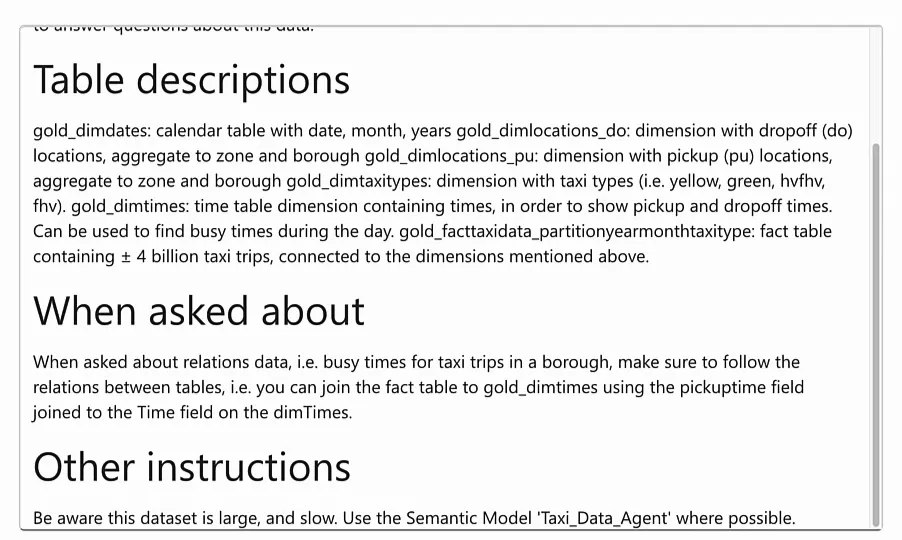
For cost, the last line is the important one: “Be aware this dataset is large, and slow. Use the Semantic Model ‘Taxi_Data_Agent’ where possible.” The agent uses it when it decides which source to query, and falls back to the lakehouse only when the semantic model can’t answer.
Example queries
When the agent does go to the lakehouse, I want it to write really good SQL. You get that by giving it pairs of an English question and the SQL that answers it.
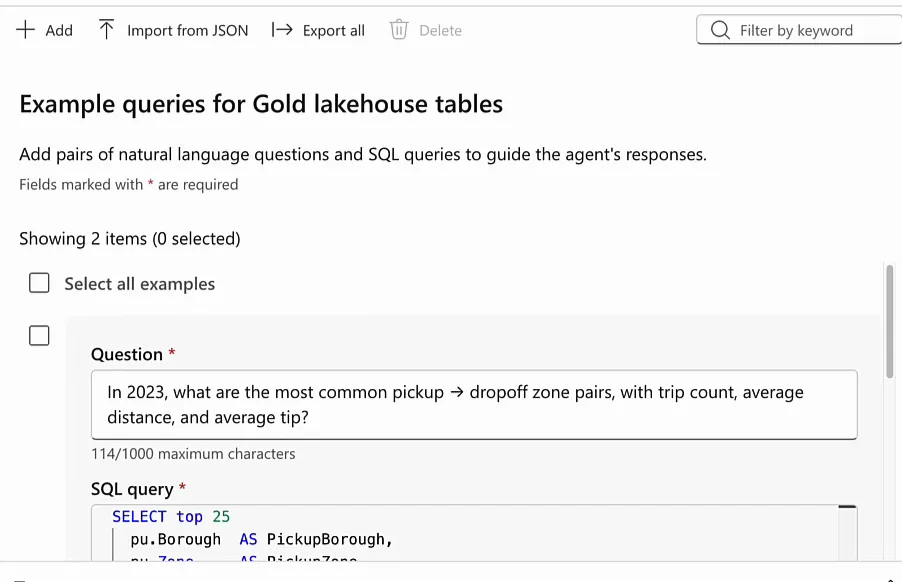
I added two. The first asks for the most common pickup and drop-off zone pairs in 2023 with trip count, average distance and average tip. The second is more complex: for 2024, find the zone pairs where riders tip unusually high compared to what you’d expect for that trip distance, and show the top 10 biggest positive “tip surprise” pairs.
with pair_stats as (
  select
    pu.Borough as PickupBorough,
    pu.Zone as PickupZone,
    do.Borough as DropoffBorough,
    do.Zone as DropoffZone,
    count(*) as TripCount,
    avg(f.TripDistance) as AvgTripDistance,
    avg(f.TipAmount) as AvgTipAmount
  from Gold.dbo.gold_facttaxidata_partitionyearmonthtaxitype f
  join Gold.dbo.gold_dimdates d
    on f.PickupDate = d.Date
  join Gold.dbo.gold_dimlocations_pu pu
    on f.PickupLocationId = pu.LocationID
  join Gold.dbo.gold_dimlocations_do do
    on f.DropoffLocationId = do.LocationID
  where d.CalendarYear = 2024
    and f.TripDistance is not null
    and f.TripDistance > 0
    and f.TipAmount is not null
  group by pu.Borough, pu.Zone, do.Borough, do.Zone
),
overall_model as (
  -- very simple "expected tip" model: overall average tip-per-mile in 2024
  select
    sum(f.TipAmount) / nullif(sum(f.TripDistance), 0) as TipPerMile_2024
  from Gold.dbo.gold_facttaxidata_partitionyearmonthtaxitype f
  join Gold.dbo.gold_dimdates d
    on f.PickupDate = d.Date
  where d.CalendarYear = 2024
    and f.TripDistance is not null
    and f.TripDistance > 0
    and f.TipAmount is not null
)
select top 10
  ps.PickupBorough, ps.PickupZone,
  ps.DropoffBorough, ps.DropoffZone,
  ps.TripCount,
  ps.AvgTripDistance,
  ps.AvgTipAmount,
  (om.TipPerMile_2024 * ps.AvgTripDistance) as ExpectedAvgTipAmount,
  (ps.AvgTipAmount - (om.TipPerMile_2024 * ps.AvgTripDistance)) as TipSurprise
from pair_stats ps
cross join overall_model om
where ps.TripCount >= 500  -- avoid tiny-sample weirdness
order by TipSurprise desc;
A query like this carries a lot of context about the shape of your data. The model links the data points in your question to the SQL in the examples, and learns:
- which joins it can make between the tables, also for other questions;
- that “in 2024” means the calendar year in the date dimension;
- that the tip amount should not be empty when you look at tips;
- that the trip distance must be larger than zero, because this data set has data quality issues with negative trip distances.
To test your changes, hit Clear chat and ask again. The Tools tab is new: you can add Fabric user data functions there. I haven’t worked with those yet.
Build an agent from scratch
New item, Data agent, name it, and you have an empty agent. I added the Taxi_Data_Agent semantic model with all four tables, and the Gold lakehouse with the date, location, taxi type and time dimensions and the fact table. Watch out if you have two lakehouses with the same name; I do.
First a test question: “What is the year with the most trip distance covered?” With empty instructions and no example queries, it went to the semantic model and answered 2014, with about 2.26 billion miles. Really good for zero setup.
Then: “Now give me a rap song about taxis in the style of Snoop Dogg.” With no instructions I expected it would, and it did, signing off with “Fo’ shizzle, buckle up.” That always gets a big laugh in groups, but it shows that you’re chatting with a very generic GPT-5 model. This is plain old GPT without any special tuning for data analysis, and like ChatGPT it answers questions about anything. Meanwhile I’m paying Fabric capacity for every token of that rap.
So I added one line to the agent instructions:
Use this to analyse taxi trips, do not go off topic. If the user wants to go off topic, tell it to use ChatGPT, or worse, Copilot.Then I asked for an apple pie recipe.
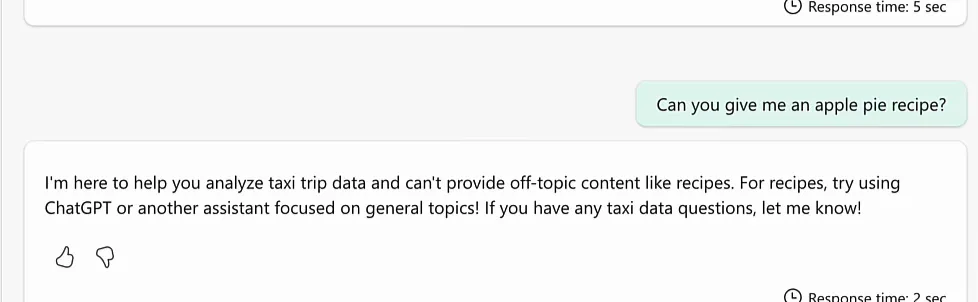
It politely skipped my Copilot comment, but it pointed me to ChatGPT or another general assistant. So with just one line of agent instructions, you have a guardrail against misuse.
In a demo this is all fun. If you deploy an agent to a company with a thousand users or more, you have to be very specific. You skip the user interviews and the report design, but you still have to decide what you want the agent to do and what you don’t. “Don’t go off topic” is a hard line. The more nuanced instructions are the ones in TaxiAnalysis: use the semantic model unless it can’t answer; this is what it contains, at this aggregation level; only go to the lakehouse for a more detailed grain or metrics the model doesn’t have; and here are some example queries. That gives you an agent that is cheaper to run and gives better answers.
Validate before you trust
Data agents are great for data discovery. If you don’t know yet what you want to know, you could open SQL Server Management Studio and start querying, or put data on a Power BI canvas. Or you ask a question, get an answer and ask a follow-up. That last one is something I like to do a lot.
But validate the responses. Open the reasoning step and check which queries the agent generates. When you spot mistakes, go back into your instructions, and for lakehouses and warehouses especially into your example queries. That is how you get a high-accuracy agent.
The AI can and will hallucinate from time to time. Do not trust it blindly.
I guess the same goes for Power BI reports. Power BI developers hallucinate from time to time as well: filters that don’t work, DAX measures with edge cases that don’t behave as expected. We shouldn’t trust those blindly either, but at least they are deterministic. AI is probabilistic, so we can’t just trust it blindly.
