
In this article 8 sections
To test a data platform properly you need a test environment with data in it. I wanted a Moneybird sandbox full of believable Dutch contacts, products and invoices, so I built a seeder with Claude. It is one parameterised notebook in Microsoft Fabric that writes dummy data into the API and stays within the rate limit while it does so.
You can do the same with any bookkeeping service or CRM, as long as it has an API you can write to and a test environment you are allowed to fill.
Why seed a sandbox at all
I use Moneybird as the bookkeeping software for my Dutch company, and it has a great API. You can extract data out of it and you can write data into it, which is amazing. You can also create a sandbox administration, a fake administration for testing. That lets me test the API from a data platform perspective without touching my real books.
The catch is that there is very little data in a sandbox. I wanted something better, so I set out to seed it from a PySpark notebook in Fabric.
Let Claude design the seeding strategy
I started by pointing Claude at the Moneybird API documentation and asking for a plan before any code:
Given this documentation: https://developer.moneybird.com/introduction Can we come up with a strategy AND implementation (using Python) to populate a Moneybird test account/administration with a lot of dummy/test data?
The strategy it came back with is fine. It read the documentation, found the entities we can create and understood that they depend on each other. First fetch the tax rates and ledger accounts that already exist in a sandbox, then create contacts and products, and only then the transactional data such as sales invoices. It also spotted the limit that the rest of the design has to work around: the API allows 150 requests per 5 minutes.
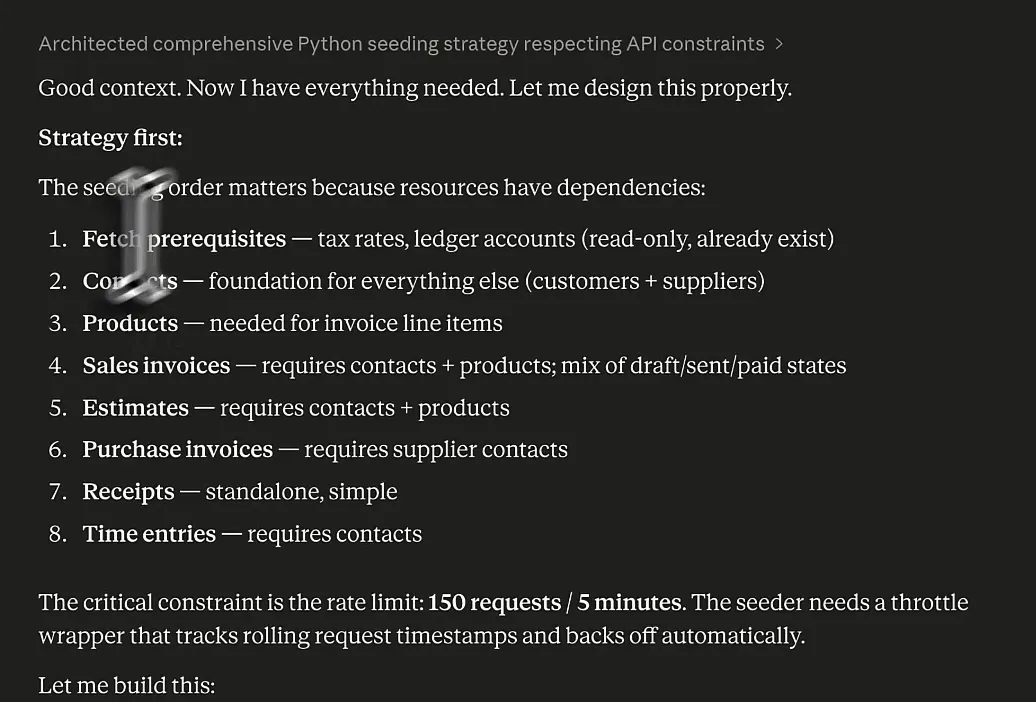
In the end we scrapped a lot of those requirements, but at least it came up with most of what the seeder needed to do.
The first version was a seeder.py with a README and a requirements file, meant to run on your own machine. I told Claude I wanted to run it from a notebook in Microsoft Fabric, with parameters so I can drive more or less volume and set the date range the transactions fall in. Along the way it did the maths on volume. A paid sales invoice costs three API calls (create, send and register the payment), so 1,000 invoices is about 3,000 calls and 100 minutes, and 10,000 invoices is roughly 17 hours.
After that I was vibing with Claude for quite a while. At one point it proposed a Data Factory pipeline with an orchestrator notebook and parallel invoice workers. What I kept is a single notebook, moneybird_seeder_final, that I can run on its own.
Getting the notebook into Fabric
Then I ran into issues. Claude did not really understand all the metadata that goes into a Fabric notebook. I think it was working from regular Jupyter notebook definitions, and Fabric needs a bit of extra metadata. One round of fixes was about the kernel and language settings, and another was about cell IDs after the import came back with a 400.
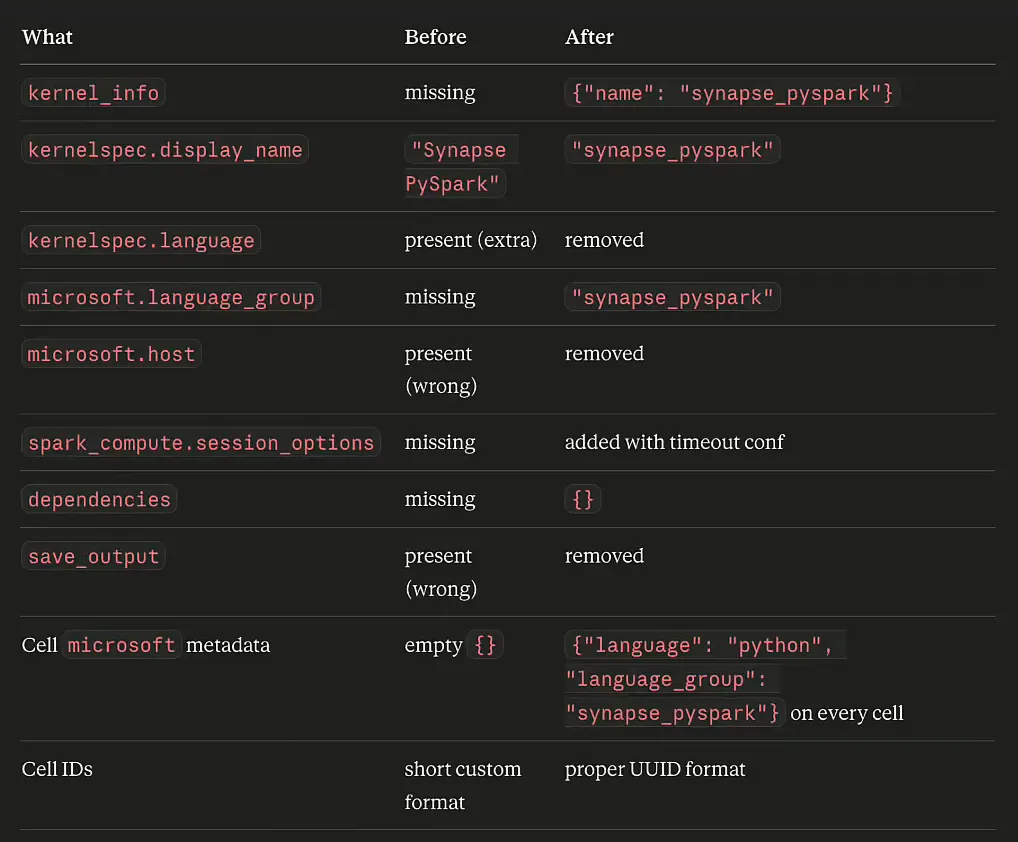
I was talking to Claude Sonnet here, and I wanted Opus, their stronger model, to work through the remaining issues. Switching model started a new chat, which is a bit unfortunate. So I gave the new chat two files, the notebook Claude had generated and a notebook I created in the Fabric UI as a reference, and asked what was wrong with the seeder.
With a working example next to the broken one, it found the difference quickly. The Fabric notebook stores each cell’s source as an array of strings:
"source": ["# Parameter cell\n","x = 1"]The seeder had it as one string:
"source": "# Moneybird Sandbox Seeder\n\nPopulates a Moneybird sandbox..."According to Claude, the Jupyter spec allows both, but Fabric’s importer is stricter. Giving it the reference notebook worked quite well, so if you let an LLM write notebooks for Fabric, give it a notebook from Fabric to compare against.
Once it imported, I tested whether the notebook actually worked, and there were a few errors. Claude had added an is_supplier field to the contacts, but that field is not in the API, so Moneybird answered with 422 Client Error: Unprocessable Content. In Moneybird any contact can be used as a customer and as a supplier. After going back and forth through all those errors, Claude gave me a working solution.
Before you run it
The notebook opens with a short checklist:
- Create a sandbox.
- Create a personal API token at
moneybird.com/user/applications/newand enable the scopessales_invoices,documents,estimates,bank,time_entriesandsettings. - Find your administration ID: the long number in the URL when you are inside the administration.
- Fill in the parameters cell and hit Run all.
The parameters cell drives everything. This is how I set it for the demo, with the placeholders where my sandbox token and ID go:
# ── CONNECTION ──────────────────────────────────────────────
API_TOKEN         = "YOUR_API_TOKEN_HERE"
ADMINISTRATION_ID = "YOUR_ADMINISTRATION_ID_HERE"

# ── DATE RANGE ──────────────────────────────────────────────
# All transactions will be dated randomly within this window.
DATE_START = "2025-01-01"
DATE_END   = "2025-12-31"

# ── VOLUME ──────────────────────────────────────────────────
N_CONTACTS          = 50    # Customer contacts  (suppliers ≈ N // 5, created automatically)
N_PRODUCTS          = 20    # Product catalogue entries
N_SALES_INVOICES    = 120   # See throughput table above - this is the main cost driver
N_ESTIMATES         = 10    # Offertes / quotes
N_PURCHASE_INVOICES = 15    # Inkoopfacturen
N_RECEIPTS          = 10    # Bonnetjes
N_TIME_ENTRIES      = 5     # Urenregistraties

# ── INVOICE STATE MIX ───────────────────────────────────────
# Controls the percentage of sales invoices that are sent / paid.
# paid + sent + draft must implicitly equal 100 % - the remainder becomes draft.
# Lower these numbers to trade realism for speed (draft = 1 API call, paid = 3).
INVOICE_PAID_PCT = 60   # % of invoices that are fully paid     (3 API calls each)
INVOICE_SENT_PCT = 25   # % of invoices that are sent but unpaid (2 API calls each)
                        # remaining % will be left as draft      (1 API call each)

# ── BEHAVIOUR ───────────────────────────────────────────────
DRY_RUN = False  # True → preview payloads, no API calls
The invoice state mix is where you trade realism for speed. A draft invoice is one call and a paid one is three, and with 150 calls per 5 minutes that adds up quickly. The notebook includes a table of what that means per hour:
| Invoice state mix | Calls per invoice | Invoices per hour | 8-hour run |
|---|---|---|---|
| 0% paid, 0% sent (all draft) | 1 | ~1,800 | ~14,400 |
| 0% paid, 50% sent | 1.5 | ~1,200 | ~9,600 |
| 60% paid, 25% sent (default) | 2.2 | ~820 | ~6,500 |
| 100% paid | 3 | ~600 | ~4,800 |
The notebook’s own conclusion is that the practical ceiling is about 5,000 to 15,000 invoices, depending on the state mix. That is as far as you get when you generate test data through an API.
Inside the seeder
After a cell with %pip install faker requests --quiet, the notebook sets up logging and Faker with a Dutch locale. Faker gets seeded with 42, of course:
fake = Faker("nl_NL")
Faker.seed(42)
random.seed(42)
Then come the guard rails. They check that the token and administration ID are filled in, that the start date is before the end date and that the paid and sent percentages do not add up to more than 100. After that the notebook estimates the cost up front: how many API calls the run needs, and how many hours and minutes it should take at 30 requests per minute.
Next is the MoneybirdClient class, the piece of code Claude wrote to talk to the API. I am not going to explain all of it. Even I do not understand everything that is going on here.
This is vibe coding to the max. I can read the code and explain what it does, and it works. Trying to write this myself was not going to work.
I know a lot about setting up data platforms. This goes more into object-oriented programming, which is not really something I am an expert in, so vibe coding it with Claude was really good. I come back to the rate limiting, the part of the client that matters most, further down.
The realism comes from the locale data: Dutch cities, company suffixes, product names such as “Consultancy (dag)” and “Data-analyse”, expense descriptions and project names. I am not quite sure why “B.V.” (besloten vennootschap, the Dutch limited company) is in the suffix list three times. The project names are all related to data platforms and Power BI (“Data Platform Implementatie”, “BI Migratie”, “Power BI Rollout”), so that sounds good. The generators then use Faker for first and last names, street addresses, postcodes, phone numbers and chamber of commerce numbers.
Last is the Seeder class. It looks up which ledger accounts and tax rates exist, then creates contacts, suppliers, products and sales invoices. I disabled estimates, purchase invoices, receipts and time entries by commenting out those lines, and in this version every sales invoice is created as a draft.
Running it
Before running it, I checked the sandbox. I had already seeded invoices for 2024, and the overview of the past year (2025, since it is 2026 now) said there were no invoices at all. That is what I wanted to see.
I set the date range to 2025 with 50 contacts, 20 products and 120 sales invoices, and pressed Run all. The run plan estimated 417 API calls and 14 minutes. That estimate still counts the work I disabled, so in practice it runs much faster. The log shows each step:
13:45:06  Starting seeder run …
13:45:06    Fetching tax rates …
13:45:06    Fetching ledger accounts …
13:45:06    Fetching user …
13:45:06  ▶ Contacts (50 customers + 10 suppliers)
13:45:20    ✓ contacts                50 customers, 10 suppliers
13:45:20  ▶ Products (20)
13:45:24    ✓ products                20
13:45:24  ▶ Sales invoices (120) - all as draft
13:45:33    … progress: 25/120
13:45:43    … progress: 50/120
13:45:46    ⏸  rate limit reached - sleeping 260s
13:50:09    … progress: 75/120
It reports progress every 25 invoices, which is nice, then hits the rate limit and sleeps for 260 seconds. The whole cell finished in 5 minutes and 21 seconds.
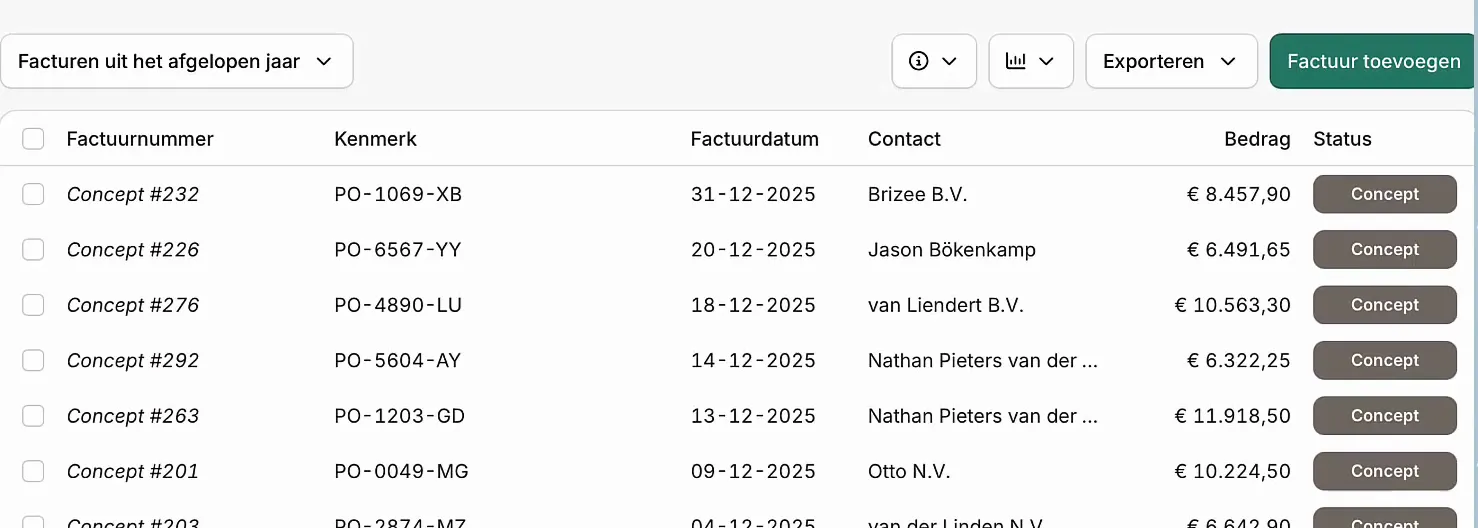
Back in Moneybird, after a refresh, the past year is full of invoices. There are a few pages of them, each with a reference, an invoice date and a due date, sent to several different customers. They show as “Concept”, Moneybird’s word for a draft.
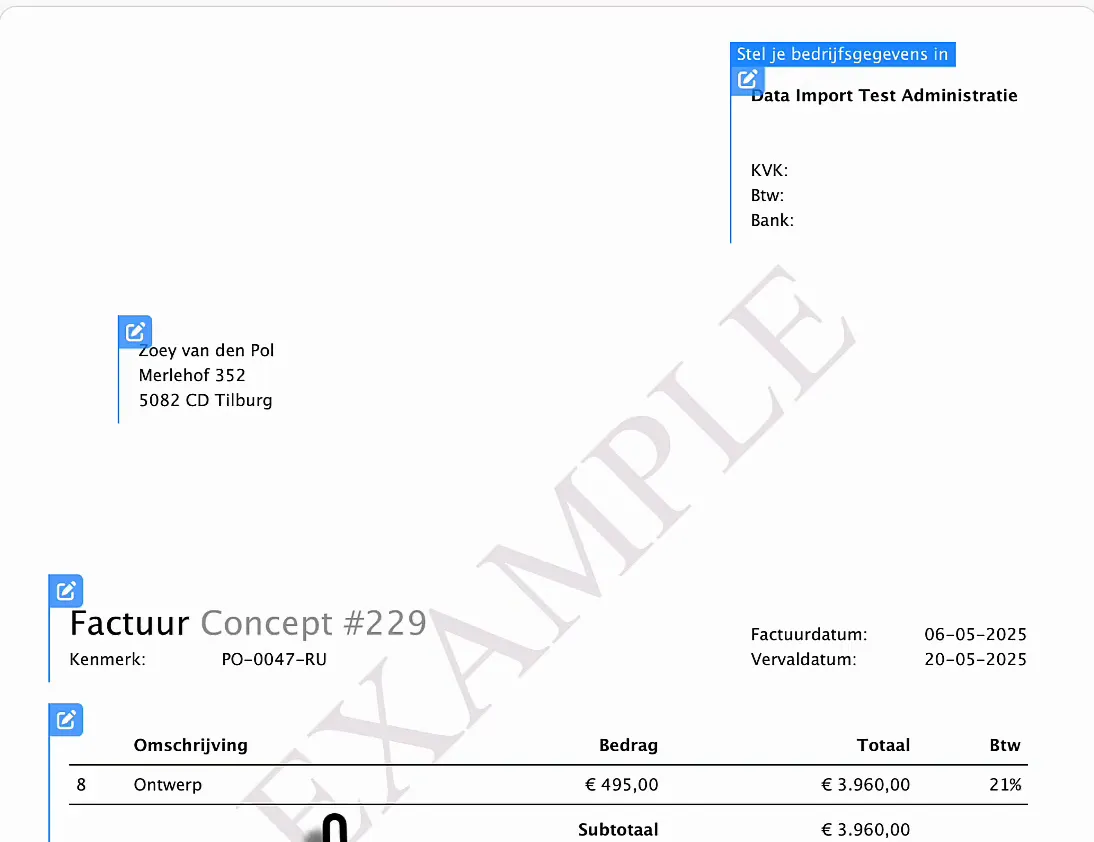
Open one and you see how it is built up. The first one I opened had four lines with different quantities, so the invoices really are randomised.
How the rate limiting works
The interesting part is that sleep. We know the API allows 150 calls per 300 seconds, so Claude built the client to throttle itself. It keeps the timestamps of the last 150 requests in a deque. Before every request it checks whether the oldest one is still inside the 5-minute window, and if so it sleeps for the rest of the window plus one second:
class MoneybirdClient:
    """
    Thin Moneybird v2 REST client with rolling-window rate limiting.
    """
    BASE_URL    = "https://moneybird.com/api/v2"
    RATE_LIMIT  = 150
    RATE_WINDOW = 300  # seconds (5 minutes)

    def __init__(self, token: str, admin_id: str, dry_run: bool = False):
        self.admin   = admin_id
        self.dry_run = dry_run
        self._calls  = 0
        self._ts     = deque(maxlen=self.RATE_LIMIT)
        self._sess   = requests.Session()
        self._sess.headers.update({
            "Authorization": f"Bearer {token}",
            "Content-Type": "application/json",
        })

    # ── Internal helpers ────────────────────────────────────

    def _throttle(self):
        now = time.monotonic()
        if len(self._ts) == self.RATE_LIMIT:
            elapsed = now - self._ts[0]
            if elapsed < self.RATE_WINDOW:
                wait = self.RATE_WINDOW - elapsed + 1
                log.warning(f"  ⏸ rate limit reached - sleeping {wait:.0f}s")
                time.sleep(wait)
        self._ts.append(time.monotonic())
        self._calls += 1
There is a second safety net. If the API still answers with status code 429, which means it is throttling your requests, the client reads the Retry-After header, sleeps that long and tries again, up to three attempts:
    def get(self, path: str, params: dict = None) -> list:
        if self.dry_run:
            return []
        for attempt in range(3):
            self._throttle()
            r = self._sess.get(self._url(path), params=params)
            if r.status_code == 429:
                retry_after = int(r.headers.get("Retry-After", 60))
                log.warning(f"  ⏸ 429 Too Many Requests - sleeping {retry_after}s")
                time.sleep(retry_after)
                continue
            r.raise_for_status()
            return r.json()
        r.raise_for_status()  # Final attempt failed
In this run the wait was 260 seconds out of the 300-second window. The first 40 seconds of the window had already gone by when the run hit the limit: it started at 13:45:06 and the sleep began at 13:45:46.
Seed any API you can test against
This is how you can vibe code anything you want to put into an API. If you have a test CRM or bookkeeping service with a fake administration you are allowed to fill, Python, Faker, a Microsoft Fabric notebook and Claude will help you seed it with data you can use for testing. Have the LLM read the API documentation and work out the order things get created in. Give it a real Fabric notebook as a reference, and make sure the client handles the rate limit for you.
Getting the data back out of Moneybird is the other half of the story. I compared how ChatGPT and Claude handle that in ChatGPT vs Claude for Microsoft Fabric notebooks. And if you want to see how far vibe coding gets you on a whole platform, read Vibe coding in Microsoft Fabric.
