
In this article 8 sections
Everybody on the internet has pitched ChatGPT against Claude by now. I wanted to know which one writes the better Microsoft Fabric notebook, so I gave both the same single prompt: build a secure, metadata-driven extract from a real API. Then I pasted their code into a notebook as is and pressed run.
The data comes from Moneybird, a Dutch accounting package with a good API. I follow the answer to that one prompt blindly, with no back and forth, and from that we can tell which LLM is better at writing a Fabric notebook in a single pass. Let’s see who walks out of the octagon.
The rules of the fight
Both LLMs got the same prompt and the most room I could give them to answer: ChatGPT in thinking mode (5.2 Thinking) and Claude on Opus (Opus 4.6, Extended). This is the prompt:
I am a data engineer working with Microsoft Fabric. My task is to extract data from
Moneybird, a Dutch accounting software. They have a good API for which the
documentation can be found at https://developer.moneybird.com/api

I want to setup an extract mechanism to get data out of Moneybird. It should run fully
in notebooks and follow principles of DRY, metadata driven orchestration, and the
solution should be secure.

Tell me exactly what to do. Begin with an explanation of your proposal, then give me
the code.

I will just copy/paste the code in a notebook to run it and see whether it works. You
will be scored on the completeness, ease of use, and the use of the principles laid
out above.
So the code has to be DRY, metadata driven and secure, and it gets scored on completeness and ease of use as well as on those principles.
On the Fabric side I created a new, empty lakehouse called Moneybird_AI_Test and attached a notebook with two cells, one for ChatGPT and one for Claude. Each answer goes into its cell as is, and I change two things by hand. The code cannot know the name of my Key Vault or my secret, so I fill those in. And I land the data in a schema or table prefix named after the LLM, depending on what each one suggests, so we know which data came from where.
I will not debug either. Fixing the generated code would turn the video into hours and hours, and the point is to see how far one prompt gets you.
ChatGPT answers first
The LLMs need a while, because this is not a simple task: they have to read the Moneybird documentation, work out the principles and give me something I can run. ChatGPT answered first, after thinking for 1 minute 14 seconds.
It opened with a blueprint for one Fabric notebook. The notebook reads the Moneybird token securely, discovers the administrations you have access to and runs a metadata-driven loop over the endpoints. It loads incrementally using Moneybird’s filter options where it can, handles pagination and throttling, and writes to Delta tables in the lakehouse with idempotent upserts, so a rerun does not duplicate data. It also listed the Moneybird facts it relied on: bearer token authentication, pagination with page and per_page plus a Link header, a 429 status code with Retry-After when you are rate limited, and an updated_after filter on contacts and sales invoices. A bearer token is secure enough for this.
The code is a set of Python functions: one parses the next link, one gets the JSON, and when the API answers with a 429 because we are doing too much at the same time, it waits and retries. On first look this is impressive stuff. Claude, meanwhile, was still “pivoting toward streamlined solution architecture”, so it was still architecting while ChatGPT was already programming.
The config section is where you fill in your details. Key Vault comes in through mssparkutils, with an environment variable as a fallback:
# Option A (recommended): use Azure Key Vault secret via mssparkutils
# You need a Key Vault linked to the Fabric workspace.
USE_KEYVAULT = True
KEYVAULT_NAME = "<your-keyvault-name>"      # e.g. "kv-fabric-prod"
SECRET_NAME   = "<your-secret-name>"        # e.g. "moneybird-api-token"

# Option B: fall back to environment variable (less ideal, but works)
ENV_VAR_NAME = "MONEYBIRD_TOKEN"

# Lakehouse target schema (Fabric usually uses "dbo" in Lakehouse SQL, but Spark writes just use table names)
BRONZE_DB = "bronze"
STATE_DB  = "bronze"  # keep state alongside bronze for simplicity
Everything else is metadata driven. The entities live in one list, and the comment above it says you add more by adding a dict, without writing new code:
ENTITY_CONFIG = [
    {
        "entity": "contacts",
        "path_template": "/{administration_id}/contacts/filter.json",
        "supports_incremental": True,
        "incremental_filter_key": "updated_after",  # ISO8601 UTC
        "table": "moneybird_contacts_bronze"
    },
    {
        "entity": "sales_invoices",
        "path_template": "/{administration_id}/sales_invoices.json",
        "supports_incremental": True,
        "incremental_filter_key": "updated_after",
        "table": "moneybird_sales_invoices_bronze"
    },
]
That gives you contacts and sales invoices, plus a few commented-out examples (ledger accounts, projects) to enable later, which is acceptable for a first pass. Then comes administration discovery, which asks Moneybird for every administration the token can see, and an orchestrator that logs when the run started and loops over each administration ID. It even keeps a watermark per entity for incremental runs. If all of this works, it will be quite amazing.
Running ChatGPT’s code
I pasted the code in, filled in my Key Vault name and mbsecret, the secret that holds my Moneybird API token, and changed BRONZE_DB and STATE_DB to chatgpt. I already thought the Key Vault name would not work and it would need the URI, but I entered the name as the code asked. The run failed on exactly that, with ChatGPT’s own error message: “Failed to read token from Key Vault via mssparkutils.credentials.getSecret(). Either fix Key Vault config or set USE_KEYVAULT=False and provide env var.”
I said I would not debug, but here I gave ChatGPT the benefit of the doubt, because this is an easy mistake to make. I worked with this Key Vault integration in my previous post on Key Vault in Fabric notebooks, and I saw then that the Microsoft documentation was not up to date: it refers to a Key Vault name, where the function actually expects the Key Vault URI. So I put the URI in the constant and ran it again.
KEYVAULT_NAME = "https://kimurakeyvaultdemo01.vault.azure.net/"The second run worked. It found one administration (my test one), fetched five contacts, set a watermark and found no sales invoices, because this demo administration has none. A chatgpt schema showed up in the lakehouse with two tables in it, so the one-prompt pass works, and that is really cool.
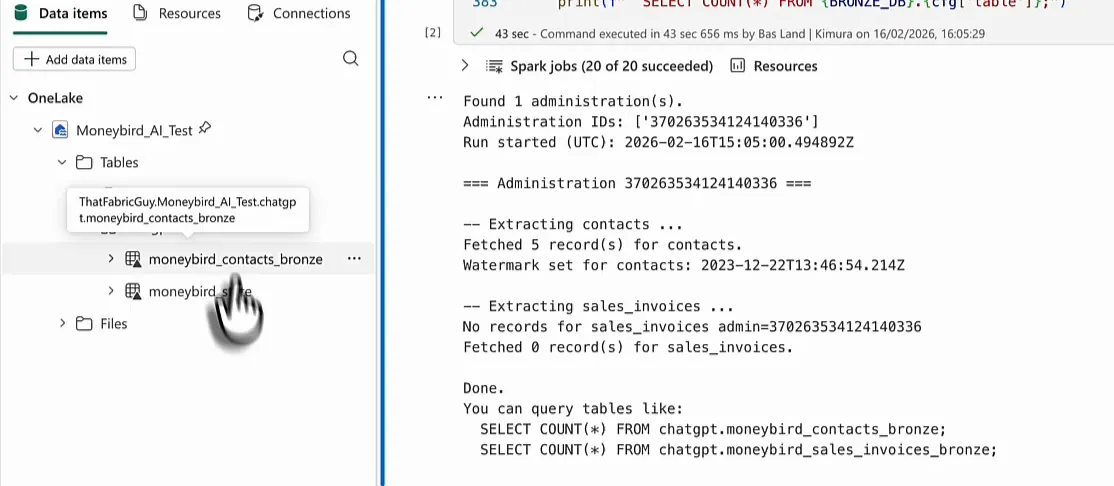
What ChatGPT’s tables look like
With the data in the lakehouse, we can query those tables:
select * from chatgpt.moneybird_contacts_bronze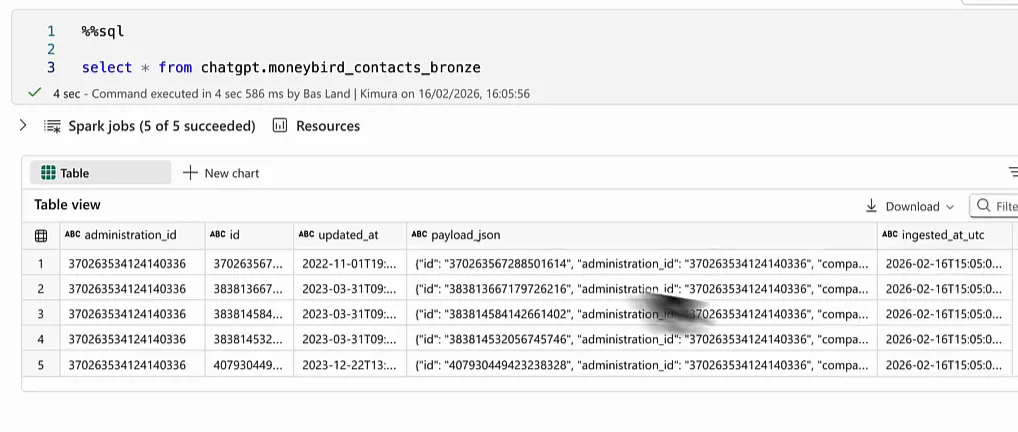
Five rows, one per contact. What it did not do is unpack the JSON. The actual contact information (company name, address and so on) sits in the payload_json column, so unpacking that document is the next step. It would have been extremely impressive if ChatGPT had figured out that the payload holds the real data. Then again, this was a one-prompt pass and I gave it no information about that.
The state table holds what makes incremental loading possible:
select * from chatgpt.moneybird_stateIt has one row with the administration, the entity contacts and a watermark_utc timestamp for the contacts we just extracted, which means we can do incremental refreshes. Overall I am quite happy with what ChatGPT gave me, and quite impressed.
Claude’s answer
Claude gives the full explanation first and then the file. It sums up its architecture in one sentence: a single metadata config table drives a generic API client and a generic Delta writer, with zero code per entity, all runnable in one Fabric notebook. Secrets come from Azure Key Vault through mssparkutils, and you only change the Key Vault name. That sounds like the same issue we just had with ChatGPT.
Each entity becomes a Delta table called moneybird_raw_<entity>. Claude tells you to split the file into seven notebook cells at each # CELL N comment. I did not bother and put it all in one cell. The header of the file lists the prerequisites and how it works:
# PREREQUISITES:
# 1. A Moneybird personal API token (create at https://moneybird.com/user/applications/new)
# 2. Your Moneybird Administration ID (visible in the URL when logged in)
# 3. An Azure Key Vault with two secrets stored:
#      - "MoneyBird-API-Token"          -> your bearer token
#      - "MoneyBird-Administration-ID"  -> your administration ID
# 4. A Fabric Lakehouse attached to this notebook (used as default lakehouse)
#
# HOW IT WORKS:
# - All entity definitions live in a single metadata config (ENTITY_CONFIG).
# - One generic function extracts ANY entity using that config -- no per-entity code.
# - Moneybird synchronization endpoints are used when available, enabling
#   efficient incremental/delta loads by comparing record versions.
# - For entities without sync support, standard paginated GET is used.
# - Results land as Delta tables in your lakehouse: moneybird_raw_<entity>.
The prerequisite list is complete, which is nice, but look at the second item. Claude wants you to supply the administration ID, where ChatGPT went and found out which administrations the token has access to. That is one plus for ChatGPT.
This is cell 1 as Claude delivered it:
KEY_VAULT_NAME = "kv-your-keyvault-name"  # <-- CHANGE THIS

API_TOKEN = mssparkutils.credentials.getSecret(KEY_VAULT_NAME, "MoneyBird-API-Token")
ADMINISTRATION_ID = mssparkutils.credentials.getSecret(KEY_VAULT_NAME, "MoneyBird-Administration-ID")

BASE_URL = f"https://moneybird.com/api/v2/{ADMINISTRATION_ID}"
LAKEHOUSE_TABLE_PREFIX = "moneybird_raw"
I put the Key Vault URI in straight away, since I assumed the name alone would fail. Claude has no way of knowing my administration ID, so I took it from the URL in Moneybird and hard-coded it. It is not in Key Vault, and that is fine for now. The table prefix became claude.
Then comes the part where Claude shines: it gives a solution for every endpoint in the Moneybird documentation. Where ChatGPT was a little better at finding the administrations, Claude is a little better at covering the API.
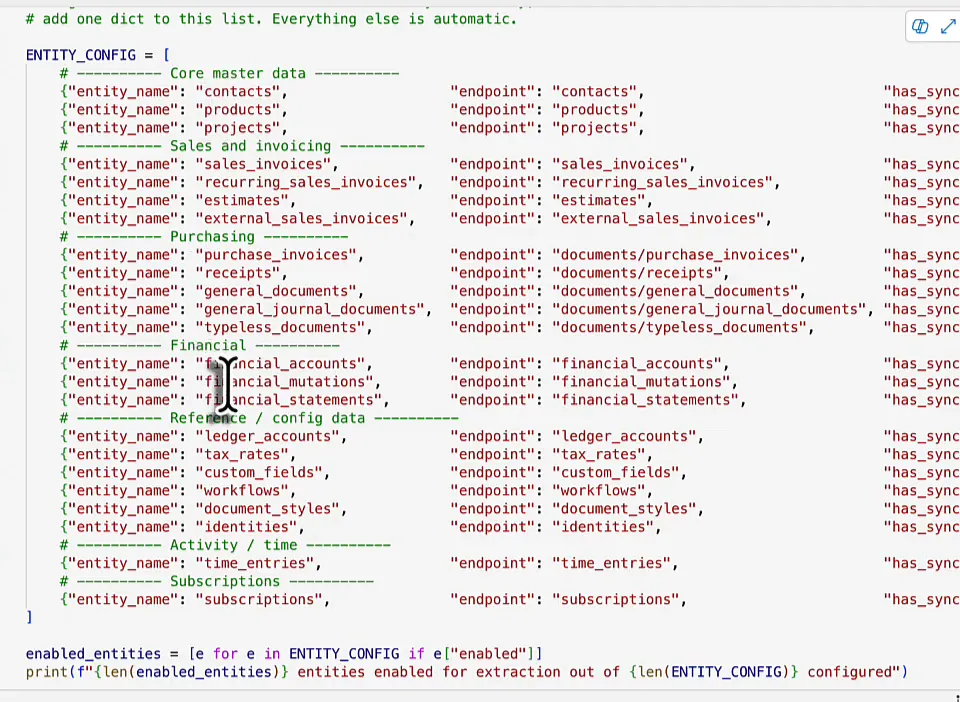
The rest reads well too. One generic MoneybirdClient class handles bearer authentication, retries when the API throttles, pagination as described in the documentation (ChatGPT read that part as well) and the synchronisation pattern. Records get flattened and written to the lakehouse with a Delta merge, and an orchestrator runs the extraction. This all looks quite cool.
Running Claude’s code
The first run failed with SecretNotFound: there was no secret called mbtoken in the Key Vault. That one is on me. I had renamed the token secret to mbtoken, but it is called mbsecret. My apologies, Claude.
The second run found a lot to do and ran into a lot of errors. For contacts it found five IDs through the synchronisation endpoint and five records, then failed with CANNOT_DETERMINE_TYPE because it could not determine some of the types after inferring them. The same happened to three sales invoices and one recurring sales invoice. Products, projects, ledger accounts, tax rates and external sales invoices failed with 404 Client Error: Not Found on their synchronisation URLs, and financial statements with a 405. A few more failed as well. Those client errors come from not reading the documentation properly. The ten entities that did come back OK were empty.
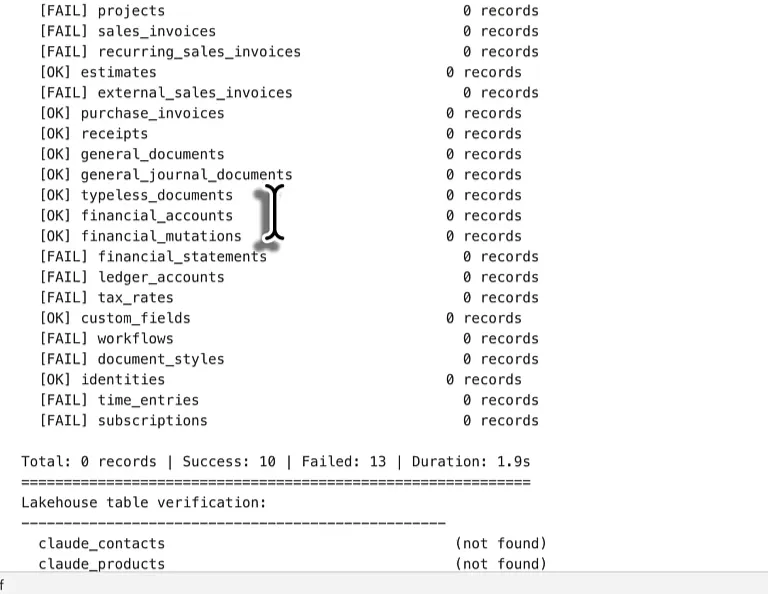
The summary says 0 records, 10 successes and 13 failures. More than half of the endpoints failed, and the lakehouse verification at the end found no claude_contacts table. That is strange, because contacts should have contained data, and there is nothing.
The verdict
| ChatGPT (5.2 Thinking) | Claude (Opus 4.6, Extended) | |
|---|---|---|
| Speed | First to answer, after 1 minute 14 seconds of thinking | Still designing while ChatGPT was writing code |
| Endpoints | Contacts and sales invoices, more as commented-out examples | All 23 entities in the documentation |
| Administration ID | Discovers the administrations the token can access | You supply it |
| Incremental loads | updated_after filter and a watermark table | Moneybird synchronization endpoints |
| What I changed | Key Vault URI | Key Vault URI, administration ID, plus my own wrong secret name |
| Result | Five contacts in bronze and a watermark | 0 records, 13 of 23 endpoints failed |
ChatGPT’s code worked in a single pass. It covered fewer endpoints, but the ones it had were extracted successfully. It should have unpacked the JSON payload, because the contact details inside it are the data set I am interested in, and the root of the JSON document is not. Apart from the outdated Key Vault documentation, I did not need to touch its code.
Claude took a lot longer to come up with a solution. The wait on its own is no problem, but if you code with an LLM all day, it adds up. I do realise I picked Opus, the largest and heaviest model, and ChatGPT on its research level would have taken a long time as well, so maybe that comparison is not entirely fair. Claude read the documentation and got all 23 entities right, which was perfect. But I asked it to extract data out of Moneybird, and I got zero data in my lakehouse.
I have to admit, I wanted Claude to win as the underdog, but ChatGPT was clearly the winner for today’s task.
One prompt is not how you would work
I have been working with ChatGPT for quite a few years now. People are very happy with Claude for coding, so I bought the Pro version to try it, and at the moment I pay for both. For writing I tend to use Claude more than ChatGPT, because it sounds more natural and more human, and less like AI. For a single pass at a Fabric notebook, though, ChatGPT impresses me more right now. The AI landscape changes really quickly, so that may not last.
In practice it will rarely be a single pass. You work step by step: you tell the AI to plan ahead and give you the solution in parts, and when a part fails, you give it the reason and go back and forth. Either of these two would probably end up with a working solution that way. This test was one prompt, head to head, and that one went to ChatGPT.
