
In this article 7 sections
The first version of my New York City taxi app in Fabric looked cool and was useless for analysis. The camera never stopped moving, so you lost your orientation, and with over a million 3D buildings on the map it stuttered as it flew. Two prompts to Claude Code fixed that. The drone flight became a static heat map with hover tooltips, then a tilted map of “skyscraper” columns, and the app shrank from 34 MB to 1.8 MB along the way.
If you haven’t read part one, start with building a Microsoft Fabric app with Rayfin and Claude Code. That’s where I set up the app, explain how Rayfin works and show how I prompt Claude Code from Visual Studio Code.
One prompt, five tasks
I thought a drone flight with the heat map changing underneath would be nice and cool, and it is nice to look at. But the buildings, each with its 3D shape and height, make the app heavy, and you’re too busy moving around to analyse anything. So I want to keep the data at the same granularity (pickups per taxi zone per month), but with New York on the screen as a map that stays where it is. My first prompt:
Change the map of New York City to a static map that we look down on, just like we do with all map applications.

Remove the 3D buildings, their references, imports, etc.

On the map, create a heat map that shows the number of taxi trips in that particular location, by changing the colour.

Keep repeating the same timeline for the monthly trip counts, and change the heatmap accordingly.

Allow the user to hover over locations with their mouse to see additional results, numbers, and otherwise a popup next to the mouse cursor with information on the Borough and Location name, the number of trips, and the average trip distance covered (this is a new calculation to take from the semantic model)
I want a clean code base, hence the line about references and imports.
I know that’s a rather big multi-step prompt. One task per prompt is usually easier and probably a bit more accurate, but we’re on Opus 5 now, and I think it’s smart enough to keep the context and work towards one end goal through several subtasks.
Claude checks the measure before using it
The average trip distance is the only new number in the prompt, and Claude didn’t take the semantic model at its word. It queried the model’s [Trip Distance] measure next to an explicit average and found that the measure adds the distances up: it returns 16.8 billion, identical to SUM(TripDistance). So despite the name, the measure can’t serve as a mean, and Claude computes AVERAGE(TaxiTrips[TripDistance]) itself. That gives 0.14 to 14.9 miles across zones, with a mean of 3.4. Sounds good. Dividing the total distance by the trip count would have done the trick too.
While it worked, the status line said “Vibing…”. Fair enough, we’re vibe coding anyway. This is the query it wrote for the map, one row per pickup zone per month from 2011 onwards:
EVALUATE
SELECTCOLUMNS(
    FILTER(
        SUMMARIZECOLUMNS(
            LocationsPickUp[LocationID],
            Dates[CalendarYear],
            Dates[MonthOfYear],
            "Trip Count", COUNTROWS(TaxiTrips),
            "Avg Trip Distance", AVERAGE(TaxiTrips[TripDistance])
        ),
        Dates[CalendarYear] >= 2011
    ),
    "LocationID", LocationsPickUp[LocationID],
    "Year", Dates[CalendarYear],
    "Month", Dates[MonthOfYear],
    "Trip Count", [Trip Count],
    "Avg Trip Distance", [Avg Trip Distance]
)
ORDER BY [Year], [Month], [LocationID]
What changed, and what got deleted
Claude finished with everything green (type check, 36 tests, lint and build) and listed what had changed:
- The map is static and top-down now: a fixed overhead view of all five boroughs with normal pan and zoom. Drag-rotate is disabled, so it stays square on like any map app.
- The 3D buildings are gone completely, code and assets: the tile streaming, the camera route, the old flight UI and the
public/buildings/folder of 289 files (28 MB). Claude grepped for stale references afterwards and found none. - The heat map is the subject, on the same log-scaled colour ramp as before, with a gradient legend.
- The timeline is lighter. With no camera to move, the map repaints only when the month changes, 168 times per cycle instead of 60 times a second.
- A hover tooltip shows the borough, zone name, pickups and average distance, and flips to the other side of the pointer near the edge of the screen.
Almost 300 files gone, and the build output dropped from 34 MB to 1.8 MB. That’s good.
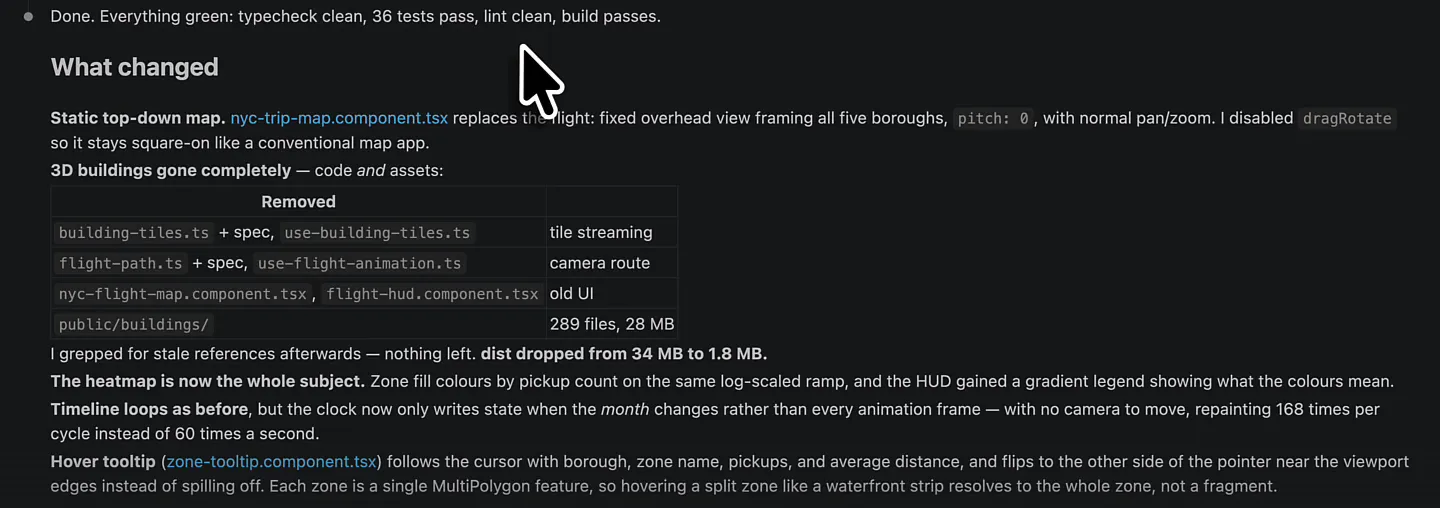
The deploy was 5 files and 1.8 MB, down from 294 files and 28.3 MB. Claude even checked that the old building paths no longer return data, because a deploy that merged files instead of replacing them would have left the 28 MB of tiles sitting on the host.
The static heat map
Claude still can’t see the app render, so that’s my job. Click View app on the app item in Fabric and it loads 14 years of New York City pickups. Then the whole city sits still on the screen while the timeline plays through the months. This looks cool.
Staten Island is in the south, and Manhattan is very, very busy according to the heat map. Central Park has pickups too, which surprised me. I’ve been to New York three or four times and never ever thought of taking a taxi from Central Park. In the other boroughs it’s busy mainly in the western parts of Brooklyn and Queens, which makes sense, because those are the more central areas of the city.
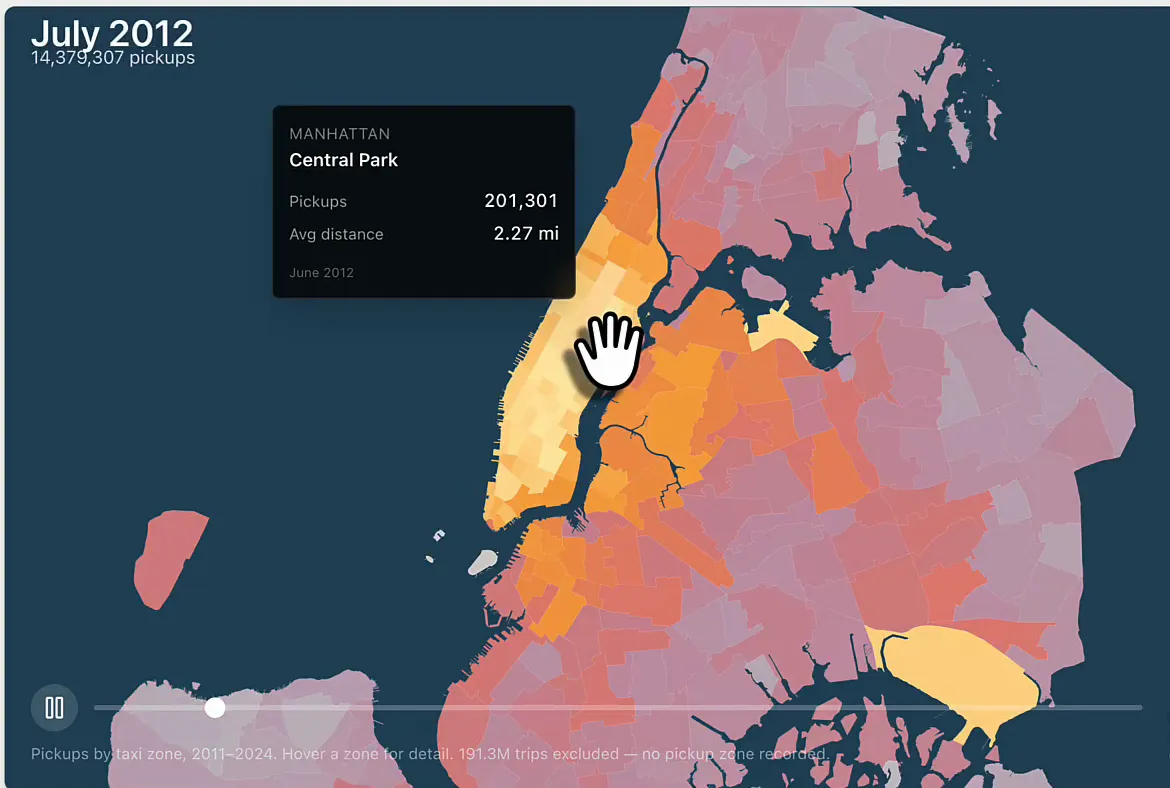
The footer is upfront about what’s missing: 191.3 million trips are left out because they have no pickup zone recorded. You can pan and zoom, but zoom out and it’s just coloured zones over water.
From heat map to skyscrapers
With a heat map it’s hard to see how big the differences between zones really are. So next I want to look at the map from a slight angle and swap the heat map for columns, almost as if they’re skyscrapers. Back to Visual Studio Code:
Now go back into the map, and look down at a slight angle so that heights will be perceivable. Then, remove the heatmaps and change to columns on the map. These will look like skyscrapers. Higher columns indicate higher taxi trip counts.All green again, now with 41 tests and a 1.9 MB build. What Claude changed:
- The view is tilted to a pitch of 48°, so the columns read as heights instead of dots. Drag-rotate is back on: now that there’s height, you can orbit around and compare the columns.
- The heat map is gone. The zones are a flat, uniform land plate for context, and the values live in the columns.
- Every zone gets one square tower, placed on the zone’s largest polygon so waterfront zones don’t end up with a tower in the harbour. All towers have the same 430 m footprint, so height is the only size cue, and directional lighting keeps them from reading as flat shapes.
Linear heights on one fixed scale
Claude also explained how it scaled the columns. With taxi data, linear bars often collapse, so it checked the distribution first. Here it’s fine: in June 2019 the median zone had 61k pickups against a maximum of 571k, and only 22 of 261 zones fall below 1% of the maximum. So the heights are linear, which is the honest way to show “higher means more”.
They’re scaled to one fixed maximum for the whole timeline, 1,118,439 pickups at JFK in October 2024, instead of to each month’s own peak. Rescaling every month would make the columns jump between frames and suggest volume changes that never happened. With one ceiling, a taller column always means more trips.
The towers keep their colour ramp on purpose, which helps when they hide each other at this angle. Hovering works on the zone around a column too, so you don’t have to hit a thin tower to get the tooltip. All good, so I published.
Manhattan and the airports
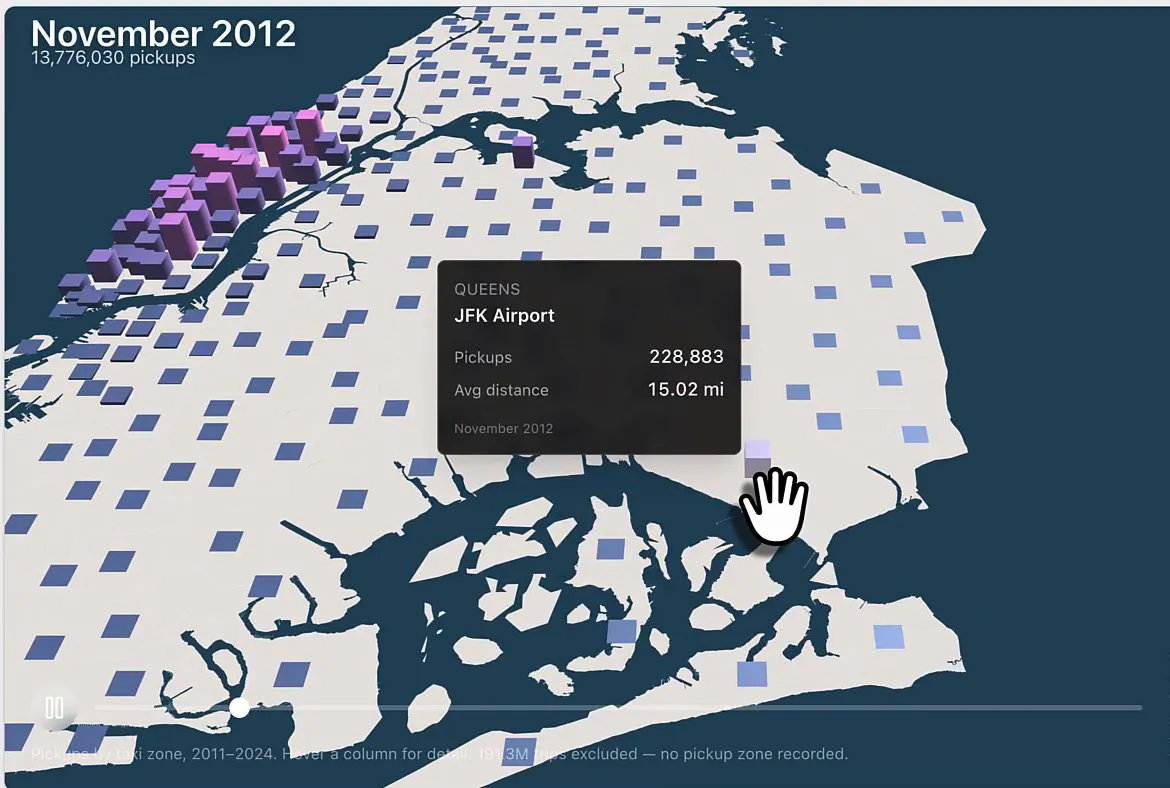
After a refresh, loading the data is still what takes most of the time, unfortunately. Then the city appears at an angle with the towers on it.
It’s mainly Manhattan’s columns that change over the months. LaGuardia stands out, and so does JFK further south: of course the airports see larger than usual pickup numbers. Most other zones are small blocks that barely move, and that’s fine. You can drag to rotate the map as well.
A few sentences per iteration
I kind of like this. Maybe not as the end result, but I do like how a few sentences typed into Claude Code give you a completely different version of the map. Ask for a change, hit publish, and you see your app change in Fabric in real time. That’s rather cool.
There’s plenty left to try. A regular map with streets and landmarks could probably come from OpenStreetMap, though that means the external tiles Claude warned about. We could probably even do Pokémon-style maps.
