
In this article 7 sections
An F64 has 32 times the capacity units of an F2, so you would expect a Spark notebook to run a lot faster on it. To see if it really is that much faster, I gave both capacities a run for their money with notebooks that load and merge almost 300 million rows into a Delta table. The F64 was no faster. On the merge it was even a little slower.
The test
The source is a 2024 taxi dataset with 295 million rows (taxi_295M), plus two location dimensions for the pickup and dropoff locations. The notebooks read these as shortcut tables in a lakehouse called Performance. The lakehouse they point to runs on the same capacity, so reading from another lakehouse is no factor in this test.
Each capacity gets two notebooks. The initial load runs a mapping query with two joins and a filter on the first three months of 2024, about a quarter of the data, and writes the result to a new Delta table. The merge load runs the same query without the date filter and merges it into that table on the key column PK. The first quarter is already in the table and gets updated, and the rest of the year is inserted.
The timings include the session start-up, which only takes a few seconds. I ran both notebooks on the F2 first, then scaled the capacity up to an F64 and ran the same notebooks into a second table.
The notebooks
The first cell sets the target table and its key. On the F64 the table is Performance_F64.
table_name = "Performance_F2"
key_columns = ["PK"]
The mapping is the Spark SQL query from Why I prefer Spark SQL in a Microsoft Fabric lakehouse, now reading from the 295 million row table and with an extra filter on the pickup date:
df_mapping = spark.sql(f"""
    select
        t.PK
        ,t.PickupDate
        ,t.DropoffDate
        ,t.PassengerCount
        ,t.TripDistance as TripDistanceMiles
        ,t.FareAmount
        ,t.PassengerCount * t.TripDistance as PassengerMiles
        ,t.FareAmount / t.PassengerCount as FareAmountPerPassenger
    from taxi_295M t
    --join to pickup location
    left join gold_dimlocations_pu pu
        on t.PickupLocationId = pu.LocationID
    --join to dropoff location
    left join gold_dimlocations_do do
        on t.DropoffLocationId = do.LocationID
    where 1=1
        and pu.Borough <> do.Borough -- only show rides to other boroughs
        and t.PassengerCount > 0 -- assume for now we only want passenger rides
        and t.PickupDate <= '2024-03-31' --initial seed only the first three months
""")
That’s a lot of data to go through. The query joins two tables to the big one and then filters the result. Because it only keeps rides that go to another borough, not all 295 million rows make it into the output. The initial load writes that output to a new Delta table:
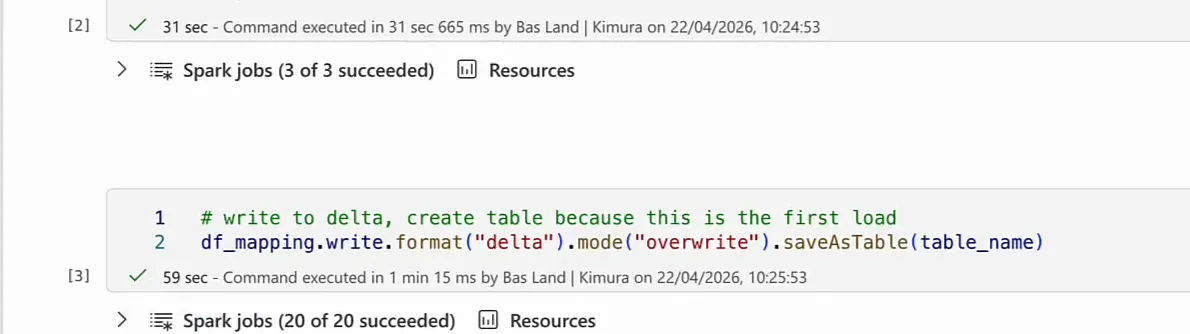
# write to delta, create table because this is the first load
df_mapping.write.format("delta").mode("overwrite").saveAsTable(table_name)
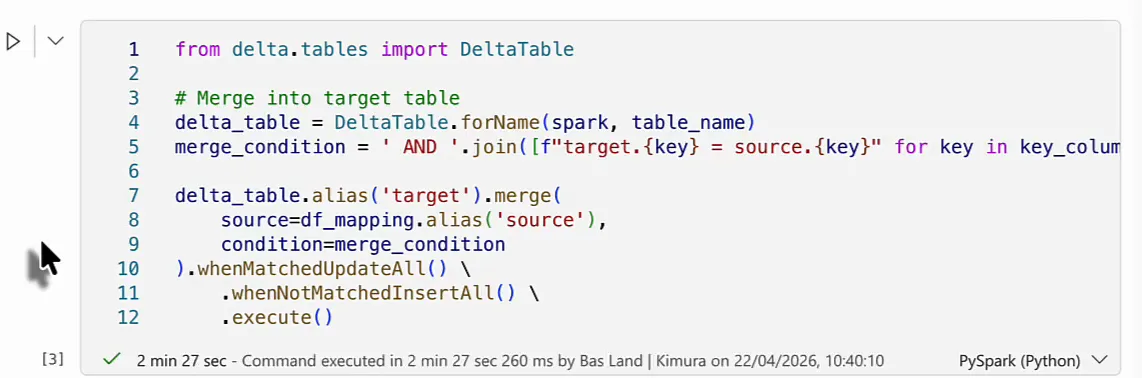
The merge notebook comments out the date filter (--and t.PickupDate <= '2024-03-31' --merge entire table) and replaces the write with a Python merge on the key columns. I explain how that merge works in Merging dataframes in PySpark.
from delta.tables import DeltaTable

# Merge into target table
delta_table = DeltaTable.forName(spark, table_name)
merge_condition = ' and '.join([f"target.{key} = source.{key}" for key in key_columns])

delta_table.alias('target').merge(
    source=df_mapping.alias('source'),
    condition=merge_condition
).whenMatchedUpdateAll() \
    .whenNotMatchedInsertAll() \
    .execute()
Results on the F2
I expected the mapping query to take quite a while, but it was done in 31 seconds. That’s really fast, and I was quite happy with it. Add 14 seconds for the session and 59 seconds for the write to Delta, and the whole initial load ran for 1 minute 44 seconds. On an F2, that’s pretty okay.
For the merge load I expected the mapping query to be a little slower, because it loads more data into the dataframe. The session was ready in 13 seconds, and the query took 17 seconds: a lot faster than the 31 seconds of the filtered version, even though it covers the whole year. Maybe reading the entire table into memory is quicker than going through it to filter on the pickup date. The merge itself took 2 minutes 19 seconds, which puts the F2 merge load at 2 minutes 49 seconds. That’s the time the F64 has to beat.
What a bigger capacity buys you
You scale a capacity in the Azure portal, under Scale > Change size on the capacity resource. The page lists every SKU with its capacity units and an estimated monthly cost: €278.31 for the F2 and €8,905.91 for the F64 when I recorded this, so the F64 costs 32 times as much.
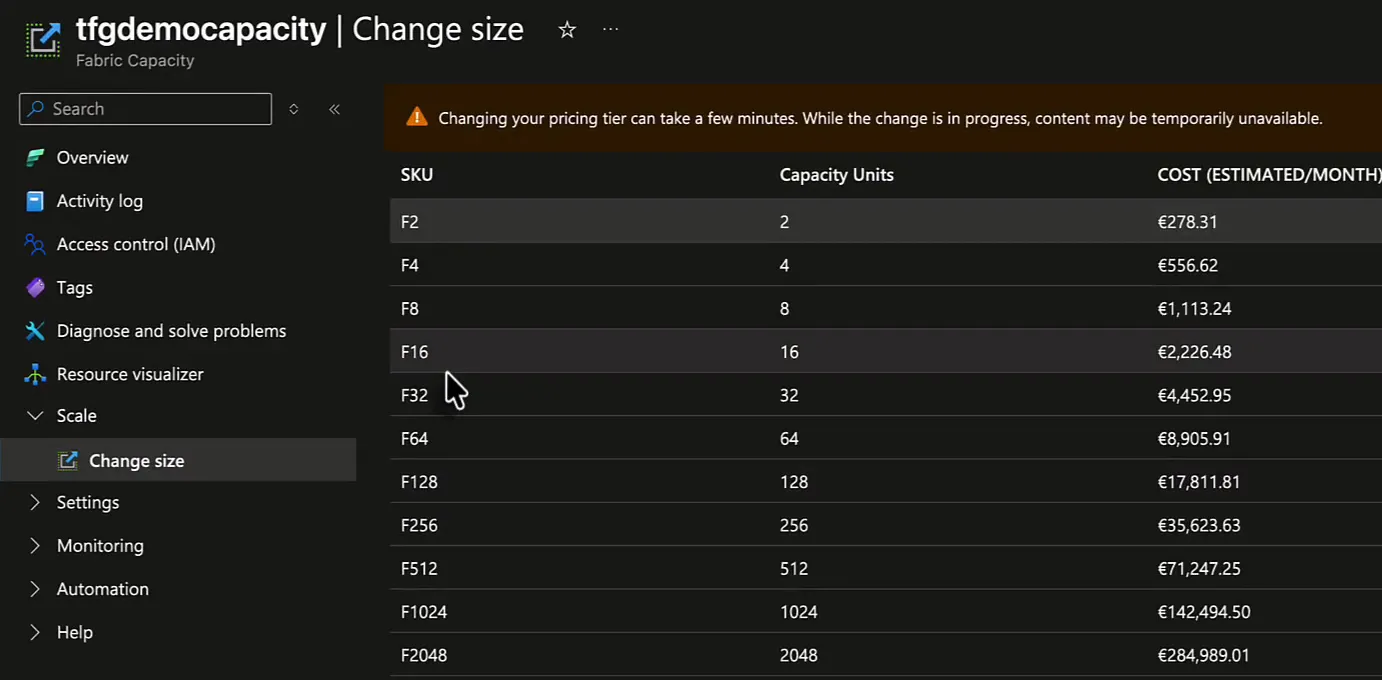
With an F64 you might expect more compute power: more CPU, more memory and so on. Sometimes you get that, but not necessarily. What you buy with a capacity is a bundle of compute usage. (For how capacity units are billed, see Microsoft Fabric costs explained.)
Buying a bigger bundle of compute does not necessarily give your job more compute resources.
Whether it does depends on how well the query can be parallelised. An F64 can scale out a bit faster and a bit better than an F2, so I did expect it to be faster. I did not expect the performance to scale linearly, though. A capacity that is 32 times bigger will not make a job run 30 times faster.
Results on the F64
The F64 session was ready in 10 seconds instead of 13 or 14. In percentage terms that’s a bit faster, but it’s only 3 seconds, and I’m not sure the bigger capacity is the reason.
The mapping query for the initial load took 33 seconds, a little slower than the 31 seconds on the F2, though not meaningfully. I think that comes down to the single-threaded nature of reading a dataset into memory, especially one of this size. A dataset of 300 million rows is not nothing, but it isn’t really big either. The F64 can scale out faster and get more concurrency, but for this query that didn’t help. The write took 1 minute, about what I expected, and the initial load finished in 1 minute 43 seconds: practically the same run time as on the F2.
The merge is where I expected the F64 to pull ahead. The session was ready in just under 12 seconds and the query took 16 seconds against 17 on the F2. That’s slightly faster, but not meaningfully, and probably not because of the capacity. By the time the merge came up on 2 minutes 19, the time to beat, I already doubted the F64 would be any faster here. It finished in 2 minutes 27 seconds, 8 seconds slower than on the F2.
| Step | F2 | F64 |
|---|---|---|
| Initial load: session start | 14 sec | 10 sec |
| Initial load: mapping query | 31 sec | 33 sec |
| Initial load: write to Delta | 59 sec | 1 min |
| Initial load: total | 1 min 44 sec | 1 min 43 sec |
| Merge load: session start | 13 sec | just under 12 sec |
| Merge load: mapping query | 17 sec | 16 sec |
| Merge load: merge | 2 min 19 sec | 2 min 27 sec |
| Merge load: total | 2 min 49 sec | about 2 min 55 sec |
Why the F64 was no faster
I did not see that coming. I would have expected the merge to run at least a little faster on the F64 than on the F2.
My explanation is the size of the data. It is probably too small to challenge either capacity in any meaningful way, so the F64 used the same number of compute nodes as the F2 and ran at the same speed.
Where an F64 does pay off
For a single job of this size, the bigger capacity made no difference to the run time. In practice, though, a data platform rarely runs one process, or a few processes one after the other. Usually you spin up a lot of sessions at the same time, for example to extract 100 API endpoints all at once. That’s where concurrency differs between an F2 and the higher SKUs, and that’s where an F64 will probably be faster: maybe you can run 50 endpoints at once instead of 10. I don’t know the exact numbers, but that is where the speed benefit of an F64 comes from in practice.
