
In this article 5 sections
Delta tables can feel like magic until you realise they are just files. Very organised files, though. Once you see how they are organised, you understand how Delta keeps track of every change and why it reads so fast.
This is the second part of my series on Delta tables. In the first part I explained what Delta is and why Fabric uses it. This time I open up a real table and go through the data files, the transaction log and how versioning works.
A Delta table is a folder
I’m using Microsoft Azure Storage Explorer, connected to OneLake, on the same Silver lakehouse as in the first part. Instead of the small taxi zone lookup table I’m looking at silver_yellow, a larger table with the trip records of all the yellow cabs in New York City.
Open the table folder and you find a _delta_log folder and a long list of Parquet files, a lot bigger than the ones in the first part. There are almost 200 of them, up to hundreds of megabytes each, so gigabytes of data in total. For a Delta table that is still not big at all. Delta tables handle massive amounts of data easily.
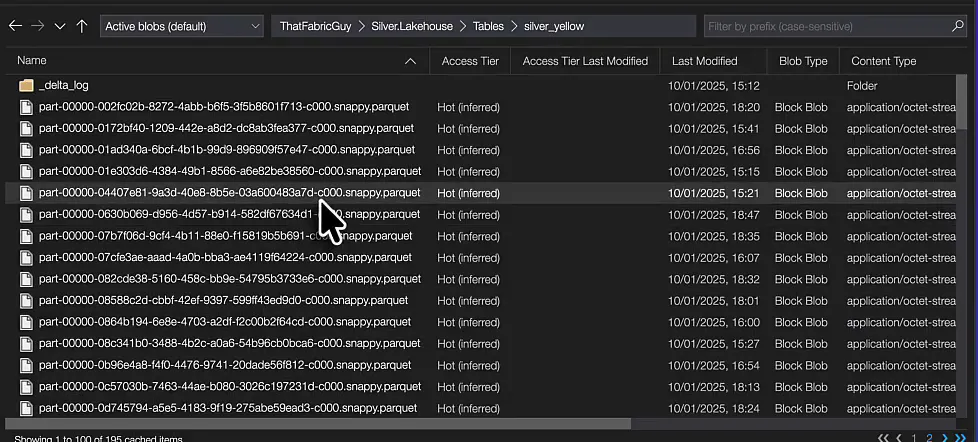
Each Parquet file holds the physical data as it was written at a point in time. The same record can appear in more than one file, and a file does not have to contain every record. The Delta log keeps track of which files together make up the table.
I don’t open the Parquet files themselves. Parquet is compressed, so you cannot browse it the way you browse a JSON or CSV file. The Delta log, on the other hand, you can open.
Every commit is a JSON file
The _delta_log folder of this table holds over 200 JSON files, and every JSON file is one commit to the table. The first one, 00000000000000000000.json, is the initialisation of the table. Preview it and you see four entries:
| Entry | What it holds |
|---|---|
commitInfo | When the commit happened, which operation ran and its parameters |
metaData | The file format and the full schema of the table |
protocol | The reader and writer versions |
add | The data file this commit adds, with its size and statistics |

commitInfo: what happened
The commit info has a timestamp and the operation that ran. Here it is CREATE TABLE AS SELECT: a select query ran on another table and its result set became this table.
There are more operation parameters than I’ll go through here, but a few are important to know:
- There is no partitioning and no clustering:
partitionByandclusterByare both empty. More on those later in this series; until then, I compare the two in Liquid Clustering vs Partitioning. isManagedis true, so this is a managed table, and that is very important to have.- Among the Delta properties,
delta.parquet.vorder.enabledis set to true. V-Order is very important in Microsoft Fabric if you want to use Power BI Direct Lake. It also gets its own part later in the series, and I wrote about setting V-Order for Delta tables before.
metaData: the schema
The metadata says the format provider is Parquet, so the data is stored in Parquet files. It also holds the entire schema of the table: for every column its name, its data type and whether it is nullable. vendor_name, for example, is a string with nullable set to true, so it can hold nulls.
add: pointing to the data
The protocol entry is not that important. The important part is add. It adds a reference to a path, part-00000-7efde9f4-...-c000.snappy.parquet, which points to a Parquet file in the root folder of the Delta table: the physical storage behind this commit. Next to the path it stores the file size and the modification timestamp, so the engine can find the data on storage quickly.
Statistics let Delta skip whole files
The add entry also stores statistics about the data in the file. First the number of records: this single file holds just over 14 million rows (numRecords is 14092413), and it is one of almost 200 Parquet files in the table.

Then there are minimum and maximum values per column. For tolls_amt, store_and_forward and trip_distance the minimum in this file is 0.0. For total_amt the minimum is 10.
Now say you run this query:
select * from silver_yellow where total_amt = 5The engine does not need to scan the 14 million rows in that file. It reads the commit, sees that the lowest total_amt is 10, and knows that no record in the file can contain 5. So it skips the entire Parquet file, all 14 million rows, before it reads any data.
That is what makes Delta so incredibly fast: it looks at the metadata of the files before it touches the data.
Checkpoints keep reads fast
Back in the _delta_log folder the commits count up: 0, 1, 2 and onwards, each one an insert, an update or a delete. About every 10 commits there is also a checkpoint, such as 00000000000000000010.checkpoint.parquet.
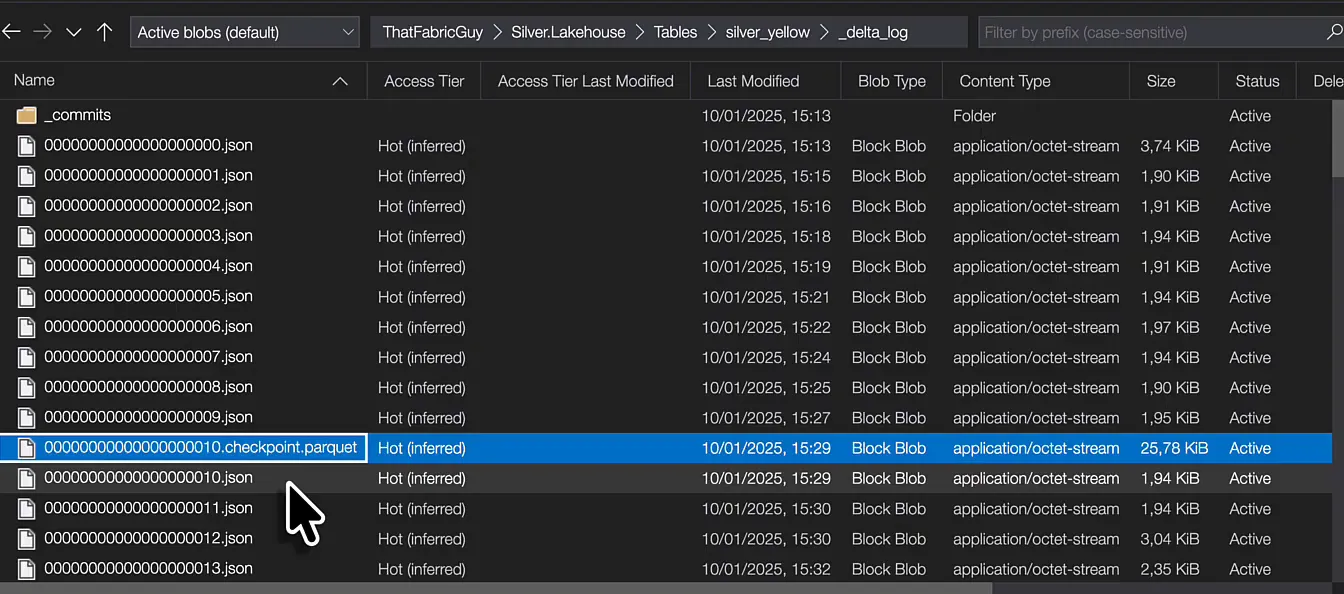
A checkpoint stores the state of the table at a point in time. Without it, the engine would have to go through hundreds of transactions to work out the current state of the data, which is not very efficient. So Delta finds the most recent checkpoint and applies only the transactions that happened since. That gives it the current state of the table.
What a Delta table is made of
To recap:
- A Delta table is a folder in your data lake.
- It contains Parquet data files; this one has a couple of hundred.
- It contains a
_delta_logfolder, the brain of the Delta table, with versioned JSON commits and checkpoints. - The commits point to the data files, and they hold metadata on those files and on the transaction itself: when it ran and what the operation was.
Together, the Parquet files and the Delta log describe the full history and the current state of the data in your table. That is how files on a data lake start behaving like a real table, as if they lived in a database.
In the next part of the series I put a plain Parquet file next to a Delta table.
